Electronics / Amplifiers Receivers
Chord PB-959 Pedal Power Bank User Manual
Quick guide for the Chord PB-959 Pedal Power Bank. Learn how to charge the device, power your effect pedals, use the USB output, and operate the built-in LED torch.
Table of contents
Quick Guide from the Manual
The Chord PB-959 is a portable power bank designed specifically for powering effect pedals. It features a 10,000mAh capacity, dual 9V outputs, and a 5V USB output. Important: Do not use the USB and 9V outputs simultaneously. Always ensure your effect pedals use centre-negative polarity before connecting.
Device Overview
The device features the following controls and ports:
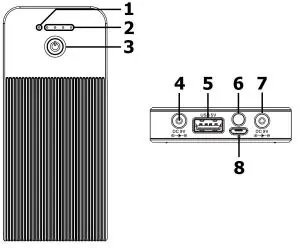
- 9V Power Button: Used to switch 9V output on/off and toggle the LED torch.
- 9Vdc Outputs: Two ports for powering effect pedals.
- 5Vdc USB Output: For charging standard USB devices.
- Micro-USB Input: For charging the power bank itself.
- Indicators: LED lights show charge status and 9V power activation.
Charging the Power Bank
It is recommended to fully charge the PB-959 before first use. Connect the supplied USB cable to the micro-B socket on the top edge of the unit and plug the type-A end into a 5V USB power supply (not included) with at least 2A output. A full charge takes approximately 5 hours. The 4 red LEDs indicate the charge level:
- 4 LEDs: ≥75%
- 3 LEDs: ≥50%
- 2 LEDs: ≥25%
- 1 LED: ≥3%
- 1 LED flashing:<3%
Using 9V Pedal Power
To power your effect pedals:
- Connect the supplied DC jack leads from the 9Vdc outputs on the PB-959 to the DC input of your pedals.
- Ensure the pedals operate on 9Vdc with centre-negative polarity.
- Press and hold the 9V Power Button for 2 seconds to initiate power. The 9V Power LED and charge status indicators will light up.
- To switch off, press and hold the 9V Power Button again.
The total output for 9Vdc is 1200mA. You can use a daisy-chain lead (not included) to power multiple pedals, provided the total current draw does not exceed the rated output.
Using USB Power
The PB-959 can function as a standard USB power bank. Connect your USB device to the USB-A socket on the top edge. The unit will automatically deliver 5Vdc (2A max). The PB-959 will switch off automatically once the USB device is fully charged.
LED Torch
The device includes a built-in LED torch. To switch it on or off, double-press the 9V Power Button.
Specifications
- Capacity: 10,000mAh
- Outputs: 2 x 9Vdc (1.2A total, DC5521 centre-negative) or 1 x 5Vdc (2A, USB)
- Dimensions: 147 x 65 x 17mm
- Weight: 255g
Safety and Disposal
Damage caused by misuse is not covered by the warranty. This product is classed as Electrical or Electronic equipment and should not be disposed of with household waste. Please follow local council guidelines for disposal.
Manufacturer information
Chord
Practical help
Common problems
USB and 9V outputs not working together
Do not use USB and 9V outputs simultaneously; the device is designed to use one or the other.
9V output does not turn on
Ensure you press and hold the 9V Power Button for 2 seconds to activate the output.
Slow charging of the power bank
Ensure you are using a 5V USB power supply with at least 2A current output.
Before use
- Fully charge the unit before first use.
- Verify that your effect pedals use centre-negative polarity.
- Check that the total current draw of your pedals does not exceed 1200mA.
- Ensure you have a 5V 2A USB power adapter for charging the unit.
Images and diagrams
- 1: 9V power output indicator
- 2: Charge status indicators
- 3: 9V Power Button
- 4 & 7: 9Vdc outputs (centre-negative)
- 5: 5Vdc USB output
Model compatibility
- Only compatible with 9Vdc centre-negative effect pedals.
- Not compatible with pedals requiring positive polarity.

Manual page author
Emily Carter
User documentation editor
Prepares concise manual descriptions and highlights the most useful setup, operation, and maintenance information for readers.