Electronics / Routers
Release Notes for Cisco 1000 Series ISRs (Cisco IOS XE Everest 16.6.x)
A comprehensive guide to the release notes for Cisco 1000 Series ISRs running Cisco IOS XE Everest 16.6.x. Includes system requirements, manual configuration procedures, key software features, and instructions for using the Cisco Bug...
Table of contents
Quick Guide from the Manual
This document provides release notes for the Cisco 1000 Series Integrated Services Routers (ISRs) running Cisco IOS XE Everest 16.6.x. It covers system requirements, software version verification, manual configuration steps, and information on how to access bug reports via the Cisco Bug Search Tool.
Overview of Cisco 1100 Series Integrated Services Routers
The Cisco 1100 Series ISRs are fixed branch routers based on the Cisco IOS XE operating system. They feature a multi-core architecture with separate cores for the data plane and control plane. These routers support advanced features such as Smart Licensing, VDSL2, ADSL2/2+, 802.11ac Wave 2, and 4G LTE-Advanced.
System Requirements
To ensure proper operation, the router must meet the following minimum system requirements:
- Memory: 4GB DDR4
- Flash Storage: 4GB
Verifying Software Version
You can verify the currently installed software version using the following commands in the CLI:
- For a consolidated package: show version
- For individual sub-packages: show version installed
Manual Configuration Procedure
If you need to configure the router manually, follow these steps:
- Log on to the router via the Console port or an Ethernet port.
- If the Setup Command Facility starts, enter no to proceed to the CLI.
- Enter enable and provide the password if configured.
- Enter configure terminal to access configuration mode.
- Create a user account with privilege level 15.
- Configure an interface IP address (e.g., int FastEthernet0, ip address 10.10.10.1 255.255.255.248, no shutdown).
- Configure the router as an HTTP or HTTPS server using ip http server or ip http secure-server.
- Configure local authentication using ip http authentication local.
- Configure VTY lines for privilege level 15 and set transport input/output protocols (telnet/ssh).
Key Software Features
The 16.6.x release introduces and supports several key features:
- Smart Licensing: A standardized licensing platform for Cisco software.
- VDSL2 and ADSL 2/2+: Provides reliable WAN connections for remote sites.
- Cisco 4G LTE Advanced: Supports GPS, SMS, Dual SIM, and LTE Link Recovery.
- Process Health Monitoring: Monitors system processes and provides syslog notifications if a process fails or crashes.
- Environmental Monitoring: Tracks temperatures of CPUs, the motherboard, and Wi-Fi components.
- SFP Auto-Failover: Automatically detects and links the connected media type.
Using the Cisco Bug Search Tool
All open and resolved bugs for this release are tracked in the Cisco Bug Search Tool. To use it:
- Navigate to the Cisco Bug Search Tool website.
- Log in with your Cisco.com account.
- Search for specific bugs by Bug ID or filter by product, release, or severity.
Official resources from the manual
Manufacturer information
Cisco Systems, Inc.
Practical help
Common problems
Router crashes or reloads unexpectedly
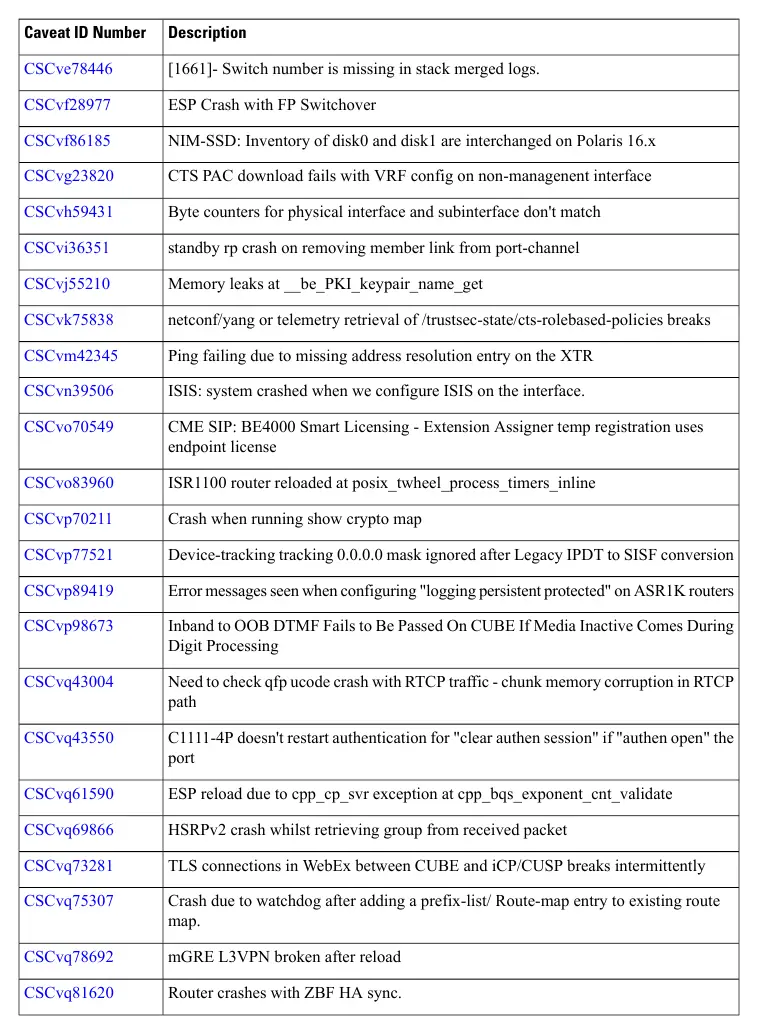
Check the release notes for known caveats (bugs) and verify if a software upgrade or workaround is available via the Cisco Bug Search Tool.
Interface or link issues (e.g., SFP, BRI)
Verify configuration settings and check for known caveats related to specific interface types in the release notes.
Before use
- Verify the router model belongs to the Cisco 1100 Series ISRs.
- Ensure the system meets the minimum requirements: 4GB DDR4 RAM and 4GB Flash storage.
- Check the current software version using the 'show version' command.
- Have a Cisco.com account ready to access the Cisco Bug Search Tool for detailed bug information.
Specs in practice
- Flash Storage
- Minimum 4GB required for system storage.
Model compatibility
- Supports Cisco IOS XE Everest 16.6.x.
- Compatible with various C1100 series models (e.g., C1111, C1101, C1116, C1117).

Manual page author
Emily Carter
User documentation editor
Prepares concise manual descriptions and highlights the most useful setup, operation, and maintenance information for readers.