Electronics / Networking
Release Notes for Cisco IOS XE SD-WAN Devices, Release Amsterdam 17.3.x
A comprehensive guide to the release notes for Cisco IOS XE SD-WAN devices, covering new features, hardware support, upgrade paths, and known issues for Release Amsterdam 17.3.x.
Table of contents
Manual images
Click an image to enlargeQuick guide from the manual
This document provides the release notes for Cisco IOS XE SD-WAN devices, specifically for Release Amsterdam 17.3.x. It includes information on new features, supported hardware, upgrade paths for Cisco vManage, and a list of resolved and open bugs.
New features in Release Amsterdam 17.3.x
This release introduces several enhancements to the SD-WAN solution, including:
- Dialer Interface: Support for tracking PPP sessions over a dialer interface in DSL deployments.
- Routing: OSPFv3 support for IPv4 and IPv6, and Multicast over L3 TLOC extension.
- Cloud OnRamp: Transit Gateway Peering between AWS regions and integration of AWS Branch with Cisco IOS XE SD-WAN devices.
- Policies: NAT fallback for Direct Internet Access (DIA) and Service Side NAT configuration.
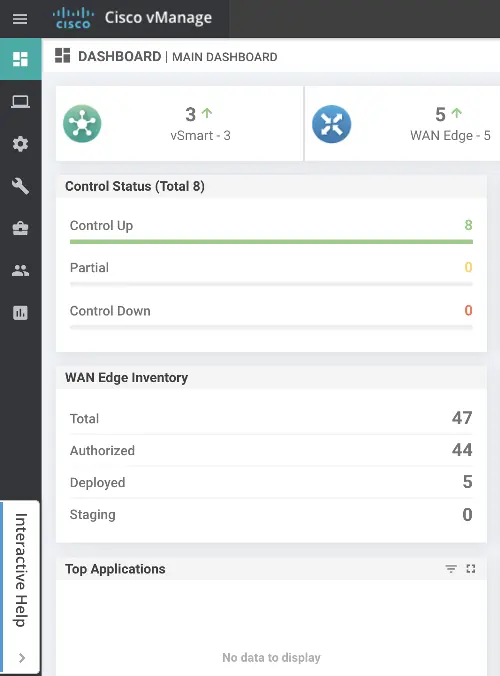
- Cisco vManage: Interactive Help for guided workflows and restructured configuration guide listings.
- Security: Hardened passwords and Posture Assessment support for Cisco 1100 Integrated Services Routers.
New and enhanced hardware
Hardware support added in Cisco IOS XE Release 17.3.2 includes:
- Cisco Catalyst 8300 Series Edge Platforms.
- Modules on Cisco Catalyst 8300 Series Edge Platforms (10G Modules, SM to NIM Slot Adapter).
- Cisco Catalyst 8500 Series Edge Platforms.
- Cisco Cellular Gateway CG418-E.
Cisco vManage upgrade paths
Before upgrading, ensure you check the available disk space. If the disk space is less than 2GB, a step upgrade through 20.1 is required. For cluster upgrades, use the CLI command: request nms configuration-db upgrade.
Interactive Help in Cisco vManage
Cisco vManage includes an Interactive Help feature to assist with guided workflows. To access this, click Interactive Help within the Cisco vManage interface. This allows you to search for specific workflows such as configuring controllers, managing devices in the overlay network, and troubleshooting connectivity issues.
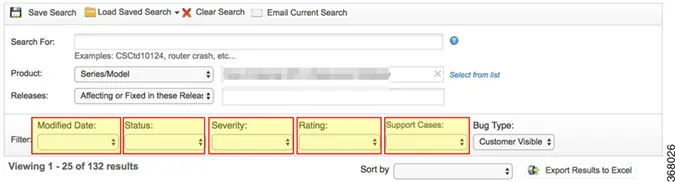
Bug search tool
Cisco provides a Bug Search Tool to access detailed information about open and resolved bugs for specific releases. You can filter results by bug ID, modified date, status, severity, and rating.
Manufacturer information
Cisco Systems, Inc.
Practical help
Common problems
Upgrade failure due to insufficient disk space.
Check free disk space using the CLI command 'df -kh | grep boot' in vshell. If less than 2GB, perform a step upgrade through 20.1.
Configuration mode mismatch after software downgrade.
Reattach the device to a device template to sync the configuration modes.
vAnalytics login failure after upgrade.
Log in to vAnalytics directly using the URL: https://analytics.viptela.com.
Before use
- Verify your current software version.
- Check available disk space on the device.
- Review the 'Important Notes, Known Behavior, and Workaround' section.
- Ensure you have access to the Cisco Bug Search Tool for the latest bug updates.
- Consult the 'Controller Compatibility Matrix' before proceeding with upgrades.
Specs in practice
- NAT Fallback
- A routing-based mechanism for Direct Internet Access (DIA) traffic to use an alternative route when required.
- SGT Propagation
- Allows edge devices to propagate Security Group Tags generated by Cisco TrustSec-enabled switches.
Images and diagrams
- The vManage Dashboard provides a high-level overview of the network, including Control Status (Control Up/Partial/Down) and WAN Edge Inventory (Total/Authorized/Deployed/Staging).
Model compatibility
- Cisco IOS XE SD-WAN devices with the SFP-10G-SR module do not support online insertion and removal (OIR).
- Upgrade paths vary based on the starting version (18.x/19.2.x, 20.1.x, 20.3.x).

Manual page author
Michael Turner
Technical manual editor
Reviews PDF manuals for structure, safety notes, and practical product details so readers can find the right information quickly.