Electronics / Networking
Cisco Nexus Dashboard Deployment Guide
A comprehensive deployment guide for Cisco Nexus Dashboard. This manual provides step-by-step instructions for setting up a 3-node cluster on physical appliances, VMware ESX, AWS, and Microsoft Azure, including network prerequisites and...
Table of contents
Manual images
Click an image to enlargeQuick guide from the manual
This guide describes the initial deployment of a 3-node Cisco Nexus Dashboard cluster. The cluster can be deployed on physical Cisco UCS servers or as virtual/cloud instances (VMware ESX, AWS, Azure). A 3-node master cluster is the minimum requirement for all deployments.
Deployment Overview
Nexus Dashboard is a central management console for data center applications. The cluster consists of 3 master nodes. For physical clusters, you can add worker and standby nodes. For virtual and cloud clusters, only the base 3-node cluster is supported.
Prerequisites
- NTP: An NTP server must be configured for clock synchronization.
- Networks: Two networks are required: Data Network (for clustering and application communication) and Management Network (for GUI, CLI, and firmware updates).
- Ports: Specific TCP/UDP ports must be open for communication between nodes and fabrics.
Deploying as Physical Appliance
The physical appliance uses the UCS C220 M5 chassis. Configuration involves:
- SSH into the node using the CIMC management IP.
- Run the first-boot setup utility.
- Enter the admin password and management network information.
- Use the GUI to complete the cluster configuration by adding the other two nodes.
Deploying in VMware ESX
Requires VMware vCenter 6.x and ESXi 6.5 or 6.7. Deployment steps:
- Download the OVA image.
- Deploy the OVF template via vCenter.
- Configure resource and network settings (fabric0 for data, mgmt0 for management).
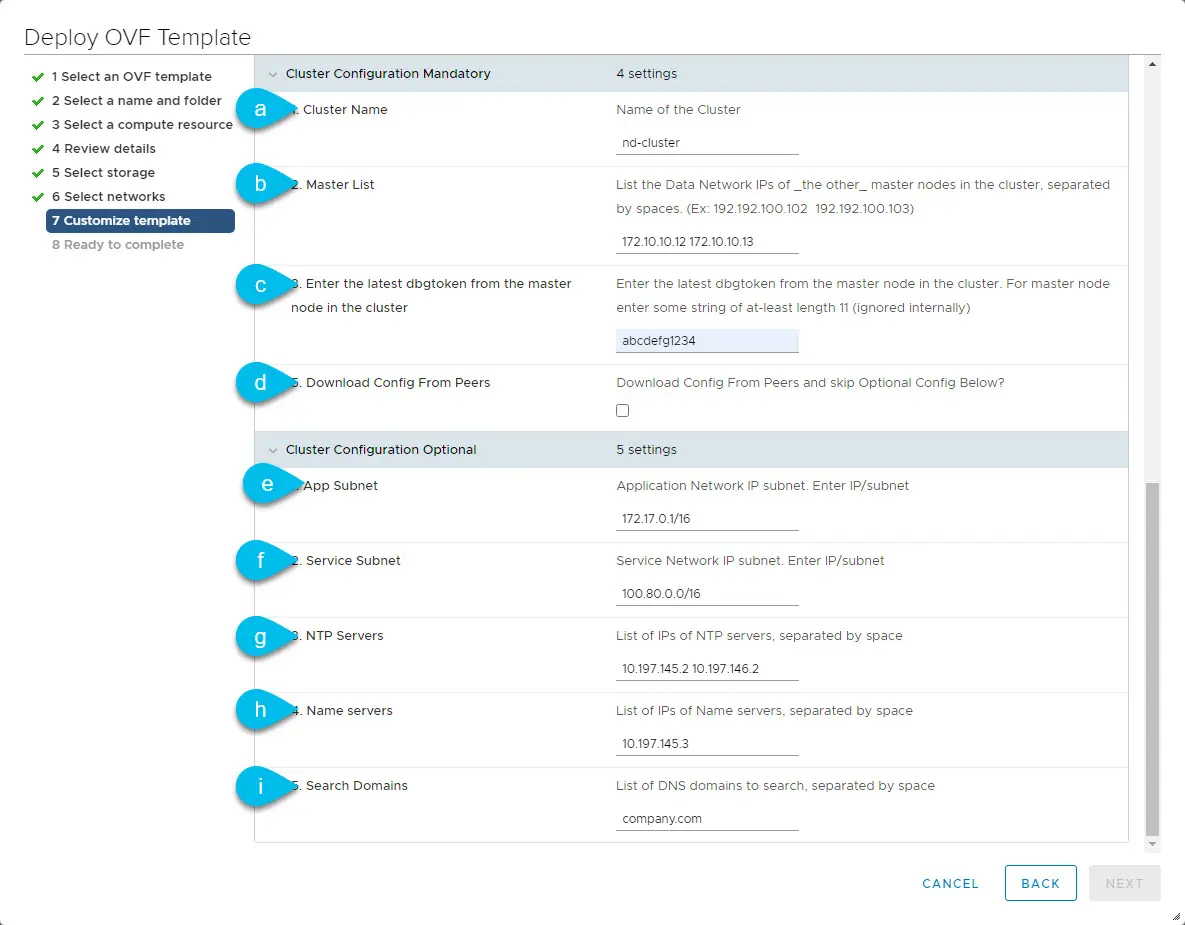
- Provide cluster configuration details (Master List, dbgtoken).
- Verify cluster health using the 'acs health' command.
Deploying in AWS
Requires an AWS account with sufficient Elastic IP limits and a VPC. Deployment steps:
- Subscribe to the product in AWS Marketplace.
- Launch the CloudFormation template.
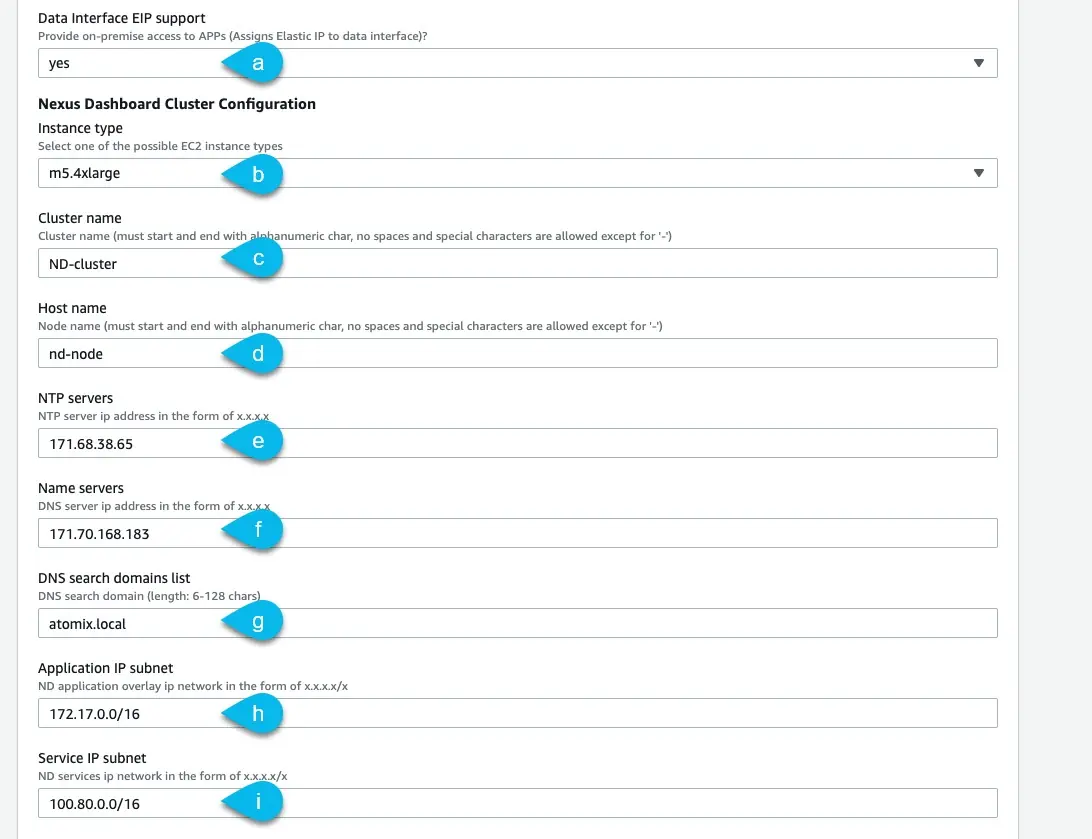
- Specify stack details (VPC, subnets, instance type m5.2xlarge).
- Verify deployment status in the CloudFormation console.
Deploying in Microsoft Azure
Requires an Azure subscription and SSH key pair. Deployment steps:
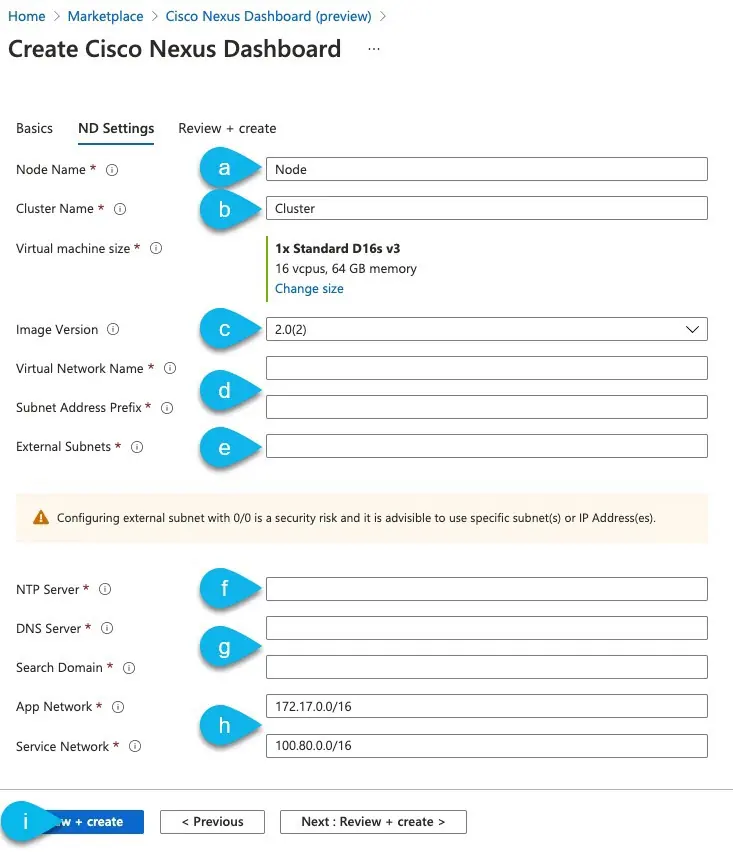
- Subscribe to the product in Azure Marketplace.
- Provide subscription, region, and password details.
- Configure ND Settings (Node Name, Cluster Name, VNET, subnets).
- Review and create the deployment.
Upgrading Nexus Dashboard
The upgrade process is consistent across all form factors:
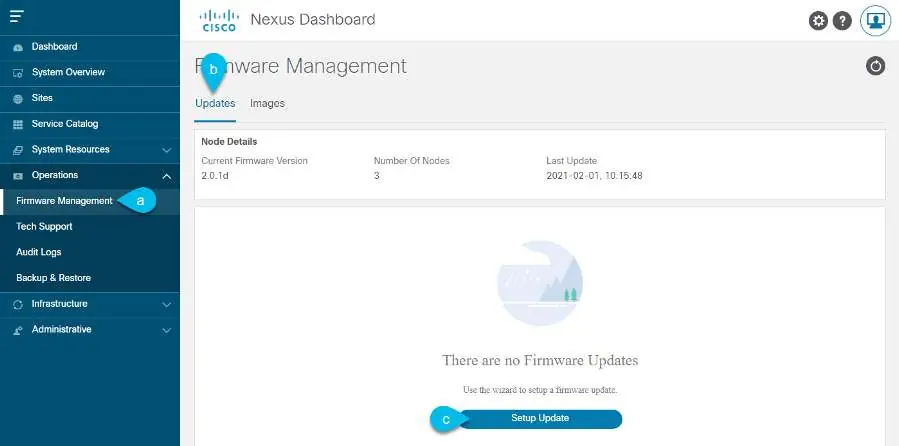
- Download the ISO image from the Cisco Software Download page.
- Log in to the GUI as Administrator.
- Navigate to Operations > Firmware Management.
- Upload the image, set up the update, and activate the new version.
Manufacturer information
Cisco Systems, Inc.
Practical help
Common problems
Cluster health check fails
Log in via SSH and run 'acs health' to check if services are in the desired state or if the Etcd cluster is ready.
Cannot access GUI
Ensure the management network is correctly configured and reachable from your workstation.
Deployment fails in AWS
Check if you have reached your Elastic IP limit and request an increase if necessary.
Before use
- Ensure an NTP server is configured in your environment.
- Prepare 3 master nodes for the cluster.
- Verify network connectivity for both Data and Management networks.
- Obtain necessary credentials (CIMC for physical, SSH keys for cloud).
- Ensure you have the correct software image (ISO for upgrades, OVA/AMI/ARM for deployment).
Specs in practice
- Data Network
- Used for node clustering, application-to-application communication, and fabric connectivity.
- Management Network
- Used for accessing the GUI, CLI via SSH, DNS, NTP, and firmware uploads.
Images and diagrams
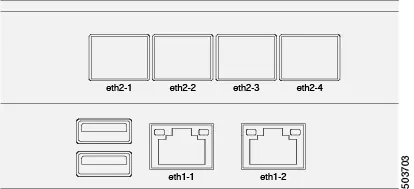
- Node Connectivity: Illustrates physical cabling for eth1 (management) and eth2 (data) interfaces.
- Network Scenarios: Shows how to connect the cluster via L3 network or directly to leaf switches.
Model compatibility
- Physical appliance form factor is supported on original Nexus Dashboard hardware only.
- Virtual form factor clusters are supported for Multi-Site Orchestrator only in Release 2.0.2h.
- Mixing different form factors within the same cluster is not supported.

Manual page author
Michael Turner
Technical manual editor
Reviews PDF manuals for structure, safety notes, and practical product details so readers can find the right information quickly.