Electronics / Networking
Cisco StarOS Software 2024.02.gh0 Release Notes
Official release notes for Cisco StarOS Software version 2024.02.gh0, covering versioning, compatibility, software integrity verification, and bug fixes.
Table of contents
Manual images
Click an image to enlargeQuick Guide to StarOS 2024.02.gh0 Release Notes
This document provides essential information regarding the Cisco StarOS Software version 2024.02.gh0. It includes details on release lifecycle milestones, software integrity verification, version numbering, and known issues. Users should refer to this document to ensure compatibility and verify the integrity of software images before deployment.
Software Integrity Verification
To ensure the software image has not been tampered with or corrupted during download, you must validate the SHA512 checksum. Follow these steps:
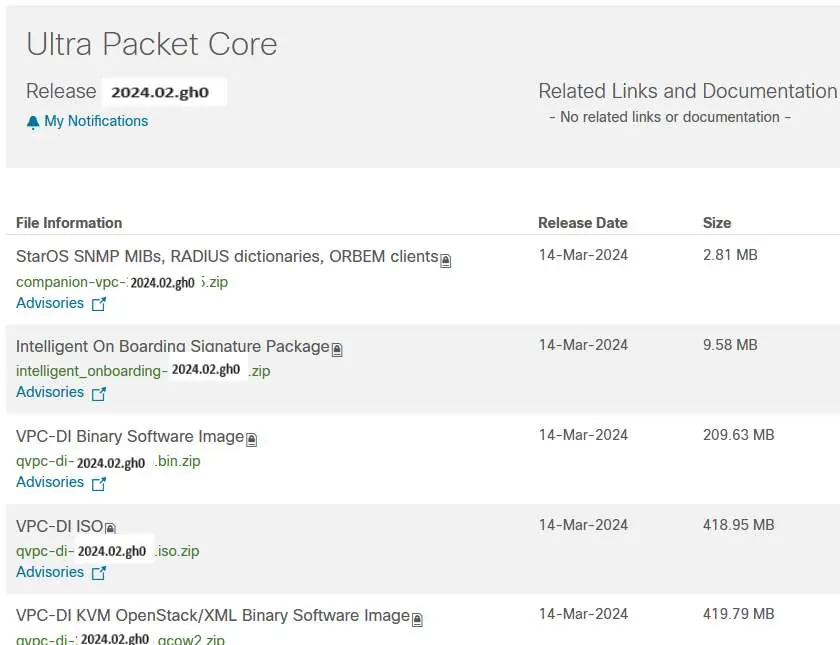
- Locate the SHA512 checksum on the Cisco.com Software Download Details page.
- Calculate the SHA512 checksum on your local machine using the appropriate command for your operating system:
- Microsoft Windows: Use certutil.exe -hashfile <filename>.<extension> SHA512.
- Apple MAC: Use shasum -a 512 <filename>.<extension>.
- Linux: Use sha512sum <filename>.<extension> or shasum -a 512 <filename>.<extension>.
If the calculated checksum does not match the one provided by Cisco, do not attempt to upgrade. Download the software again and re-verify. If the mismatch persists, contact the Cisco Technical Assistance Center.
Version Numbering System
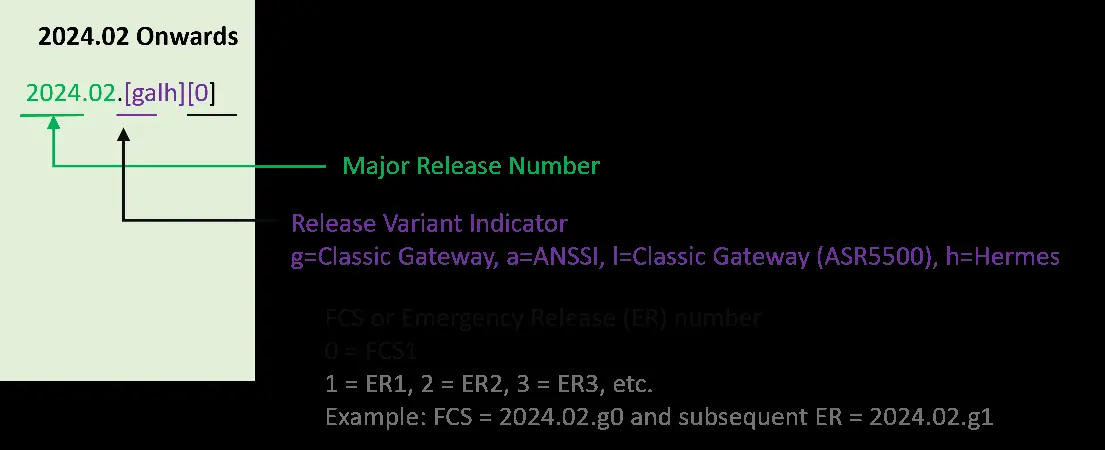
Starting with the 2024.01.0 release, Cisco has transitioned to a new versioning scheme based on the current year and product. The version format is YYYY.MM.[galh][0]. The release variant indicator (e.g., g, a, l, h) specifies the gateway or platform type (e.g., Classic Gateway, ASR5500, Hermes).
Release Packages
The release includes various packages for different platforms, including ASR 5500, VPC-DI, VPC-SI, and the Ultra Services Platform (USP). Each package contains specific software images, signature files, and verification scripts. Refer to the Release Package Descriptions section for details on specific bundles like usp-em-bundle, usp-ugp-bundle, and usp-vnfm-bundle.
Support and Documentation
For a complete list of documentation, bug search tools, and service requests, visit the official Cisco support website at www.cisco.com/c/en/us/support/index.html.
Official resources from the manual
Manufacturer information
Cisco Systems, Inc.
Practical help
Common problems
Software image corruption
Verify the SHA512 checksum against the value provided on the Cisco download page.
Checksum mismatch
Do not upgrade; download the software again and re-verify. If the issue persists, open a case with Cisco TAC.
Before use
- Verify software integrity using SHA512 checksums.
- Check compatibility with existing products (ADC Plugin, RCM).
- Review release lifecycle milestones.
- Ensure compatible versions of p2p are used.
Images and diagrams
- Figure 1 explains the new version numbering scheme introduced in 2024.01.0.
Model compatibility
- ADC Plugin version 2.74.0 is verified.
- RCM version 2024.02.gh0 is verified.

Manual page author
David Miller
Documentation analyst
Organizes user manual content into clear summaries, with attention to model details, product context, and everyday usability.