Music / Instruments
Clarke 135L Cement Mixer Operation & Maintenance Instructions
Quick guide for the Clarke 135L cement mixer, covering assembly, safe operation, electrical connections, and maintenance procedures.
Table of contents
Manual images
Jump to the sectionQuick guide from the manual
This document provides essential instructions for the safe assembly, operation, and maintenance of the Clarke 135L Cement Mixer (Model CCM135). Always ensure the machine is placed on firm, level ground and never operate it on a gradient to prevent tipping. Always disconnect the power supply before performing any maintenance or cleaning.
Safety Precautions
- Always wear suitable protective clothing, including industrial gloves, ear defenders, and impact-resistant safety glasses.
- Wear a dust mask when handling cement.
- Keep children and bystanders away from the work area.
- Never put hands or tools inside the drum while it is rotating.
- Never leave the machine running unattended.
- Ensure the electrical cable is protected and inspected for damage before every use.
Assembly
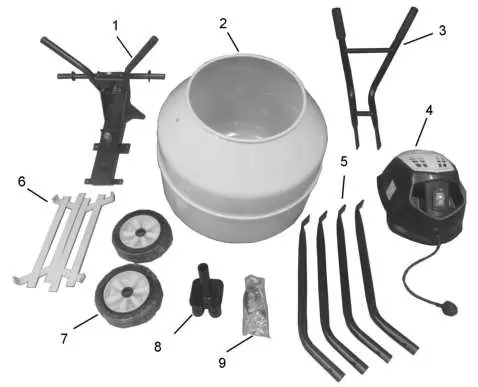
- Bolt the mixing blades to the drum using the provided screws, leather washers, and nuts.
- Attach the protective plastic drive guard to the frame.
- Bolt the drum to the frame using the M12x30 bolt.
- Attach the drive motor assembly to the frame, ensuring the drive shaft is aligned.
- Secure the handles to the main frame.
- Slide the wheels onto the axles and secure them with large washers and cotter pins.
- Assemble the stand by sliding the four legs into the connector and fastening them with pins and R-clips.
- Lift the mixer onto the stand (requires two people).
Operation
- Switch the mixer on using the green (I) button.
- Add water first to prevent clogging, then add cement and aggregate.
- Always ensure the drum is rotating before loading materials.
- To empty, remove the locking pin and tilt the mixer forward using both handles.
Care and Maintenance
After every use, hose down the drum thoroughly with clean water to prevent cement from hardening. The machine is rated IP44D, allowing for safe hosing, but do not spray the motor or plug directly under high pressure. Bearings are sealed for life and the drive belt requires no adjustment.
Technical Specifications
- Model: CCM135
- Max drum capacity: 135 Litre
- Max mixing capacity: 100 Litre
- Drum speed: 25 rpm
- Operating voltage: 230V-50Hz
- Rated input: 485W
- Weight: 43.5 kg
Contact
For parts and service, call 020 8988 7400 or email [email protected] or [email protected].
Manufacturer information
Clarke International
Practical help
Common problems
Cement hardening inside the drum
Hose down the drum thoroughly after every use. Do not beat the drum with tools to dislodge dried cement.
Mixer tipping over
Ensure the mixer is placed on firm, level ground. Never operate on a gradient.
Electrical hazard
Use a Residual Current Device (RCD) and ensure the plug is wired correctly (Brown=Live, Blue=Neutral).
Before use
- Inspect the power cable for any damage.
- Ensure the work area is clean and well-lit.
- Verify the mixer is on firm, level ground.
- Wear appropriate PPE (gloves, eye protection, dust mask).
- Check that all bolts and pins are securely fastened.
Specs in practice
- Duty cycle S6 30%
- The motor is designed for intermittent operation; it should not run continuously at full load.
Images and diagrams
- The assembly diagram shows the correct sequence for attaching the drum, motor, and stand components.
- The wiring diagram illustrates the correct connection of the 3-pin plug.
Model compatibility
- Requires a 230V 50Hz power supply.
- If using an extension cable, it must be of watertight construction.

Manual page author
Emily Carter
User documentation editor
Prepares concise manual descriptions and highlights the most useful setup, operation, and maintenance information for readers.