General / Other Manuals
Cobra Bridge Alarm System User Guide
Quick guide for the Cobra Bridge alarm system. Learn how to arm/disarm, use the PIN code for emergency override, replace remote batteries, and troubleshoot common issues.
Table of contents
Manual images
Jump to the sectionQuick guide from the manual
The Cobra Bridge alarm system is controlled via a high-security radio remote. Key operational requirements include keeping your PIN-CODE (found on the Emergency Key Card) in a safe place, as it is required for emergency overrides and programming new remotes. If the remote fails to operate, ensure you are within 5-10 meters of the vehicle. If the system does not respond, perform the re-synchronization procedure or use the emergency override.
Arming and Disarming
Arming: Press button 'A' on the remote. The doors will lock (if central locking is equipped), indicators will flash twice, and the buzzer will beep twice. Protections activate after 40 seconds.
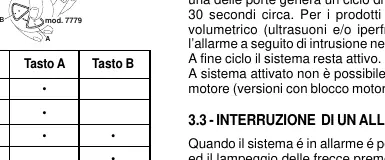
Disarming: Press button 'A' on the remote. The doors will unlock, indicators will flash once, and the buzzer will beep once. Protections deactivate immediately.
Interrupting an Alarm: If the alarm is sounding, press button 'A' once to stop the siren and indicators. The system remains armed. Press button 'A' a second time to fully disarm the system.
Emergency Procedures
If the remote control is lost or non-functional, you can disarm the system using the PIN-CODE:
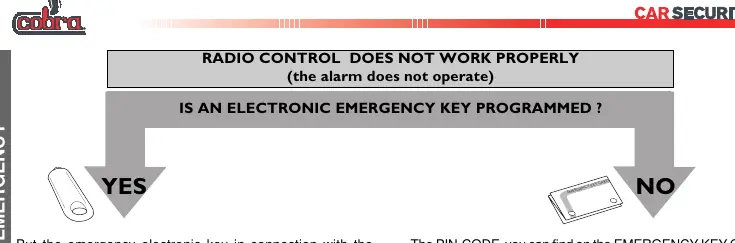
- Turn the ignition key ON and then OFF three times within 5 seconds.
- The LED will flash for 3 seconds, indicating you can enter the PIN.
- Switch the ignition ON and count the LED blinks to match the first digit of your PIN, then switch the ignition OFF and ON again.
- Repeat this procedure for all digits of the PIN.
- If the code is correct, the system will disarm.
Alternatively, if your system is equipped with electronic emergency keys, touch the key to the emergency panel for approximately 1 second to disarm.
Advanced Functions
- Automatic Arming: The system can automatically arm 60 seconds after the driver's door is opened or 255 seconds after the engine is switched off.
- Panic Alarm: Press button 'B' on the remote (after the initial 40-second arming period) to trigger a 10-second alarm cycle (30 seconds for the 8100 range).
- Sensor Exclusion: To leave windows open or passengers inside, arm the system with button 'A', then press button 'B' within 40 seconds to deactivate the volumetric sensor.
Maintenance and Troubleshooting
Remote Battery Replacement: If the remote LED blinks irregularly or not at all, replace the battery. Open the remote casing at the 'OPEN' mark, remove the old battery, wait 10 seconds, and insert a new one, ensuring correct polarity. Press button 'A' twice near the vehicle to verify operation.
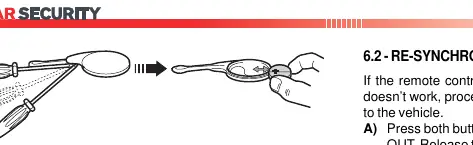

Re-synchronization: If the battery is fresh but the remote does not work, press both buttons until the LED turns off. Release, then press button 'A' while standing near the engine compartment.
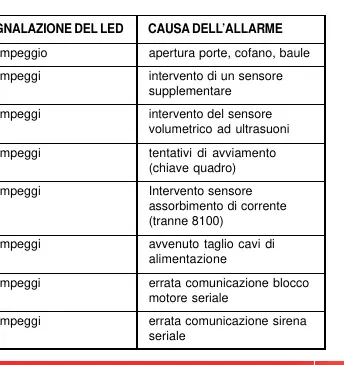
Alarm Memory: Upon disarming, if the buzzer and indicators signal four times instead of once, an alarm has occurred. The LED will blink to indicate the cause (e.g., 1 blink for door/bonnet/boot, 3 blinks for ultrasonic sensor).
Manufacturer information
Cobra Electronics
Practical help
Common problems
Remote control does not arm/disarm the system
Check if the battery is flat and replace if necessary. If the battery is fine, perform the re-synchronization procedure or use the emergency PIN override.
Alarm triggers for no apparent reason
Check that all windows, sunroof, and air vents are closed. Ensure no loose objects are moving inside the vehicle. If the problem persists, contact your dealer.
Lost both remote controls
Use the emergency deactivation procedure with your PIN-CODE or electronic emergency key.
Before use
- Keep your PIN-CODE (from the Emergency Key Card) in a secure place.
- Ensure all doors, the bonnet, and the boot are properly closed before arming.
- Verify that no passengers or pets are left inside if using volumetric sensors.
- Check that the remote control LED lights up when buttons are pressed.
Specs in practice
- Radio control range
- 5-10 meters from the vehicle.
- Alarm cycle duration
- Approximately 30 seconds.
- Automatic arming delay
- 60 seconds after opening the driver's door or 255 seconds after switching off the engine.
Images and diagrams
- Remote control button functions (A for arm/disarm, B for panic/sensor exclusion).
- Battery replacement steps for the remote control.
- Emergency PIN code entry sequence using the ignition key.
- Alarm memory LED blink codes indicating the cause of the last alarm.
Model compatibility
- Compatible with Cobra modules: 5452 (Level monitor), 5462 (Hyperfrequency), 2980 (Window lift), and 930 (Electronic keys).
- Some features like engine cut-off or courtesy light depend on the specific vehicle installation.
- The system is Thatcham listed; modifications may invalidate insurance approval.

Manual page author
Emily Carter
User documentation editor
Prepares concise manual descriptions and highlights the most useful setup, operation, and maintenance information for readers.