Lighting / Emergency Lighting
Installation Guide for Commercial Electric 1-Gang In-Use Cover
Step-by-step installation instructions for the Commercial Electric 1-Gang In-Use Cover (Model 234165). Includes guidance on mounting, adapter selection, and adjusting orientation for vertical or horizontal use.
Table of contents
Manual images
Click an image to enlargeQuick guide from the manual
This document provides installation instructions for the Commercial Electric 1-Gang In-Use Cover. The primary focus is on mounting the base to a receptacle box, selecting the correct adapter, and adjusting the cover orientation for specific installation needs.
Safety Information
Warning: Improper installation of any electrical device can cause serious injury or death. Always turn off the power supply before beginning installation.
Installation Steps
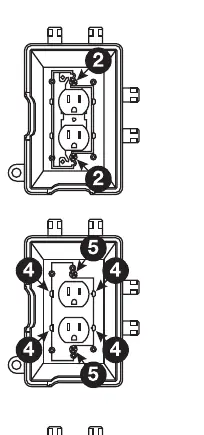
- Turn off the power supply to the receptacle.
- Back out the receptacle screws, but do not remove them completely.
- Align the screws with the holes on the base.
- Select the appropriate adapter (Duplex, GFCI, or Toggle/Round) and snap it onto the base.
- Tighten the screws to secure the base.
- If necessary, adjust the lid and cord port door orientation.
Installation Notes
The base should be installed on a smooth, flat surface. To ensure a proper weatherproof seal on irregular surfaces such as brick or cedar siding, apply a 1/4 inch bead of non-hardening silicone caulk (not included) between the gasket and the mounting surface.
Adjusting Orientation
The lid and cord port door are pre-installed in the vertical position. To install in the horizontal position:
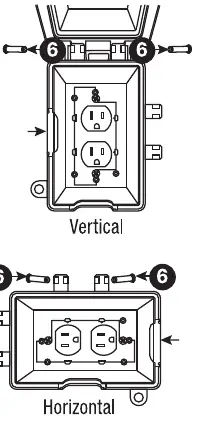
- Remove the hinge pins by placing a screwdriver into the central space on the back of the lid.
- Use the screwdriver as a lever to push each hinge pin out.
- Align the holes on the lid with the hinge holes on the base.
- Slide the horizontal hinge pins marked (2) until they snap in place.
- Pull out the side cord port door and snap it into the other side.
Manufacturer information
Commercial Electric
Practical help
Common problems
Weatherproof seal failure on irregular surfaces
Apply a 1/4 inch bead of non-hardening silicone caulk between the gasket and the mounting surface.
Before use
- Turn off power supply
- Ensure mounting surface is smooth and flat
- Select appropriate adapter (Duplex, GFCI, or Toggle/Round)
Images and diagrams
- The diagrams illustrate the alignment of screws with the base, the snapping of the adapter, and the process of changing the hinge position from vertical to horizontal.
Model compatibility
- Compatible with Duplex, GFCI, and Toggle/Round configurations.

Manual page author
Emily Carter
User documentation editor
Prepares concise manual descriptions and highlights the most useful setup, operation, and maintenance information for readers.