Power / USB Chargers
Comsol 10 Port 120W USB Charging Station DCS1024 User Manual
Quick guide for the Comsol 10 Port 120W USB Charging Station (DCS1024). Learn how to set up, operate, and maintain your charging station safely with this comprehensive manual.
Table of contents
Manual images
Click an image to enlargeQuick guide from the manual
This guide provides essential information for setting up and safely operating the Comsol 10 Port 120W USB Charging Station (DCS1024). To begin, connect the provided AC power cable to the station and a wall socket, turn on the power switch, and connect your devices to the USB ports.
Product Overview
The Comsol 10 Port USB Charging Station is designed to charge up to 10 devices simultaneously, including Apple, Android, and other USB-powered devices. It features a smart power chip to ensure maximum charging speeds and built-in protection against overcharging, over-current, overheating, surges, and short circuits.
Operating Instructions
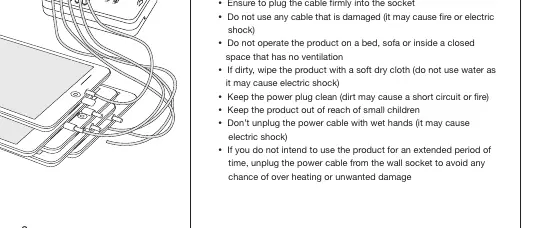
- Connect the Comsol 10 port USB charging station to a power socket using the provided AC power cable.
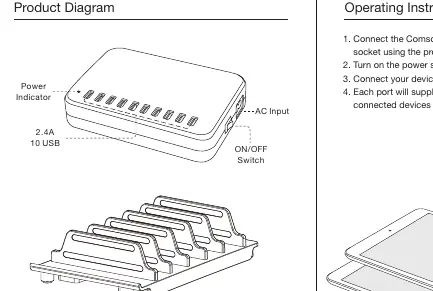
- Turn on the power switch; the green power LED will illuminate.
- Connect your devices to any of the USB ports as required.
- Each port supplies up to 2.4A for fast charging.
Safety Precautions
- Environment: Do not operate the product on a bed, sofa, or inside a closed space without ventilation.
- Handling: Do not disassemble the unit, apply external force to cables, or bend the power cable pins.
- Maintenance: If the unit is dirty, wipe it with a soft dry cloth. Do not use water as it may cause electric shock.
- Emergency: If you notice strange sounds, smoke, or odor, disconnect the power cable immediately.
- General: Keep out of reach of children. Do not unplug by pulling the cable. Do not touch the power cable with wet hands.
Technical Specifications
- Model: DCS1024
- Input: AC 100-240V ~ 1.68A 50/60Hz
- Output: DC 5V 2.4A x 10
- Total Power: 24A (120W)
- Dimensions: 156mm (W) x 109mm (D) x 33mm (H)
- Net Weight: 465g
Practical help
Common problems
Strange sounds, smoke, or odor detected
Disconnect the power cable immediately.
Unit is dirty
Wipe with a soft dry cloth. Do not use water.
Extended period of non-use
Unplug the power cable from the wall socket to avoid overheating or damage.
Before use
- Ensure the power cable is not damaged.
- Verify the charging station is placed in a well-ventilated area.
- Check that the power source is AC 100-240V.
- Ensure the power plug is clean and free of dirt.
Specs in practice
- Output 5V 2.4A x 10
- Each of the 10 ports provides up to 2.4A for fast charging.
- Total Power 120W
- The maximum combined power output available for all connected devices.
Images and diagrams
- The Product Diagram identifies the Power Indicator, AC Input, and ON/OFF Switch locations.
- The Operating Instructions diagram illustrates the connection flow from the wall socket to the charging station and then to the devices.
Model compatibility
- Suitable for use with Information Technology Equipment only.
- Compatible with Apple, Android, and Windows devices.

Manual page author
David Miller
Documentation analyst
Organizes user manual content into clear summaries, with attention to model details, product context, and everyday usability.