Electronics / Video Lighting
Quick Start Guide for Corsair Ring Light 20LAC9901
Learn how to set up, adjust, and control your Corsair Ring Light 20LAC9901. This guide covers stand assembly, software installation, Wi-Fi pairing, and brightness/color temperature adjustments.
Quick answers from the manual
Quick answer
- The Corsair Ring Light 20LAC9901 is a studio light controlled via the Elgato Control Center app. It features adjustable brightness and color temperature, and connects to Wi-Fi for remote control. p. 1
Key actions
- Adjusting Brightness p. 1
- Resetting the device p. 1
First start
- Download Elgato Control Center, connect the light to power, and follow the app instructions to pair with Wi-Fi. p. 1
Show 4 more answers Show less
Problems and fixes
Wi-Fi connection issues
Reset the device by holding the power button for 10 seconds until the light flashes.
p. 1Maintenance and reset
- Hold the power button for 10 seconds to reset the device. p. 1
Technical specifications
| Parameter | Value | Meaning | Pages |
|---|---|---|---|
| Max Load | 2.0 kg / 4.50 lbs | Maximum weight capacity of the stand | p. 1 |
Where to find it in the PDF
- Quick Start Guide p. 1
Table of contents
Manual images
Click an image to enlargeQuick Guide from the Manual
The Corsair Ring Light 20LAC9901 is a professional lighting solution designed for content creators. This guide provides the essential steps for assembly, software configuration, and daily operation.
Assembly and Stand Adjustment
Follow these steps to assemble the stand:
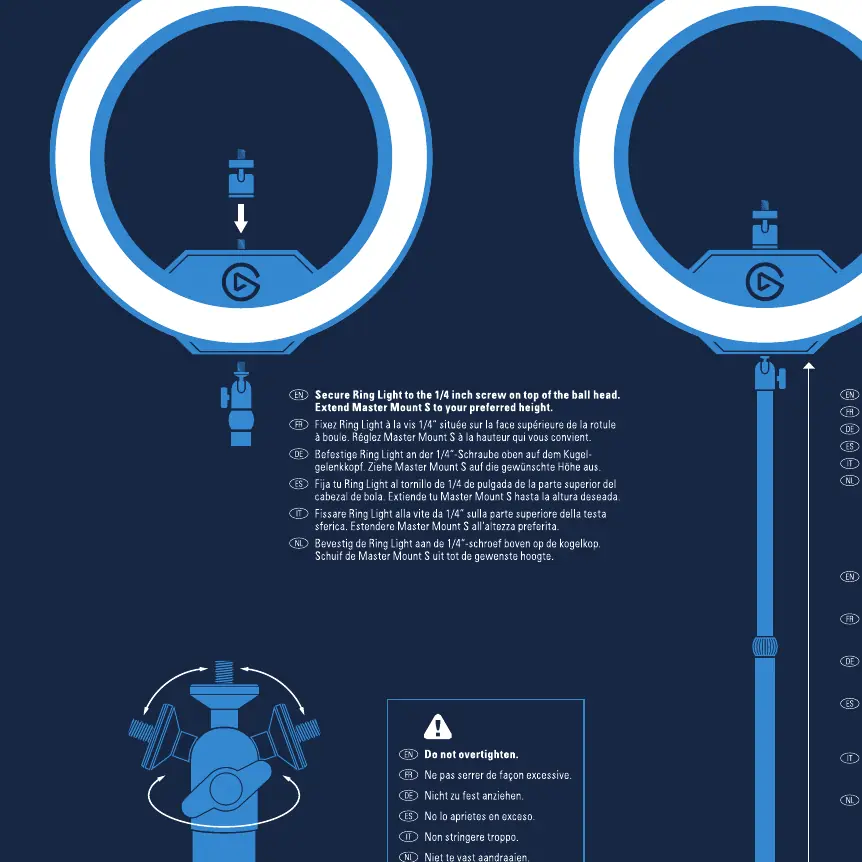
- Secure the Ring Light: Use the 1/4 inch screw on top of the ball head to attach the light.
- Extend the Stand: Pull the stand to your preferred height.
- Tighten: Ensure the knob is tightened to secure the height.
- Weight Limit: Do not exceed the maximum load of 2.0 kg (4.50 lbs).
Power and Controls
The light is operated via physical buttons on the unit or through the software:
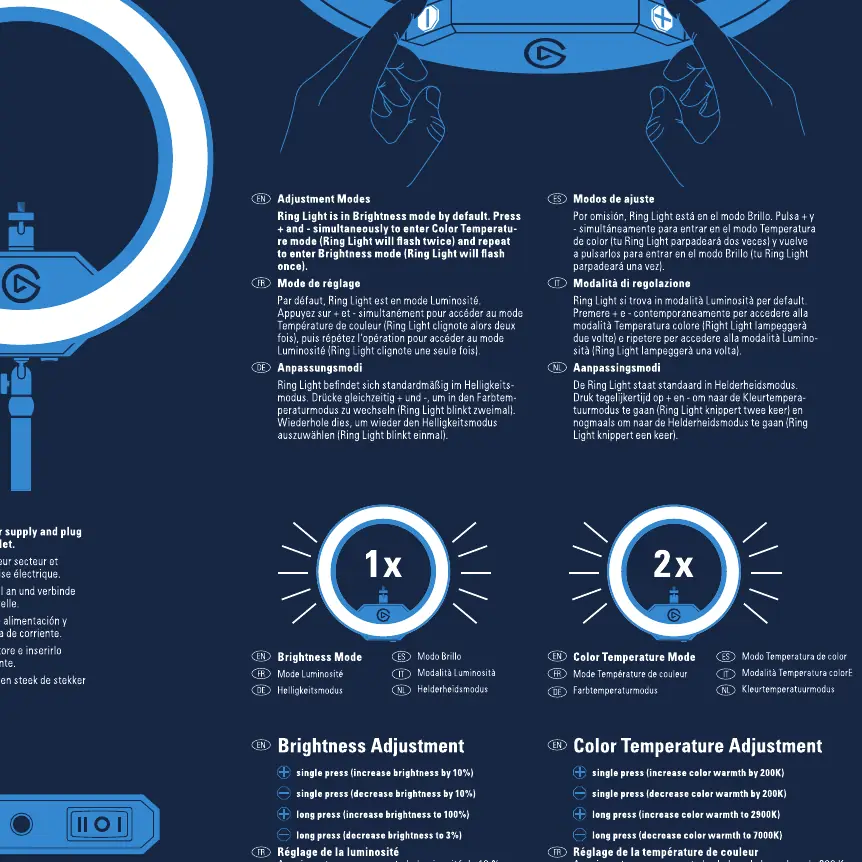
- Brightness Adjustment: Press the button once to increase brightness by 10%. Press and hold to increase brightness continuously.
- Color Temperature Adjustment: Press the button twice to increase color temperature by 200K. Press and hold to increase color temperature continuously.
Software and Wi-Fi Setup
To enable remote control and advanced features:
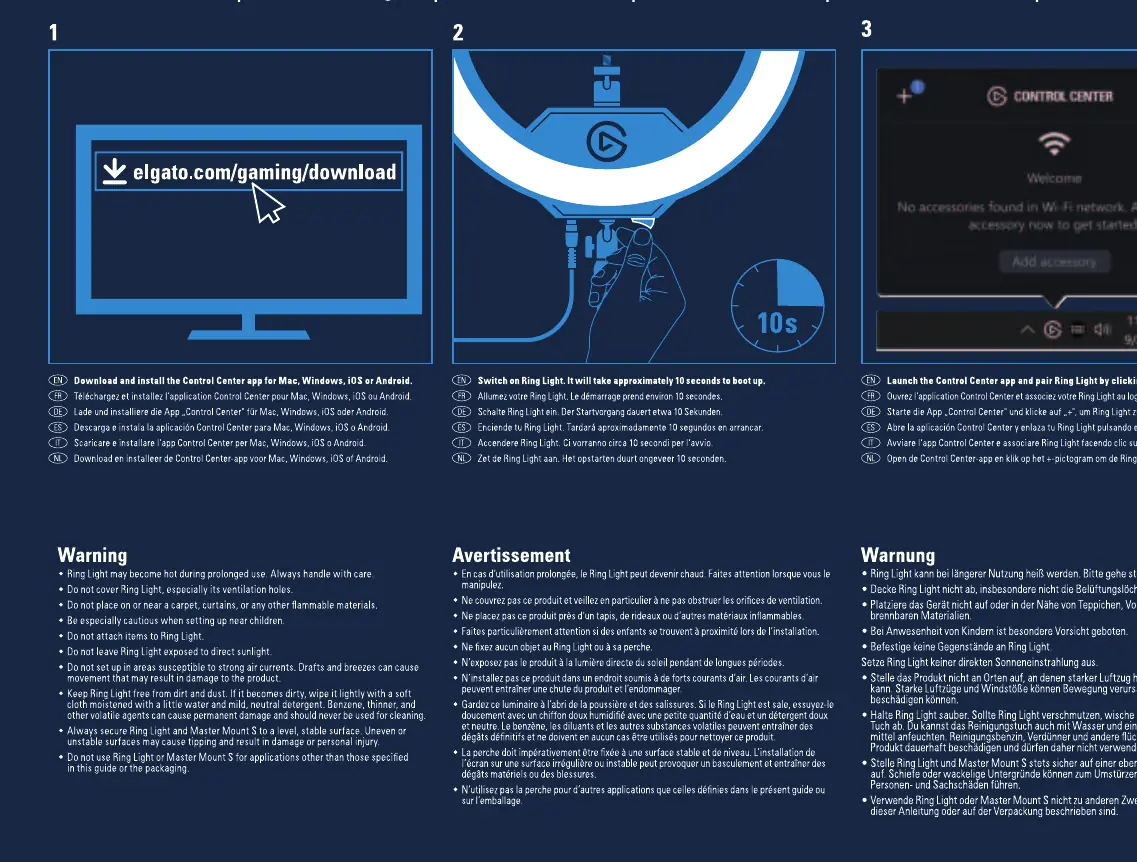
- Download and install the Elgato Control Center app for Windows, macOS, iOS, or Android.
- Connect the Ring Light to a power outlet.
- Open the Control Center app and follow the on-screen instructions to add the accessory.
- The app will guide you through connecting the light to your Wi-Fi network.
Reset Procedure
If you encounter connectivity issues or need to reconfigure the device, perform a factory reset:
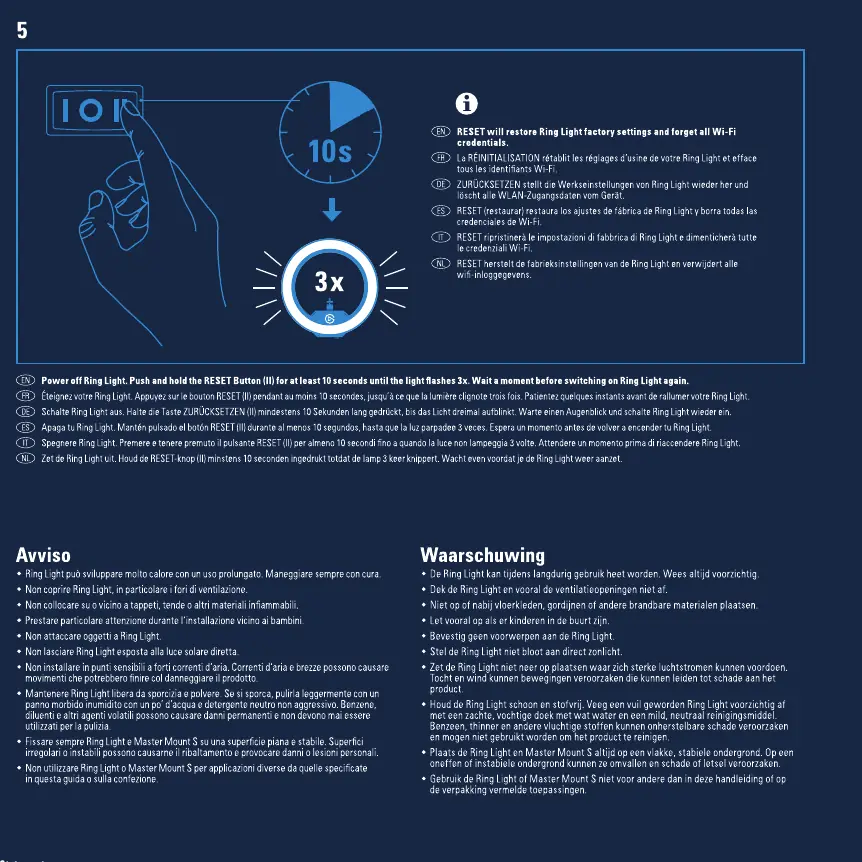
- Hold the power button for 10 seconds.
- The light will flash, indicating it has been reset and is ready to be set up again via the Control Center app.
Safety Warnings
- Do not place the device on a carpet or near curtains.
- Ensure proper ventilation; do not cover the light.
- Keep away from flammable materials.
- For indoor use only.
Manufacturer information
Corsair Memory, Inc.
Practical help
Common problems
Device not connecting to Wi-Fi
Ensure you are using the Elgato Control Center app and follow the pairing instructions. If it fails, perform a factory reset by holding the power button for 10 seconds.
Light not turning on
Check the power connection and ensure the power outlet is active.
Before use
- Ensure the stand is fully extended and the knob is tightened.
- Verify that the mounted equipment does not exceed 2.0 kg (4.50 lbs).
- Download the Elgato Control Center app on your device.
- Ensure the light is connected to a power outlet.
Show more Show less
Images and diagrams
- The stand features a tightening knob to secure the height adjustment.
- The control panel allows for single-press and double-press operations for brightness and color temperature.
- The reset procedure requires holding the power button for 10 seconds.
Model compatibility
- Compatible with Windows, macOS, iOS, and Android via the Elgato Control Center app.

Manual page author
Emily Carter
User documentation editor