Tools / Impact Wrenches
User Manual for Craftsman 20V Max Bluetooth Clamp Speaker CMXCREF1900002
Quick guide for the Craftsman 20V Max Bluetooth Clamp Speaker (CMXCREF1900002). Learn how to pair via Bluetooth, link multiple speakers, use the USB-C charging port, and install using the Versatrack system.
Quick answers from the manual
Quick answer
- The Craftsman CMXCREF1900002 is a 20V Max Bluetooth clamp speaker. It supports wireless audio streaming, linking up to 100+ speakers, and features a 5V/2.4A USB-C charging port. p. 8, 22, 26
Key actions
- Pairing via Bluetooth p. 22
- Linking multiple speakers p. 24, 25
First start
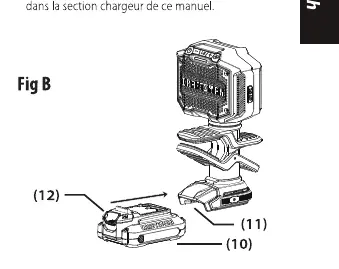
- Insert a charged 20V Max battery into the base of the speaker. p. 20
Problems and fixes
Speaker turns off automatically
The speaker is designed to turn off after 2 hours of inactivity to save battery.
p. 23Maintenance and reset
- Factory Reset p. 21
Technical specifications
| Parameter | Value | Meaning | Pages |
|---|---|---|---|
| USB Output | 5V DC, 2.4A | Charging power for external devices. | p. 26 |
Where to find it in the PDF
- Components p. 8
- Operation p. 21, 22
Table of contents
Manual images
Click an image to enlargeQuick guide from the manual
The Craftsman 20V Max Bluetooth Clamp Speaker (CMXCREF1900002) is designed for wireless audio streaming and job site utility. Key features include Bluetooth connectivity, the ability to link over 100 speakers, a 5V/2.4A USB-C charging port, and compatibility with the Versatrack mounting system.
Device components
Familiarize yourself with the controls and features:
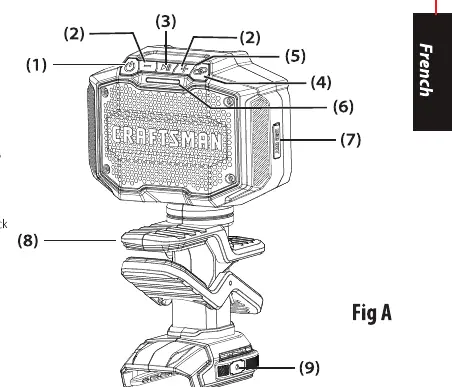
- Power Button: Turns the speaker on and off.
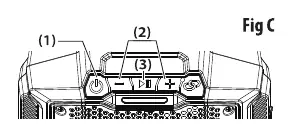
- Volume Controls (+/-): Adjusts audio volume and skips tracks.
- Play/Pause Button: Controls audio playback and Bluetooth disconnection.
- LINK Button: Used to connect multiple speakers.
- USB Port: Type-C port for charging external devices.
- Clamp: For securing the speaker to surfaces.
- Versatrack Support: For mounting on the Versatrack system.
Operation
Bluetooth pairing
- Place the speaker and audio source within 1 meter (3 feet) of each other.
- Press the Power button to turn on the speaker.
- The speaker will attempt to pair automatically. If not, ensure your device is searching for Bluetooth signals and select CMXCREF1900002.
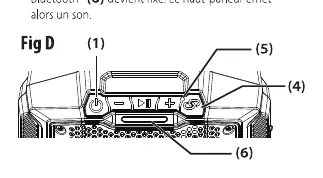
- Once paired, the Bluetooth status indicator will remain solid.
Linking multiple speakers
- Press and hold the LINK button on the main speaker.
- Turn on additional speakers and press their LINK buttons.
- The main speaker controls the volume for all linked units.
- To disconnect, press and hold the LINK button on the main or secondary speaker.
USB-C charging
The USB-C port provides 5V DC at up to 2.4A for charging devices.
- Connect your device to the USB-C port using a cable (not provided).
- The speaker must be powered on for the port to function.
- Charging stops if the speaker is turned off, the device is fully charged, or after 4 hours of charging.
Versatrack installation
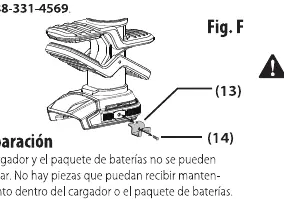
- Ensure the tool is powered off and the battery is removed.
- Attach the Versatrack hook to the base of the tool.
- Use the provided screw to secure the hook. Do not use other screws.
- Ensure the hook is securely tightened before hanging the tool.
Maintenance
Warning: Always turn off the unit and remove the battery before performing adjustments or cleaning. Clean the speaker using a dry cloth. Do not use aggressive chemicals or solvents. Keep ventilation openings clear of dust and debris.
Manufacturer information
CRAFTSMAN
Practical help
Common problems
Speaker will not pair via Bluetooth
Ensure the speaker is in pairing mode (flashing blue light). If the connection is lost, restart the pairing process.
Linking multiple speakers fails
Hold the LINK button on the main speaker to reset the connection, then re-initiate the linking process on all units.
USB charging stops unexpectedly
The speaker must be powered on to charge devices. Charging will stop automatically if the speaker is turned off, the device is fully charged, or after 4 hours.
Before use
- Ensure the 20V Max battery is fully charged.
- Check that the Bluetooth range is clear of major obstructions.
- Verify the Versatrack hook is securely tightened with the provided screw.
- Ensure the speaker is not exposed to water or flammable liquids.
Specs in practice
- USB-C Output
- Provides 5V DC at 2.4A for charging mobile devices.
- Bluetooth Range
- Up to 79.2 meters (260 feet) in open, unobstructed areas.
- Linking Capacity
- Supports connecting over 100 additional speakers.
Images and diagrams
- Fig A: Overview of buttons, ports, and mounting points.
- Fig B: Battery insertion and removal procedure.
- Fig C: Playback and volume control layout.
- Fig D: Bluetooth pairing indicator status.
- Fig E: Linking multiple speakers setup.
Model compatibility
- Compatible with Craftsman 20V Max battery systems.
- Compatible with the Versatrack wall storage system.

Manual page author
Emily Carter
User documentation editor
Prepares concise manual descriptions and highlights the most useful setup, operation, and maintenance information for readers.