Sports / Fitness
User Manual for Crivit SUP-Pumpe CSPA 20-Li A1
Quick guide for the Crivit SUP-Pumpe CSPA 20-Li A1. Learn how to operate, inflate/deflate, set pressure, and maintain your SUP pump safely.
Quick answers from the manual
Quick answer
- The Crivit SUP-Pumpe CSPA 20-Li A1 is an electric pump for SUP boards, powered by a 12V car socket or a 20V Parkside battery. It features automatic shut-off when the target pressure is reached. p. 6, 13
Key actions
- Inflate/Deflate p. 13
First start
- Connect to 12V or 20V power, set desired pressure using +/- buttons, attach hose, and press power button. p. 12, 13, 14
Problems and fixes
Device not running
Check power source, fuse, or motor overheating (cool down 10 mins).
p. 11, 15Maintenance and reset
- The device is maintenance-free. Clean regularly with a dry cloth. p. 14
Technical specifications
| Parameter | Value | Meaning | Pages |
|---|---|---|---|
| Max Pressure | 1.38 bar (20 PSI) | Maximum operating pressure | p. 7 |
| Max Runtime | 10 minutes | Maximum continuous operation time | p. 7, 13 |
Where to find it in the PDF
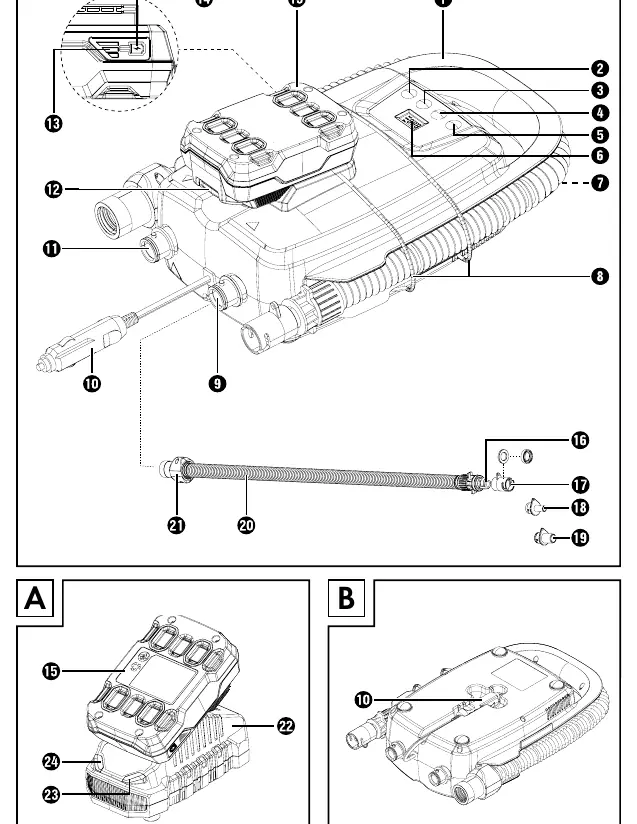
- Device Overview p. 3
- Technical Data p. 7
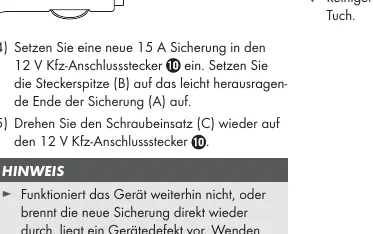
- Fuse Replacement p. 14
Table of contents
Manual images
Click an image to enlargeImportant Information
The Crivit SUP-Pumpe CSPA 20-Li A1 is designed for inflating SUP boards. It is not suitable for continuous operation; do not exceed 10 minutes of continuous use. If the device overheats, turn it off and let it cool for at least 10 minutes. The device is not for commercial use.
Device Overview
The pump features a carrying handle, a display for pressure settings, and ports for inflation and deflation. It can be powered by a 12V car socket or a 20V Parkside battery. The hose includes a locking connection and various adapters for different valves.
Power Supply
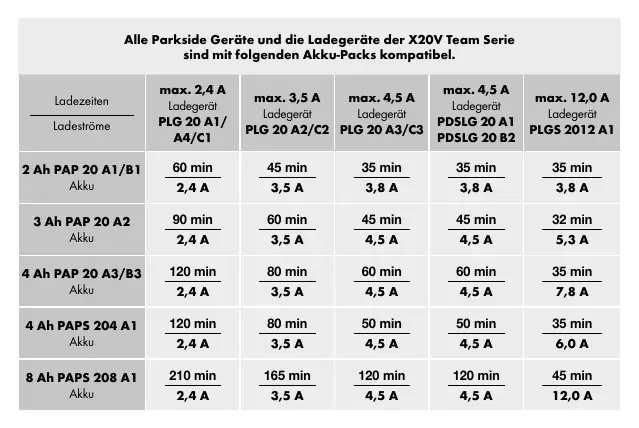
The device has automatic 12V or 20V voltage detection. If both a 20V battery and a 12V car plug are connected, the device will prioritize the 12V connection. Note that the battery does not charge via the 12V car plug.
Operation
Inflation and Deflation
- Inflation: Connect the hose to the inflation port.
- Deflation: Connect the hose to the deflation port.
- Pressure Setting: Use the '+' and '-' buttons to set the desired pressure. You can toggle between 'bar' and 'psi' using the selection button.
- Starting: Press the ON/OFF switch to start. Hold the switch for approx. 3 seconds to enter high-pressure mode. The compressor will shut off automatically once the target pressure is reached.
Safety Warnings
- Do not leave the device unattended during operation.
- Do not use the device if the hose is damaged.
- Ensure the inflation inlet is not pointed towards the body.
- Do not use the device in temperatures below +5°C.
- Keep the device clean, dry, and free of oil or grease.
Maintenance and Troubleshooting
The device is maintenance-free. Do not open the housing. If the device fails to operate, check the power source and the fuse inside the 12V plug. If the device vibrates excessively, place it on a flat surface using the four feet on the bottom.
Manufacturer information
Crivit
Practical help
Common problems
Device does not run
Check the power source (12V socket or battery). Check the fuse in the 12V plug. Ensure the motor has not overheated (let cool for 10 minutes).
Slow or abnormal inflation
Check if the hose is blocked or damaged. Ensure the hose connection to the pump is secure.
Before use
- Ensure the hose is not damaged or cracked.
- Check the 12V plug for rust or debris if using car power.
- Ensure the battery is charged (if using 20V).
- Verify the device is clean and dry.
- Place the device on a flat surface.
Specs in practice
- Max Pressure
- 1.38 bar (20 PSI). Do not exceed the recommended pressure for your inflatable.
- Duty Cycle (S2)
- 10 minutes max continuous operation. Allow to cool afterwards.
Images and diagrams
- Page 3 illustrates the main components, including the hose, adapters, and control panel.
- Page 14 shows the step-by-step process for replacing the fuse in the 12V plug.
Model compatibility
- Compatible with Parkside X20V Team series batteries.
- Use only recommended Parkside chargers for the batteries.

Manual page author
David Miller
Documentation analyst
Organizes user manual content into clear summaries, with attention to model details, product context, and everyday usability.