Electronics / Networking
Cudy GS 1020PS2 16-Port Gigabit PoE+ Switch User Manual
Quick guide for the Cudy GS 1020PS2 16-Port Gigabit PoE+ Switch. Includes technical specifications, LED indicator meanings, operating modes (VLAN, Default, Extend), and installation information.
Table of contents
Quick guide from the manual
This document provides technical specifications and operational details for the Cudy GS 1020PS2 16-Port Gigabit PoE+ Switch. It covers port configurations, LED status meanings, and switch modes to assist with installation and troubleshooting.
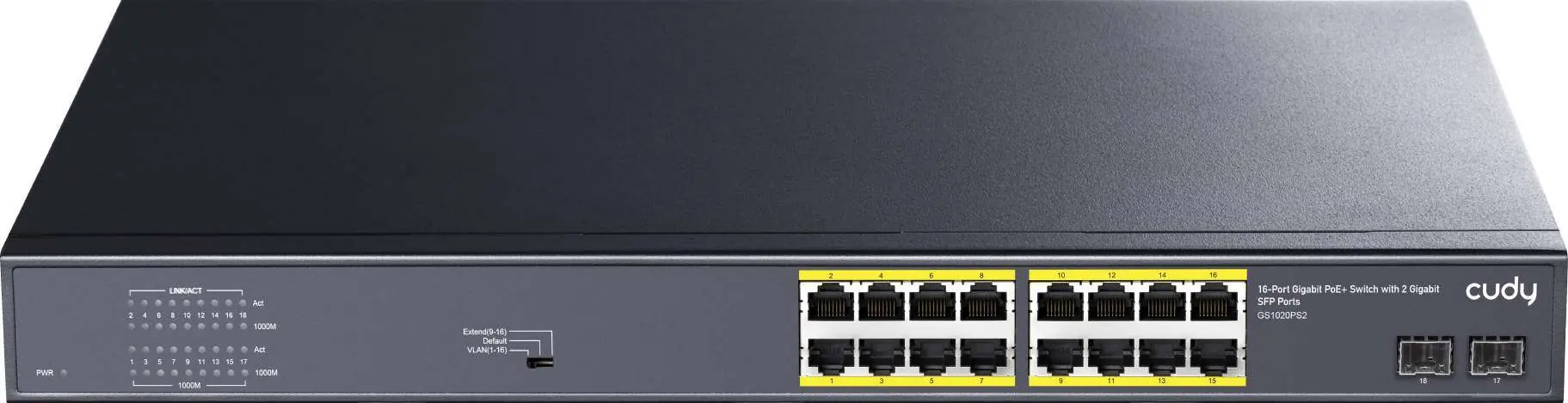
Features
- 16 x 10/100/1000M PoE ports and 2 x Gigabit SFP Uplink ports.
- Complies with IEEE 802.3, 802.3u, 802.3ab, 802.3z, and 802.3x standards.
- Supports port auto-flip (Auto MDI/MDIX).
- 1U 19-inch rack installation design.
Operating Modes
The switch features a physical switch to toggle between three modes:
- VLAN: Port isolation mode. PoE ports (1-16) cannot communicate with each other and can only communicate with the uplink port.
- Default: Normal mode. All ports can communicate with each other; transmission distance is within 100 meters.
- Extend: Link extension mode. Ports 9-16 PoE power and data transmission distance can be extended to 250 meters, with the transmission rate limited to 10M.
LED Indicators
- PWR: Indicates power status (Lighting: Powered, Un-Light: No Power).
- 1-18 ACT (Link&Data): Indicates connection status (Lighting: Connecting, Flashing: Data Transmit, Un-Light: Disconnect).
- 1-18 1000M (Link): Indicates speed (Lighting: 1000M, Un-Light: 10/100M).
Technical Specifications
- Power Input: AC 100-240V, 50/60Hz.
- Switching Capacity: 36Gbps.
- Throughput: 26.784Mpps.
- Packet Buffer: 4Mb.
- MAC Address: 8K.
- Jumbo Frame: 9.6Kbytes.
- PoE Protocol: IEEE 802.3af (15.4W) and IEEE 802.3at (30W).
- Working Environment: Temperature -10 to 50°C, Humidity 10% to 90% (non-condensing).
Package Contents
- Switch (1 pc)
- Power cord (1 pc)
- User manual (1 pc)
- Certification (1 pc)
- Brackets (1 pair)
Practical help
Common problems
No power indicator
Check if the power cord is securely connected to the AC outlet and the switch.
Data not transmitting
Check the ACT LED. If unlit, the device is disconnected. Ensure the cable is within the 100m limit (or 250m in Extend mode).
Slow network speed in Extend mode
Extend mode limits transmission rate to 10M to achieve 250m distance. Switch to Default mode for 1000M speeds.
Before use
- Verify power source is AC 100-240V.
- Ensure rack space is available for 1U 19-inch installation.
- Use Cat5 or above UTP cables for 1000Base-TX connections.
- Check if SFP modules are compatible with the fiber type (Multimode or Single mode).
- Set the mode switch (VLAN/Default/Extend) according to your network requirements before powering on.
Specs in practice
- PoE Protocol
- Supports IEEE 802.3af (up to 15.4W) and 802.3at (up to 30W) per port.
- Switching Capacity
- The total bandwidth capacity of the switch is 36Gbps.
Images and diagrams
- The front panel features 16 PoE ports, 2 SFP ports, and a mode selector switch for VLAN, Default, and Extend modes.
Model compatibility
- 10Base-T: Cat3, 4, 5 or above UTP (<=100m).
- 100Base-TX: Cat5 or above UTP (<=100m).
- 1000Base-TX: Cat5 or above UTP (<=100m).
- Fiber: Supports Multimode (50/125, 62.5/125, 100/140μm) and Single mode (8/125, 8.7/125, 9/125, 10/125μm).

Manual page author
David Miller
Documentation analyst
Organizes user manual content into clear summaries, with attention to model details, product context, and everyday usability.