Electronics / Networking
User Manual for Cudy GS 1008PS2 8-Port Gigabit PoE+ Switch
Quick guide for the Cudy GS 1008PS2 8-Port Gigabit PoE+ Switch. Learn about DIP switch modes (Default/Extend), LED indicators, PoE specifications, and installation requirements.
Table of contents
Quick Guide from the Manual
The Cudy GS 1008PS2 is an 8-Port Gigabit PoE+ Switch with 2 additional Gigabit SFP slots. This device features a DIP switch for toggling between Default and Extend modes, allowing for flexible network deployment. It supports IEEE 802.3af/at PoE standards and includes surge protection.
Device Overview
The front panel of the switch contains the following elements:
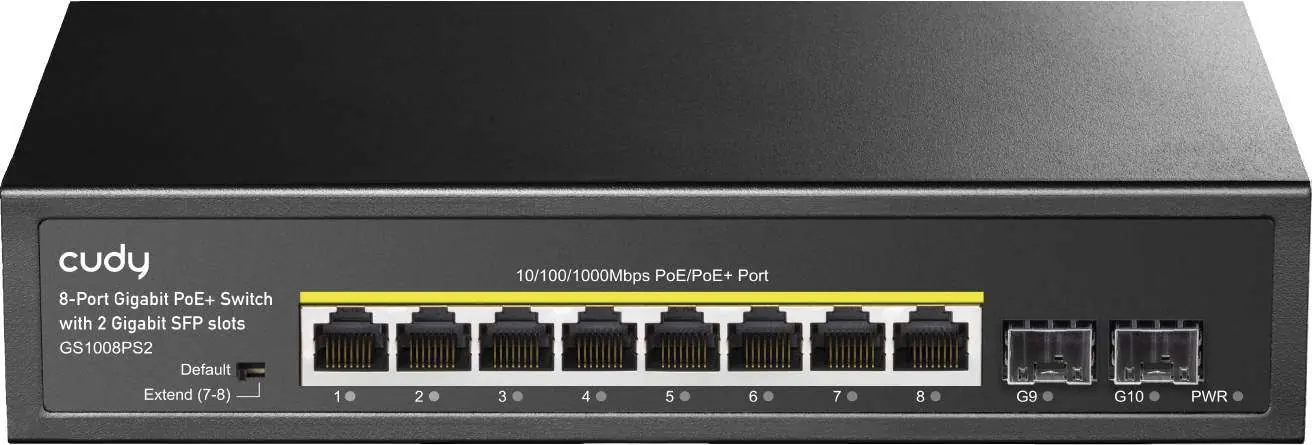
- 8x PoE+ Ports: 10/100/1000Mbps ports for connecting PoE-powered devices.
- 2x Gigabit SFP Slots: For fiber optic connectivity.
- DIP Switch: Located on the front panel to switch between Default and Extend modes.
- LED Indicators: PWR (Power) and 1-10 (Link/Data) indicators.
DIP Switch Settings
The DIP switch allows you to change the operational mode of the switch:
- Default: Standard operation. All interfaces can communicate with each other. The transmission distance is limited to 100 meters, and the transmission rate is 10/100/1000M adaptive. The AI mode is disabled.
- Extend: Link extension mode. Ports 7-8 are forced to 10M speed, extending the transmission distance to 250 meters. This mode also enables the PoE watchdog feature.
LED Indicators
- PWR (Power): On when the device is powered on; Off when powered off.
- 1-10 Green Light: On indicates the link is normal; Off indicates the link is blocked; Flashing indicates data is transmitting.
Technical Specifications
- Power Input: AC 100-240V, 50/60Hz.
- PoE Protocol: Supports IEEE802.3af (15.4W) and IEEE802.3at (30W).
- Bandwidth: 20Gbps.
- Throughput: 14.88Mpps.
- Memory Cache: 448Kb.
- MAC Address Table: 2K.
- Jumbo Frame: 9216 Kbytes.
Operating Environment
- Working Temperature: -10 to 50°C.
- Storage Temperature: -40 to 70°C.
- Working Humidity: 10% to 90% (non-condensing).
- Storage Humidity: 5% to 90% (non-condensing).
Practical help
Common problems
Device not powering on
Verify that the power cord is securely connected and the power source provides AC 100-240V.
Network link blocked
Check the LED indicator for the specific port. If the light is off, the link is blocked. Ensure the Ethernet cable is properly connected and functional.
Transmission distance is insufficient
If you need to extend the distance beyond 100 meters, switch the DIP switch to 'Extend' mode. Note that this limits the speed of ports 7-8 to 10M.
Before use
- Verify package contents: Switch, power cord, and user manual.
- Ensure the power outlet provides AC 100-240V.
- Use appropriate cabling: Cat5 or above for 1000Base-TX connections.
- Determine if 'Extend' mode is required for your installation distance.
- Ensure the installation environment is within the -10 to 50°C temperature range.
Specs in practice
- PoE Protocol
- The switch supports IEEE802.3af (up to 15.4W) and IEEE802.3at (up to 30W) for powering devices like IP cameras or access points.
Images and diagrams
- The front panel features 8 PoE+ ports and 2 Gigabit SFP slots for fiber connectivity.
- The DIP switch is located on the front panel to toggle between Default and Extend modes.
Model compatibility
- Supports Cat3, 4, 5 or above UTP for 10Base-T.
- Supports Cat5 or above UTP for 100Base-TX and 1000Base-TX.
- Supports Multimode (50/125, 62.5/125, 100/140um) and Single-mode (8/125, 8.7/125, 9/125, 10/125um) optical fiber via SFP slots.

Manual page author
Michael Turner
Technical manual editor
Reviews PDF manuals for structure, safety notes, and practical product details so readers can find the right information quickly.