Hvac / Thermostats Controls
Installation Guide for Danfoss Redia RA Click Thermostatic Sensors
A comprehensive installation and configuration guide for Danfoss Redia RA Click thermostatic sensors. Includes step-by-step instructions for mounting, uninstalling, setting temperature limits, and enabling theft protection.
Table of contents
Quick guide from the manual
This document provides installation and configuration instructions for the Danfoss Redia RA Click thermostatic sensor series (models 015G5421, 015G5422, 015G5423). The guide covers standard installation, BIV installation, uninstallation, temperature limitation settings, and theft protection.
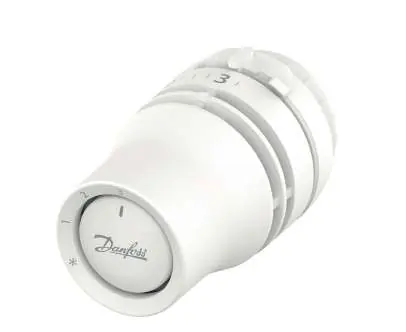
Installation
To install the sensor on a standard valve:
- Remove the old sensor head from the valve.
- Set the new Redia RA Click sensor to position 3.
- Push the sensor firmly onto the valve until you hear a distinct click sound, indicating it is locked in place.
BIV Installation
For BIV (Built-in Valve) installations, follow the same procedure as standard installation:
- Ensure the valve is clear.
- Set the sensor to position 3.
- Push the sensor onto the valve until it clicks into position.
Uninstalling
To remove the sensor from the valve:
- Rotate the sensor to the unlock position.
- Pull the sensor straight off the valve body.
Temperature Limitation
You can restrict the temperature range to prevent overheating or overcooling.
Maximum Temperature Limitation
- Locate the adjustment ring on the sensor.
- Rotate the sensor to the desired maximum setting (e.g., 2).
- Adjust the internal limiter to lock this maximum position.
Minimum Temperature Limitation
- Locate the adjustment ring.
- Set the sensor to the desired minimum setting (e.g., 1).
- Adjust the internal limiter to lock this minimum position.
Theft Protection
To prevent unauthorized removal of the sensor:
- Use the designated theft protection tool.
- Insert the tool into the sensor housing to lock the mechanism.
- To remove, use the tool to unlock the mechanism before pulling the sensor off.
Blind Mark
The sensor features a blind mark indicator to assist with alignment and setting identification. Ensure the mark is visible and aligned correctly during installation.
Manufacturer information
Danfoss A/S
Practical help
Common problems
Sensor does not click into place during installation
Ensure the sensor is set to position 3 before attempting to push it onto the valve.
Cannot remove the sensor from the valve
Ensure the sensor is rotated to the unlock position. If theft protection is active, you must use the removal tool to unlock it first.
Before use
- Verify the valve body is compatible with the RA Click system.
- Set the sensor dial to position 3 before mounting.
- Ensure the theft protection tool is available if you intend to secure the sensor.
Specs in practice
- 015G5421, 015G5422, 015G5423
- Model numbers for the Danfoss Redia RA Click thermostatic sensor series.
Images and diagrams
- The installation diagrams show the sequence of setting the dial to 3 and pushing the sensor onto the valve until it clicks.
- The theft protection diagrams illustrate the use of a tool to lock and unlock the sensor housing.
Model compatibility
- Designed for RA Click valve connections.

Manual page author
David Miller
Documentation analyst
Organizes user manual content into clear summaries, with attention to model details, product context, and everyday usability.