Hvac / Thermostats Controls
Installation Guide for Danfoss Regus RA nut Thermostatic Sensors
Quick guide for installing and configuring Danfoss Regus RA nut thermostatic sensors, including BIV installation, temperature limitation, and theft protection.
Table of contents
Quick guide from the manual
This document provides essential installation and configuration procedures for the Danfoss Regus RA nut thermostatic sensors. It covers standard mounting, BIV installation, temperature limitation settings, and theft protection installation.
Installation
Follow these steps to install the sensor on a standard valve:
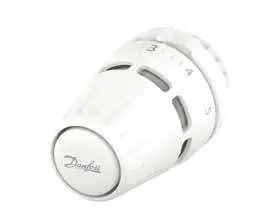
- Remove the existing protective cap from the valve.
- Align the sensor with the valve body.
- Tighten the connection using a tool to a torque of 6Nm.
BIV Installation
For BIV (Built-in Valve) configurations, follow these steps:
- Remove the protective cap from the BIV valve.
- Align the sensor with the BIV valve body.
- Secure the connection using a tool, applying a torque of 6Nm.
Temperature Limitation
The sensor allows for both maximum and minimum temperature limitations to prevent unwanted adjustments.
Maximum Temperature Limitation
- Identify the current setting.
- Rotate the sensor to the desired maximum position (e.g., 5).
- Use a screwdriver to adjust the internal limiter mechanism to the desired maximum setting.
- Verify the setting by attempting to rotate the dial.
Minimum Temperature Limitation
- Rotate the sensor to the desired minimum position.
- Use a screwdriver to adjust the internal limiter mechanism to the desired minimum setting.
- Verify the setting by attempting to rotate the dial.
Theft Protection
To secure the sensor against theft, use the dedicated theft protection accessory (Code no. 013G3910). Snap the protection ring around the base of the sensor connection to prevent unauthorized removal.
Blind Mark
The sensor features a blind mark indicator to assist with orientation and setting identification. Ensure the mark is aligned correctly during installation for optimal visibility and operation.
Manufacturer information
Danfoss A/S
Practical help
Common problems
Sensor can be easily removed
Install the theft protection accessory (Code no. 013G3910) to secure the sensor.
Temperature range is too wide
Use the internal temperature limitation feature (Max/Min) with a screwdriver to restrict the dial range.
Before use
- Ensure the valve body is compatible with the RA nut sensor.
- Have a screwdriver available for temperature limit adjustments.
- Use a torque wrench or appropriate tool to tighten the sensor to 6Nm.
- Verify the orientation of the blind mark before final tightening.
Images and diagrams
- Standard installation involves removing the cap and tightening the nut to 6Nm.
- Temperature limitation requires using a screwdriver to set the internal limiter at the desired dial number.
- Theft protection is installed by snapping the ring around the sensor base.
Model compatibility
- The manual distinguishes between standard installation and BIV (Built-in Valve) installation.
- Ensure the specific valve type matches the installation method shown.

Manual page author
Michael Turner
Technical manual editor
Reviews PDF manuals for structure, safety notes, and practical product details so readers can find the right information quickly.