Industrial / Electrical
Installation Guide for Danfoss VLT Memory Module MCM 103
Learn how to install the Danfoss VLT Memory Module MCM 103 into your VLT Midi Drive FC 280. This guide covers step-by-step installation, module functionality, and setup requirements.
Table of contents
Manual images
Click an image to enlargeQuick guide from the manual
The VLT Memory Module MCM 103 is an optional component for the VLT Midi Drive FC 280 frequency converter. It serves two primary functions:
- Memory Module: Stores firmware and parameter settings, allowing for easy copying to new frequency converters of the same power size.
- Activation Module: Enables locked features within the frequency converter firmware.
The module is protected from direct viewing. To view or transfer files, a separate Memory Module Programmer (ordering number 134B0792) is required.
Installation
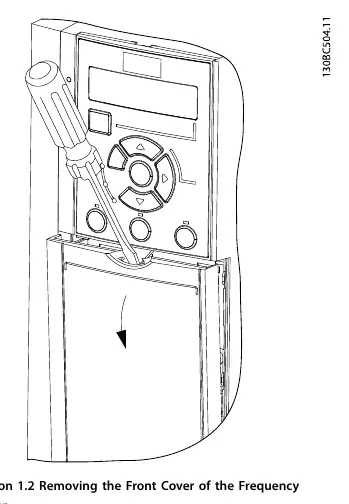
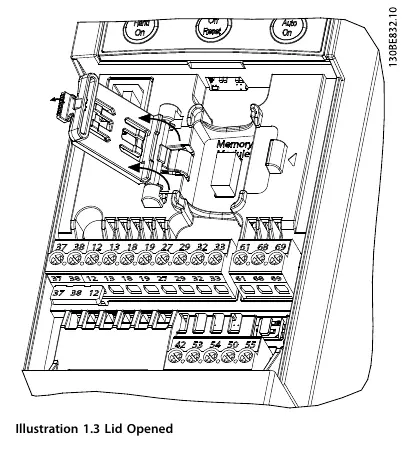
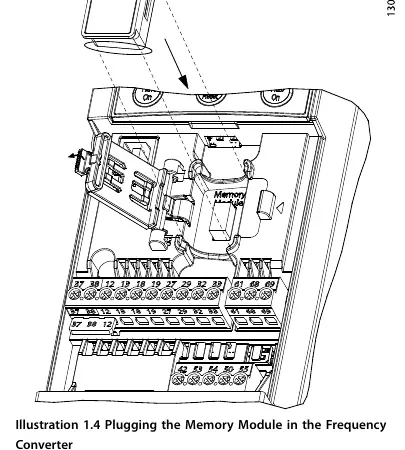
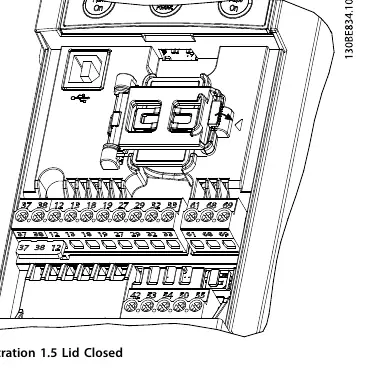
- Remove Cover: Use a screwdriver to remove the plastic front cover of the frequency converter.
- Open Container: Open the lid of the memory module container located inside the unit.
- Install Module: Plug the memory module into the designated socket within the frequency converter.
- Close Container: Close the lid of the memory module container.
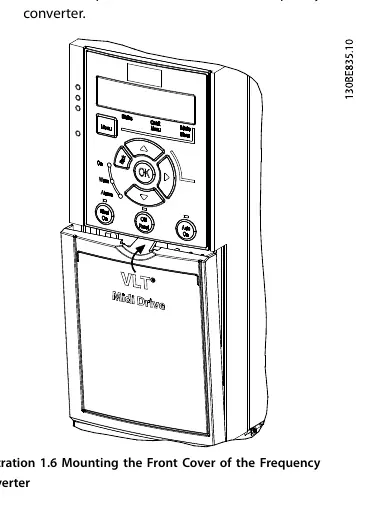
- Replace Cover: Mount the plastic front cover back onto the frequency converter.
Operation
The memory module can be inserted or removed while the frequency converter is in operation; however, it only becomes active after a power cycle. When the frequency converter powers up, the data on the converter is automatically stored into the memory module.
Safety
Personnel responsible for mounting or dismounting the memory module must be familiar with the safety instructions and measures described in the VLT Midi Drive FC 280 Operating Guide.
Manufacturer information
Danfoss A/S
Practical help
Common problems
Cannot view or transfer files on the memory module.
A separate Memory Module Programmer (ordering number 134B0792) is required to view or transfer files, as the module data is encoded and protected.
Module does not appear to be active after installation.
The memory module only becomes active after a power cycle of the frequency converter.
Before use
- Ensure you have the VLT Midi Drive FC 280 frequency converter.
- Verify you have the VLT Memory Module MCM 103 (Ordering number 132B0466).
- Have a screwdriver available for removing the front cover.
- Review the VLT Midi Drive FC 280 Operating Guide for safety instructions.
Images and diagrams
- Illustration 1.1 identifies the memory module, status indicator light, socket, programmer, and USB Type-B receptacle.
- Illustration 1.2 demonstrates the correct method for removing the frequency converter front cover using a screwdriver.
- Illustration 1.4 shows the correct orientation for plugging the memory module into the frequency converter socket.
Model compatibility
- The MCM 103 module is specifically designed as an option for the FC 280 frequency converter.
- Data copying is intended for new frequency converters of the same power size.

Manual page author
Emily Carter
User documentation editor
Prepares concise manual descriptions and highlights the most useful setup, operation, and maintenance information for readers.