Computers / Laptops
Quick Start Guide for DELL Latitude 3320 Laptop
A quick start guide for the DELL Latitude 3320 laptop, covering initial setup, power connection, safety information, and port identification.
Table of contents
Quick guide from the manual
This document provides essential initial setup instructions for the DELL Latitude 3320 laptop. It covers connecting the power adapter, powering on the device, and understanding system status indicators and port icons. For detailed maintenance, part replacement, or safety best practices, users are directed to the official Dell support website.
Initial setup
To set up your computer:
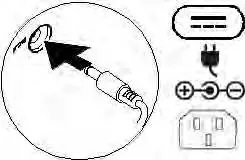
- Connect the power adapter or power cable to your computer and to the display, if required.
- Power on the computer (and the display, if connected).
Note: Depending on your specific computer configuration, some ports or connectors may not be available.
System information
To view system information:
- Windows: In Windows Search, type System. In the search results, click System.
- Ubuntu: On the desktop, click the icon and select About This Computer.
Safety and compliance
Users must read the safety information provided with the computer. For additional safety best practices, visit Dell.com/regulatory_compliance. Do not remove the computer cover unless you need to install internal accessories. Always retain filler brackets or cards for empty card-slot openings to maintain FCC certification, prevent dust accumulation, and ensure proper airflow for cooling.
Technical specifications
The power adapter supports an input voltage of 100-240 V AC at 50-60 Hz. The maximum operating temperature for the device is 35°C.
Official resources from the manual
Manufacturer information
Dell Inc.
Practical help
Common problems
Some ports or connectors are missing.
Availability depends on your specific computer configuration.
Computer overheating or dust accumulation.
Ensure all empty card-slot openings are covered with filler brackets or cards to maintain proper airflow.
Before use
- Read the safety information shipped with the computer.
- Ensure the power adapter is connected to the computer and a power source.
- Verify that all empty card slots have filler brackets installed.
Specs in practice
- Input voltage
- 100-240 V AC, suitable for standard global power grids.
- Maximum operating temperature
- 35°C; do not exceed this ambient temperature to prevent performance issues.
- Input frequency
- 50-60 Hz.
Images and diagrams
- The power connection diagram shows the adapter cable being inserted into the power port.
- Port icons are provided to identify various connections like USB, Thunderbolt, HDMI, and audio jacks.
Model compatibility
- FCC certification requires the use of filler brackets in empty card slots.
- Thunderbolt 3 port supports Power Delivery (USB-C).

Manual page author
David Miller
Documentation analyst
Organizes user manual content into clear summaries, with attention to model details, product context, and everyday usability.