Home Appliances / Fans
User Manual for Denali 5" Rechargeable USB Fan 1DAFD5R
Quick guide for the Denali 5" Rechargeable USB Fan (1DAFD5R). Learn how to operate, charge, clean, and maintain your fan with this easy-to-follow manual.
Quick answers from the manual
Quick answer
- The Denali 5" Rechargeable USB Fan (1DAFD5R) is a portable fan with 3 speed settings, adjustable tilt, and a rechargeable battery. It is charged via a micro USB cable. p. 1, 2
Key actions
- Turn on/off and change speed p. 2
- Clean the fan p. 3
First start
- Charge the device p. 2
Problems and fixes
Fan malfunction
Avoid using in humid or wet weather/environments.
p. 3Maintenance and reset
- Cleaning the grill p. 3
Technical specifications
| Parameter | Value | Meaning | Pages |
|---|---|---|---|
| Input | DC 5 Volts – 1 Amp | Power requirement | p. 4 |
| Battery capacity | 2000 mAh | Internal battery size | p. 4 |
Where to find it in the PDF
- Diagram and Operation p. 2
- Maintenance and Safety p. 3
- Specifications p. 4
Table of contents
Manual images
Click an image to enlargeQuick guide from the manual
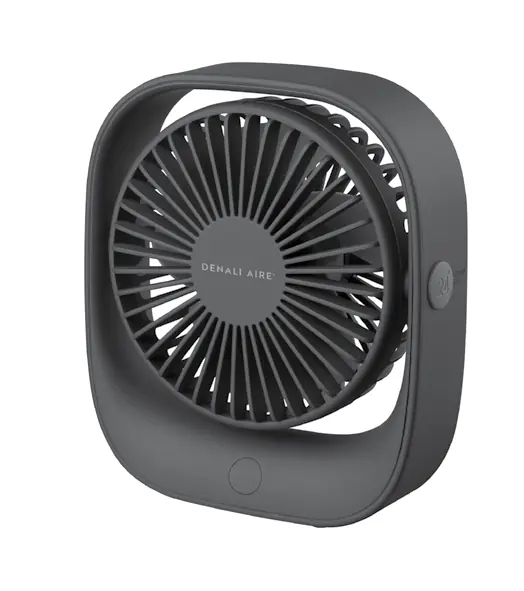
The Denali 5" Rechargeable USB Fan (1DAFD5R) is a portable device designed for personal cooling. It features three speed settings, an adjustable head angle, and is powered by a rechargeable battery. Ensure you charge the device fully before first use using a standard DC 5V power source.
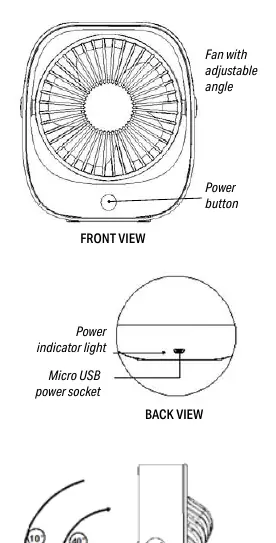
Product Diagram
The fan features a power button on the front and a micro USB power socket on the back. The fan head can be manually adjusted to tilt between 10 and 40 degrees to direct airflow as needed.
Operating the Fan
The fan is controlled by a single power button:
- First press: Highest speed.
- Second press: Medium speed.
- Third press: Lowest speed.
- Fourth press: Turns the fan off.
Charging Status
Connect the fan to a power source using the provided USB cable. The power indicator light is located on the back of the unit:
- Red LED: The fan is currently charging.
- Blue LED: The fan is fully charged or in use.
Working hours when fully charged:
- Lowest speed: Approximately 5.5-6 hours.
- Middle speed: Approximately 4.5-5 hours.
- Highest speed: Approximately 2.5-3 hours.
Cleaning and Maintenance
To clean the fan, ensure it is turned off. The front grill can be removed for cleaning:
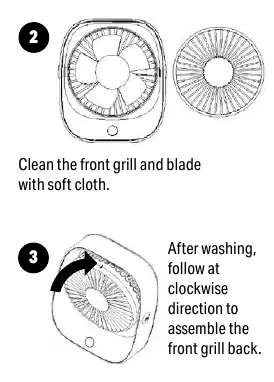
- Rotate the front grill in an anti-clockwise direction to remove it.
- Clean the front grill and fan blades with a soft cloth.
- After cleaning, reassemble the grill by rotating it in a clockwise direction.
Safety Precautions
- Do not disassemble the product yourself.
- Do not use the fan in humid or wet environments to prevent damage or malfunction.
- Keep the product away from heat sources and liquids.
- Do not place the fan on flammable surfaces while charging.
- Keep the product within a temperature range of 32°F to 104°F.
- Do not put fingers or objects into the fan blades while operating.
- Do not replace the battery yourself; seek professional guidance.
Specifications
- Input: DC 5 Volts – 1 Amp
- Speed Levels: 3 (High, Medium, Low)
- Battery Capacity: 2000 mAh
Practical help
Common problems
Fan malfunction or damage
Do not use the fan in humid or wet weather/environments.
Battery issues
Do not replace the battery yourself; contact a professional. Stop charging immediately if the battery leaks, gets too hot, or changes shape.
Before use
- Charge the fan fully before first use.
- Ensure the USB cable is connected to a standard DC 5V power source.
- Verify the fan is placed on a stable surface.
- Check that the fan head is adjusted to the desired angle (10°-40°).
Specs in practice
- Battery Capacity
- 2000 mAh capacity provides up to 6 hours of runtime on the lowest setting.
- Speed Levels
- 3 adjustable speeds (High, Medium, Low) controlled by the power button.
Images and diagrams
- Front view: Shows the power button and adjustable fan head.
- Back view: Shows the micro USB power socket and the power indicator light.
Model compatibility
- Charge only with standard DC 5V voltage.
- Operating temperature range: 32°F - 104°F.

Manual page author
Emily Carter
User documentation editor
Prepares concise manual descriptions and highlights the most useful setup, operation, and maintenance information for readers.