Home Appliances / Fans
Owner's Manual for Denali 4 Inch Rechargeable USB Clip Fan 1DAFD4R
Quick guide for the Denali 4 Inch Rechargeable USB Clip Fan (1DAFD4R). Includes setup, charging instructions, operation, maintenance, and safety guidelines.
Quick answers from the manual
Quick answer
- The Denali 1DAFD4R is a 4-inch rechargeable USB clip fan. To start, remove the transparent activation tab. Charge via the USB port using a 5V/1A power source. p. 2
Key actions
- Charging the battery p. 2
- Operating the fan p. 2
First start
- Remove the transparent activation tab to connect the battery. p. 2
Maintenance and reset
- Clean exterior with a soft, damp cloth. Use a vacuum cleaner nozzle on guards to remove dust. p. 3
Technical specifications
| Parameter | Value | Meaning | Pages |
|---|---|---|---|
| Battery | 3.7V 18650 1800mAh | Rechargeable Li-ion battery | p. 2 |
| Input | 5V 1A | Required USB power input | p. 2 |
Where to find it in the PDF
- Safety and First Use p. 2
- Parts and Operation p. 2
- Maintenance and Cleaning p. 3
Table of contents
Manual images
Click an image to enlargeQuick guide from the manual
Before using your Denali 4 Inch Rechargeable USB Clip Fan for the first time, you must remove the transparent activation tab fitted to the product to connect the battery. Ensure the fan is placed on a flat, stable, and heat-resistant surface during operation.
Parts Diagram
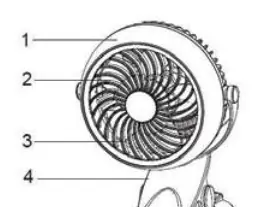
- 1. Middle ring
- 2. Front safety guard
- 3. Blade
- 4. Clip
- 5. Rear safety guard
- 6. Switch
- 7. Inlet of micro-USB cord
- 8. USB cord
Operation Instructions
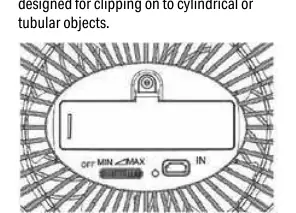
Rechargeable Battery
Use the provided USB cord (8) to charge the battery. Plug the cord into the USB inlet (7) and connect it to a computer USB port or an adapter with a rated voltage output of DC 5V 1A. The indicator light stays on while charging and turns off when the battery is full.
Manual Control
Rotate the switch (6) to the "MAX" direction to turn on the fan. You can adjust the speed by rotating the switch between "MIN" and "MAX". Rotate to "MIN" to turn off the fan.
Tilt and Clipping
The fan head can be tilted to adjust the wind direction. The clip (4) is designed to grip flat objects between 0.25" and 1" thick. It is not designed for clipping onto cylindrical or tubular objects.
Maintenance and Cleaning
Always switch off and unplug the fan before cleaning. Use a soft, damp cloth (with or without mild soap) to clean the exterior. Do not allow water to enter the interior of the product. Periodically clean the guards using a vacuum cleaner nozzle to remove dust. Do not use harsh detergents or solvents.
Safety Information
- For domestic indoor use only.
- Never insert objects into the grill while the fan is running.
- Do not use in hot or humid locations like bathrooms.
- Keep away from curtains, drapes, and plants.
- The battery is not replaceable.
- Only use with a USB power supply up to 5V/1A.
- Never operate without the safety guards in place.
Practical help
Common problems
Fan does not turn on
Ensure the transparent activation tab has been pulled out from the battery compartment.
Fan not charging
Verify that the USB power source provides 5V/1A and the cable is securely connected.
Clip is unstable
Ensure the surface is flat and between 0.25" and 1" thick; the clip is not designed for tubular objects.
Before use
- Remove the transparent activation tab from the battery.
- Ensure the fan is placed on a flat, stable, heat-resistant surface.
- Verify the USB power source is 5V/1A.
- Check that safety guards are securely in place.
Specs in practice
- Clip Capacity
- Compatible with flat surfaces 0.25" to 1" thick.
Images and diagrams
- The parts diagram identifies the switch, USB inlet, and clip mechanism.
- The operation section illustrates the switch rotation for speed control.
Model compatibility
- Not suitable for use in bathrooms or high-humidity areas.
- Do not clip onto cylindrical or tubular objects.

Manual page author
David Miller
Documentation analyst
Organizes user manual content into clear summaries, with attention to model details, product context, and everyday usability.