Power / Batteries & Chargers
User Manual for DJI Power 1000 and Power 500 Portable Power Station
Comprehensive user guide for the DJI Power 1000 and Power 500 portable power stations. Learn how to operate, charge, maintain, and troubleshoot your device, including AC/DC output, solar recharging, and UPS functionality.
Table of contents
Manual images
Click an image to enlargeQuick guide from the manual
The DJI Power 1000 and Power 500 are portable power stations designed for various power supply scenarios. Key operations include:
- Powering On/Off: Press and hold the power button for at least two seconds.
- Recharging: Use the recharge mode switch to toggle between Fast Recharge (higher power, faster) and Standard Recharge (lower noise, extends battery life) modes.
- AC Output: Connect devices to AC ports and press the AC button. Press once for automatic shutdown (if no load detected), or press and hold for continuous output.
- UPS Function: Automatically enabled when connected to AC power and an external device, providing power within 20ms during an outage.
Product Overview
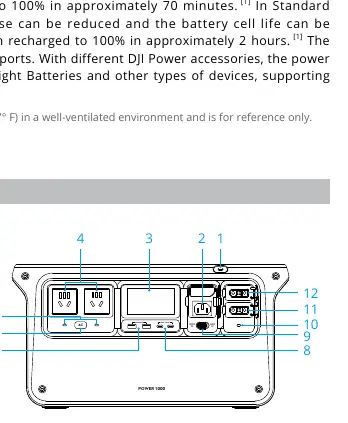
The power stations feature multiple output ports including AC, USB-A, USB-C, and SDC/SDC Lite ports. The display screen provides real-time information on battery level, input/output power, and system warnings. The DJI Power 1000 has a capacity of 1024 Wh, while the DJI Power 500 has 512 Wh.
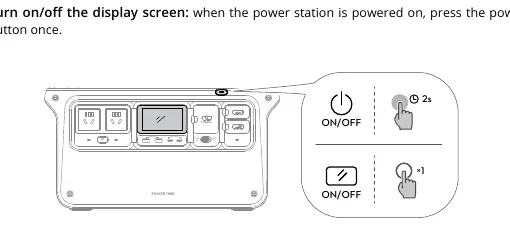
Powering On and Off
To power on or off the device, press and hold the power button for at least two seconds. When the device is powered on, pressing the power button once will turn the display screen on or off.
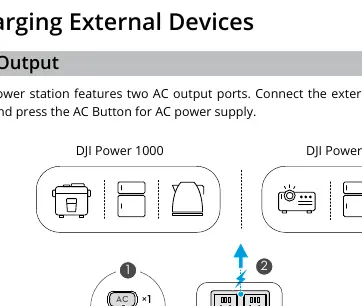
Charging External Devices
AC Output: Connect your device to an AC port. Press the AC button to enable output. Use the automatic shutdown mode for standard use or continuous output mode for devices like refrigerators.
USB Output: Connect devices to the USB-A or USB-C ports for power supply.
Fast Charging DJI Aircraft Batteries: Use the SDC or SDC Lite port with a compatible SDC fast charge cable (sold separately) to charge supported DJI Intelligent Flight Batteries.
Other SDC Output: Use compatible SDC cables to charge car-powered devices or provide 12V DC input for devices with an XT60 port.
Recharging the Power Station
AC Recharging: Connect to an AC outlet. Toggle the recharge mode switch to select between Fast Recharge and Standard Recharge modes.
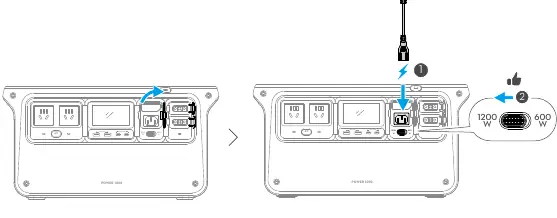
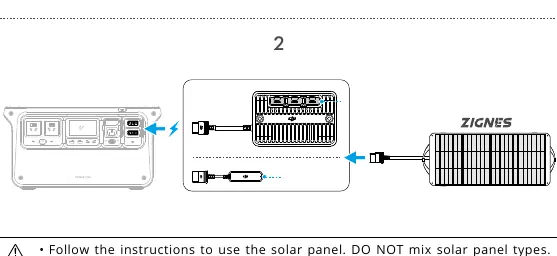
Solar Recharging: Connect solar panels using the DJI Power Solar Panel Adapter Module (MPPT) or compatible cables. Ensure panels are not covered and are aligned with sunlight.
Car Recharging: Use the DJI Power Car Power Outlet to SDC Power Adapter to connect to a car power port. Ensure the car engine is started before recharging.
USB-C Recharging (DJI Power 500 only): Recharge using a USB Power Delivery charger via the USB-C port.
Uninterruptible Power Supply (UPS)
When connected to an AC outlet and an external device, the power station acts as a UPS. If a power outage occurs, it switches to battery power within 20ms. Note that this function is unavailable in some regions and does not support 0ms switching for sensitive medical or server equipment.
Firmware Update and Log Export
Firmware Update: Power off the device, press and hold the AC and power buttons simultaneously until LOAD appears. Connect to a computer via USB-C and use the DJI Assistant 2 (Power Series) software to update.
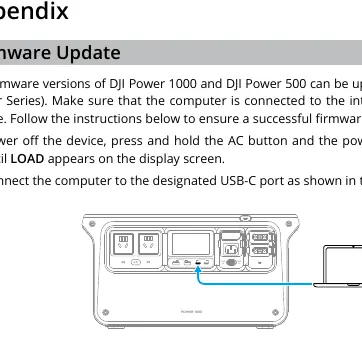
Log Export: Power on the device, toggle the recharge mode switch three times, then press the AC button. The USB-C icon will blink, indicating data export mode. Connect to a computer to save logs via DJI Assistant 2.
Maintenance and Storage
Store in a cool, dry environment between -10° and 45° C. Discharge to 60% for long-term storage. Charge and discharge once every four months to maintain battery performance. Do not store fully discharged.
Troubleshooting
If a system warning appears (e.g., temperature error or overload), refer to the display screen icons. Visit the official DJI support website for detailed troubleshooting steps if problems persist.
Manufacturer information
DJI
Practical help
Common problems
Temperature error (blinking icon)
Temperature is abnormal in Fast Recharge mode. Wait for the temperature to return to normal.
Overload warning
Check connected devices and reduce the load.
Firmware update failure (UPGD FAIL)
Disconnect from computer and AC outlet, power off for 5 seconds, and try again.
Before use
- Read the Safety Guidelines.
- Watch the tutorial videos via the QR code in the manual.
- Review the Quick Start Guide.
- Ensure the power station is charged.
Specs in practice
- Fast Recharge Mode
- Recharges to 80% in ~50 mins, 100% in ~70 mins.
- Standard Recharge Mode
- Lower noise, extends battery life, 100% in ~2 hours.
Images and diagrams
- Power Button: Press and hold for 2 seconds to power on/off.
- Recharge Mode Switch: Toggle between Fast and Standard recharge modes.
- AC Button: Press once for AC output; press and hold for continuous output.
Model compatibility
- SDC port supports DJI Intelligent Flight Batteries and specific SDC cables.
- USB-C supports PD 3.1 (Power 1000) or PD 3.0 (Power 500).
- Solar panels: Max current < 10A, total power < 400W (if multiple).

Manual page author
Emily Carter
User documentation editor
Prepares concise manual descriptions and highlights the most useful setup, operation, and maintenance information for readers.