Electronics / Networking
Quick Start Guide for DJI Power 1000 V2 Portable Power Station
A comprehensive quick start guide for the DJI Power 1000 V2 portable power station. Learn how to power on the device, charge it, activate AC and DC outputs, and connect various accessories like solar panels and car chargers.
Quick answers from the manual
Quick answer
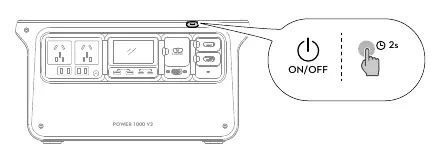
- To turn on the DJI Power 1000 V2, hold the power button for 2 seconds. To use AC output, press the AC button once. p. 2, 3
Key actions
- Power On/Off p. 2
- Activate AC Output p. 3
First start
- Power on by holding the button for 2 seconds. p. 2
Where to find it in the PDF
- Quick Start p. 1
- Operation p. 2, 3
- Accessories p. 4
Table of contents
Manual images
Click an image to enlargeQuick Start Guide
This guide provides essential instructions for operating the DJI Power 1000 V2 portable power station. Please follow these steps to ensure safe and efficient use of your device.
Powering On and Off
To turn the device on or off, locate the power button on the front panel. Press and hold the button for 2 seconds.
Charging the Unit
To charge the DJI Power 1000 V2:
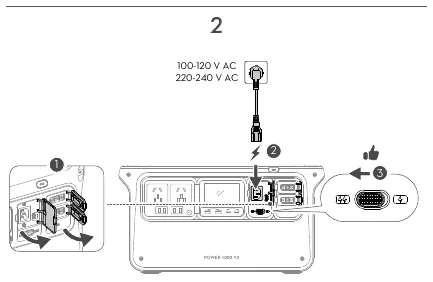
- Open the charging port cover.
- Connect the AC power cable to the AC input port.
- Connect the other end to a standard wall outlet (100-120 V AC or 220-240 V AC).
- The device will indicate charging status.
Using AC Output
To power devices using the AC outlets:
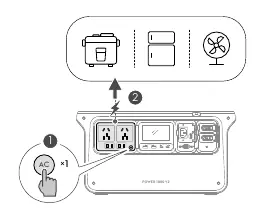
- Ensure the power station is turned on.
- Press the AC button once to activate the AC output ports.
- Connect your appliance to the AC outlet.
Using USB and DC Output
The device features USB and DC output ports for charging smaller electronics like laptops, phones, and cameras. These ports are typically active when the device is powered on.
Accessories and Scenarios
The DJI Power 1000 V2 supports various accessories via the SDC port, including:
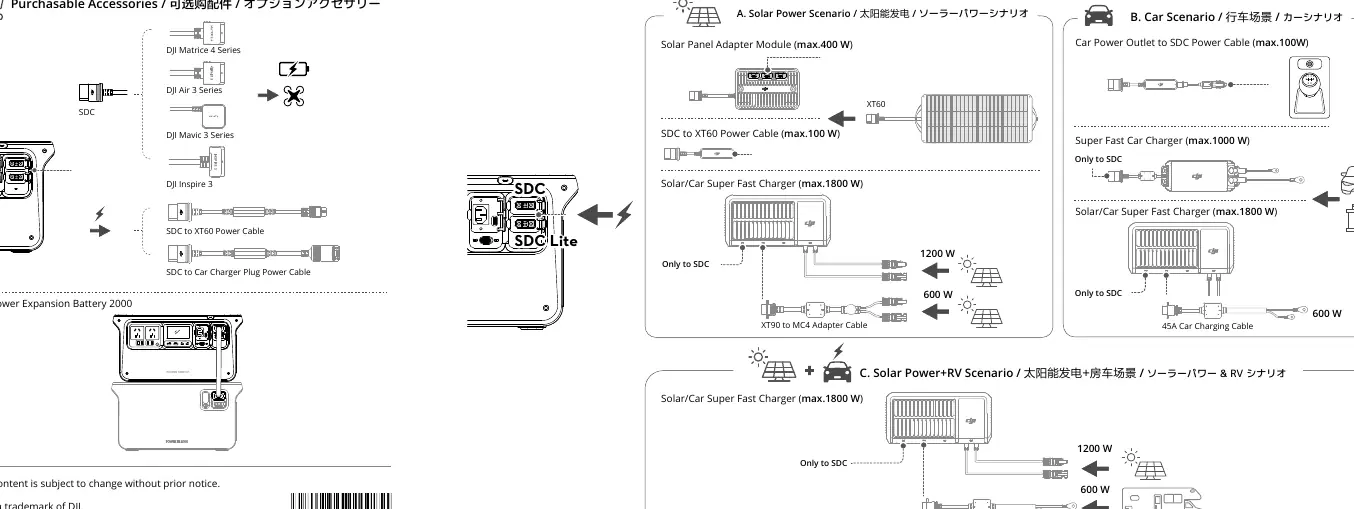
- Solar Power Scenario: Connect solar panels using the Solar Panel Adapter Module or Solar/Car Super Fast Charger.
- Car Scenario: Charge the unit using a car power outlet with the appropriate SDC power cable.
- Expansion: The unit is compatible with the DJI Power Expansion Battery 2000.
Manufacturer information
DJI
Practical help
Common problems
Device does not turn on
Ensure you are pressing and holding the power button for at least 2 seconds.
AC outlets are not providing power
Ensure the AC button has been pressed once to activate the AC output mode.
Before use
- Ensure the device is sufficiently charged.
- Verify the AC input voltage matches your local power grid (100-120V or 220-240V).
- Check that all cables are securely connected to the correct ports.
- Ensure the SDC port cover is managed correctly when using accessories.
Images and diagrams
- Page 2 illustrates the power button location and the AC charging connection process.
- Page 3 demonstrates how to activate the AC output for appliances.
- Page 4 provides a detailed overview of accessory connections, including solar and car charging scenarios.
Model compatibility
- Compatible with DJI Power Expansion Battery 2000.
- Supports solar panel charging via SDC port.
- Supports car charging via SDC port.

Manual page author
Emily Carter
User documentation editor
Prepares concise manual descriptions and highlights the most useful setup, operation, and maintenance information for readers.