Electronics / Security Systems
Installation and Programming Guide for DMP 1100T Series Wireless Translator
Quick guide for the DMP 1100T Series Wireless Translator. Learn how to install, wire, program, and perform a walk test for your security system upgrade.
Table of contents
Manual images
Click an image to enlargeQuick Guide
The 1100T Wireless Translator is designed to upgrade non-DMP systems (such as Interlogix, Honeywell 5800, 2GIG, and DSC) to work with DMP panels. It operates via a wireless connection to a DMP receiver.
Compatibility
- Panels: DMP XT Series and XR Series panels (version 211 or higher).
- Receivers: 1100 Series Wireless Receivers (version 207 or higher).
- Note: Not compatible with the 1100R Wireless Repeater.
Installation
Wiring the Power Supply
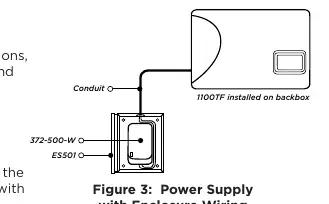
The translator requires a 12 VDC external power supply. The power supply must be located within 100 feet of the translator using 22 AWG wire.
- Remove the cover.
- Connect the positive wire to the positive terminal.
- Connect the negative wire to the negative terminal.
- Plug the power supply into a wall outlet not controlled by a switch.
Mounting
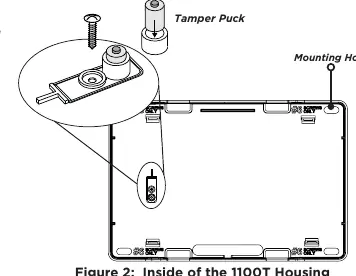
Mount the translator in a secure, dry location away from metal objects and at least 4 feet away from wireless panels or receivers. Use the provided #6 screws in the four mounting holes. It is necessary to remove the PCB when installing the enclosure.
Programming
Device Setup
- Go to DEVICE SETUP on the panel and press CMD.
- Enter the desired device number (XT30/XT50/XTL/XR150: 2-8; XR550: 2-16).
- Select *UNUSED* to name the device.
- For XR Series, select TLR as the device type. For XT Series, select YES at the 1100T prompt.
- Enter the Serial number.
- Select the non-DMP system frequency (Default is HWL for Honeywell).
- Set the supervision time (Default is 240 minutes).
Zone Information
- In ZONE INFORMATION, enter the wireless zone number and name.
- Select the ZONE TYPE.
- Set DMP WIRELESS to NO and COMP WLS to YES.
- Enter the transmitter serial number (manually or via LRN/Transmit).
- Select the transmitter contact (1-4) and supervision time.
Walk Test
To test the system, perform a standard walk test. Note that non-DMP wireless devices are not compatible with the DMP Wireless Walk Test.
- XR Series: Reset the panel, enter 8144 (WALK), select zone types, and choose BELL options (NO, YES, or PULS).
- XT Series: Reset the panel, enter 8144 (WALK), and select STD to test all programmed zones.
Maintenance
Battery Replacement
DMP recommends replacing the battery every three years.
- Open the housing and remove the PCB board.
- Unplug the battery connector and remove the old battery.
- Connect the new battery and snap the PCB back into place.
- Replace the cover.
Status LEDs
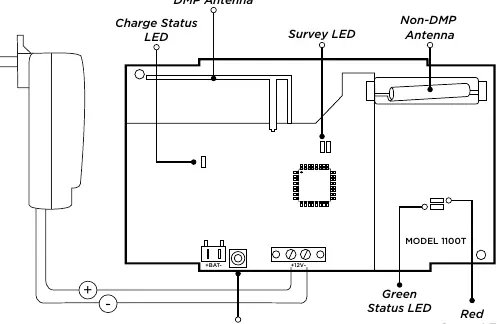
- Green ON / Red OFF: In sync with the receiver.
- Green OFF / Red ON: Not in sync.
- Green OFF / Red flashes (1/4 sec): Power cycle the unit.
- Charge Status LED: ON when charging, OFF when fully charged. Flashing once per second indicates a charge controller fault.
Practical help
Common problems
Communication faulty (LED remains on for 8 seconds or flashes rapidly)
Relocate the translator or receiver until the Survey LED confirms clear communication.
Not in sync with receiver (Green OFF, Red ON)
Ensure the receiver is properly connected and the panel version is compatible.
Charge controller fault (Charge status LED flashes once per second)
Check if the battery is disconnected or faulty.
Before use
- Ensure DMP panel and receiver are powered on and set up.
- Verify compatibility with your non-DMP transmitter (Interlogix, Honeywell, 2GIG, DSC).
- Have 22 AWG wire ready for power supply connection.
- Ensure power supply is within 100 feet of the translator.
- Verify panel version is 211 or higher.
Specs in practice
- Operating Voltage
- 12 VDC, 31 mA.
- Frequency Range
- 905-924 MHz.
- Battery (1100T)
- 3.7 VDC, 800 mAh, 4-hour standby.
- Battery (1100TF)
- 3.7 VDC, 2400 mAh, 24-hour standby.
Images and diagrams
- Figure 1 shows the internal layout including antennas, LEDs, and terminals.
- Figure 2 illustrates the mounting process using #6 screws and the tamper switch.
- Figure 3 shows the power supply wiring for commercial fire installations.
Model compatibility
- Compatible with DMP XT and XR series panels (version 211+).
- Compatible with 1100 Series Wireless Receivers (version 207+).
- Not compatible with 1100R Wireless Repeater.

Manual page author
Emily Carter
User documentation editor
Prepares concise manual descriptions and highlights the most useful setup, operation, and maintenance information for readers.