Electronics / Security Systems
DMP 1144INT Key Fob Transmitter
Quick guide for the DMP 1144INT Key Fob Transmitter. Learn how to program the panel, configure buttons, replace the CR2430 battery, and understand LED status indicators.
Table of contents
Manual images
Click an image to enlargeQuick Guide
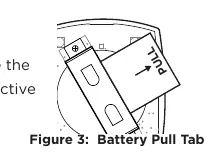
The DMP 1144INT Series Wireless Key Fob is a water-resistant transmitter available in 1-button, 2-button, and 4-button configurations. It features 128-bit AES encryption and is compatible with 1100XINT/1100DINT Wireless Receivers (Version 700+), XT30INT Series Panels (Version 700+), and XR150INT/XR550INT Series Panels (Version 693+). Before use, ensure the battery isolation pull tab is removed.
Operation and Button Layouts
Each button on the key fob can be individually programmed for one of nine different actions. The default programming varies by model:
- 1144-1INT: Top button is Panic.
- 1144-2INT: Top is Arm, Bottom is Disarm.
- 1144-4INT: Top is Arm, Bottom is Disarm, Left is Panic, Right is Arm Area 1 or Perimeter.
Programming the Panel
To program the key fob into your system:
- Access the PROGRAMMER menu by entering 665 (XT Series) or 6653 (XR Series) at the keypad.
- Navigate to ZONE INFORMATION, enter the zone number, and press CMD.
- Enter the ZONE NAME and ZONE TYPE.
- At the NEXT ZONE prompt, select NO. If prompted for WIRELESS ZONE, select YES.
- Enter the eight-digit SERIAL# and press CMD.
- Enter the SUPERVSN TIME (set to 0 for off-site applications) and press CMD.
- In SYSTEM OPTIONS, set 1100 ENCRYPTION to ALL or BOTH.
- Confirm the default passphrase or enter a new 8-character hexadecimal string.
Programming Key Fob Buttons
- At NO. OF KEY FOB BUTTONS, enter the number of buttons (1, 2, or 4).
- At BUTTON, select the button to program (TOP, BTM, LFT, or RGT).
- At BUTTON ACTION, choose the desired action.
- Configure press time or output options if needed.
- Repeat for each button.
- Select YES at the NEXT ZONE prompt to finish, then go to STOP and press CMD to save.
LED Status Operation
The Status LED provides visual feedback:
- Panic, Emergency, Output, Sensor Reset: 1/2 second green flash.
- Arm, Disarm, Toggle, Status: LED pulses once to indicate system status.
- Red: All System On.
- Green: All System Off.
- Green/Red: System On (Some Areas Armed).
Replacing the Battery
The device uses a 3.0 V CR2430 Lithium coin cell battery. When a LOBAT message appears on the keypad:
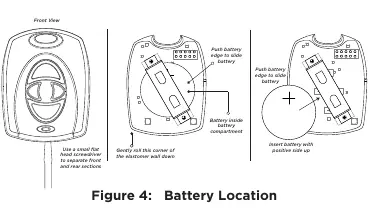
- Insert a small flat head screwdriver into the slot at the end opposite the key ring and twist to separate the housing.
- Push on the button area to remove the PCB and elastomer.
- Gently roll the corner of the elastomer wall down and slide the old battery out.
- Insert the new CR2430 battery with the positive side up.
- Roll the elastomer wall back around the PCB and snap the housing sections together.
- Perform a Sensor Reset at the keypad to clear the LOBAT message.
Specifications
- Battery: 3.0 V Lithium Sony CR2430 (2-year life expectancy).
- Frequency Range: 863-869 MHz.
- Operating Temperature: 0°C to 49°C (32°F to 120°F).
- Dimensions: 5.03 H x 3.89 W x 1.27 D cm.
Practical help
Common problems
LOBAT message on keypad
Replace the CR2430 battery and perform a Sensor Reset at the system keypad.
Key fob unresponsive
Ensure the battery isolation pull tab has been removed and the battery is installed with the positive side up.
LED does not turn on
Allow the LED to turn off completely before pressing another button to ensure the signal is sent.
Before use
- Remove the battery isolation pull tab.
- Record the transmitter serial number.
- Verify panel compatibility (XT/XR series).
- Have a small flat head screwdriver ready for battery replacement.
Specs in practice
- Operating Temperature
- 0°C to 49°C (32°F to 120°F).
Images and diagrams
- Figure 1: Shows button layouts for 1-button, 2-button, and 4-button models.
- Figure 3: Shows the battery isolation pull tab location.
- Figure 4: Illustrates the battery replacement process, including removing the PCB and inserting the new battery.
Model compatibility
- Compatible with 1100XINT/1100DINT Wireless Receivers (Version 700+).
- Compatible with XT30INT Series Panels (Version 700+).
- Compatible with XR150INT/XR550INT Series Panels (Version 693+).

Manual page author
Michael Turner
Technical manual editor
Reviews PDF manuals for structure, safety notes, and practical product details so readers can find the right information quickly.