Electronics / Security Systems
Installation Guide for DMP 1148-G Personal Pendant
Quick installation and setup guide for the DMP 1148-G Personal Pendant. Learn how to mount the device, program it into your DMP 1100 Series system, test communication, and maintain the device.
Table of contents
Manual images
Click an image to enlargeQuick guide from the manual
The DMP 1148-G Personal Pendant is a wireless emergency transmitter. Key requirements for setup include programming the device as an Emergency (EM) zone in your panel, entering the 8-digit serial number found on the back of the device, and setting the Supervision Time to 0 to extend battery life. The device must be tested at least every 30 days to ensure proper communication.
Description and compatibility
The 1148 Personal Pendant is a one-button, water-resistant wireless transmitter. It features a Status LED for visual confirmation of message transmission and uses a pre-installed, non-removable battery. It is compatible with all DMP 1100 Series Wireless Receivers and Panels.
Installation
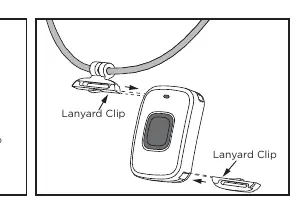
The pendant can be worn as a wristband or on a break-away lanyard. The clips for both options are inserted in one direction.
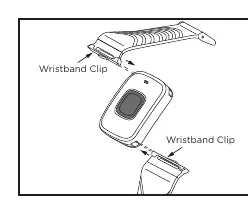
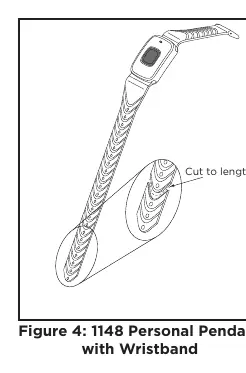
- Wristband: Slide the wristband clip into the slots. Adjust the band to fit your wrist and trim any excess length using scissors by cutting along the thinned area between the clasp holes.
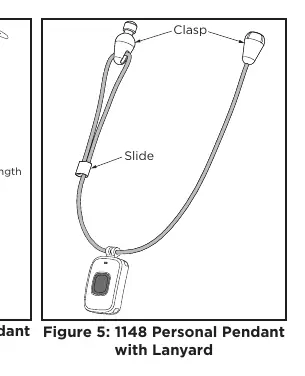
- Lanyard: Slide the lanyard mount into the slots. Place the lanyard around your neck and snap the break-away clasp together. Adjust the length using the slide.
Programming
Program the pendant as an Emergency (EM) Zone type in the Zone Information section of your panel programming. You must enter the eight-digit serial number located on the back of the pendant. To maximize battery life, ensure the Supervision Time is set to 0.
LED status and survey
The Status LED provides feedback based on the LED OPERATION setting in the panel programming:
- YES: The LED blinks once when the button is pressed and once every second for five minutes to confirm the message was sent.
- NO: The LED blinks once when the button is pressed to confirm the message was sent.
The pendant also includes a Survey LED capability to confirm communication with the receiver. Press the button to send data; if the LED blinks immediately on and off, communication is confirmed. If the LED remains on for eight seconds or flashes multiple times in quick succession, communication is faulty and the receiver should be relocated.
Testing and maintenance
As a non-stationary wireless device, the 1148 pendant should be tested at least every 30 days. If the pendant is taken out of the range of the receiver, press the button to test it once it is back within range.
Specifications
- Frequency Range: 905-924 MHz
- Dimensions: 1.6" L x 1.2" W x 0.45" H (4.1 x 3.0 x 1.1 cm)
- Housing Material: Flame retardant ABS
- Battery Life: Approx. 2.5 to 3 years (non-removable)
Practical help
Common problems
Communication is faulty (LED remains on for 8 seconds or flashes multiple times)
Relocate the receiver until the LED blinks immediately on and off when the button is pressed.
Battery life is short
Ensure that Supervision Time programming is set to 0 in the panel settings to extend battery life.
Before use
- Verify you have a DMP 1100 Series Wireless Receiver or Panel.
- Locate the 8-digit serial number on the back of the pendant.
- Program the device as an Emergency (EM) zone.
- Set Supervision Time to 0.
- Test the pendant communication using the Survey LED feature.
Specs in practice
- Frequency Range
- 905-924 MHz, the radio frequency used for communication with the panel.
- Battery Life
- Approximately 2.5 to 3 years; the battery is non-removable.
- Housing Material
- Flame retardant ABS plastic.
Images and diagrams
- Wristband mounting: Slide the clip into the slots on the pendant.
- Lanyard mounting: Slide the mount into the slots and snap the break-away clasp.
- Wristband adjustment: Trim excess band length using scissors at the thinned area between clasp holes.
Model compatibility
- Compatible with all DMP 1100 Series Wireless Receivers and Panels.

Manual page author
David Miller
Documentation analyst
Organizes user manual content into clear summaries, with attention to model details, product context, and everyday usability.