Home / Pet Supplies
User Manual for Dogtra 1900S WETLANDS E-Collar
Comprehensive user guide for the Dogtra 1900S WETLANDS training e-collar. Includes setup, charging, button functions, receiver fitting, training tips, and troubleshooting.
Quick answers from the manual
Quick answer
- The Dogtra 1900S WETLANDS is a 1-dog training e-collar system. It features a 3/4-mile range, IPX9K waterproof rating, and a rheostat dial for precise stimulation control (0-127). p. 6
Key actions
- Turn on/off p. 9
- Charge the unit p. 15, 16
First start
- Charge the unit for 2 hours, fit the receiver snugly (two fingers under the strap), and test with the test light. p. 11, 15, 19
Problems and fixes
Dog not reacting
Check fit, contact points, and increase intensity level.
p. 24
Unit not holding charge
Clean charging port, check for damaged pin, or contact support.
p. 25Maintenance and reset
- Rinse the receiver and clean out any dirt or debris after each session. p. 23
Technical specifications
| Parameter | Value | Meaning | Pages |
|---|---|---|---|
| Range | 3/4-mile | Maximum operating distance. | p. 6 |
| Stimulation Levels | 0-127 | Intensity range. | p. 6 |
| Waterproof Rating | IPX9K | Water and heat resistance. | p. 6 |
| Battery Charge Time | 2 hours | Time for full charge. | p. 6, 16 |
Where to find it in the PDF
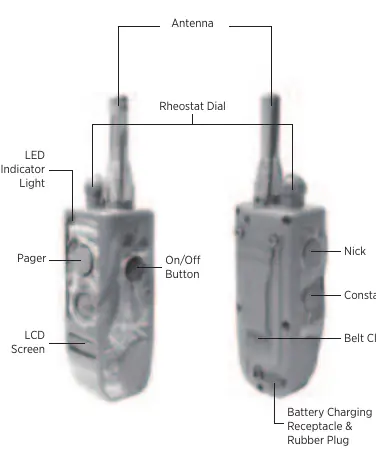
- Transmitter Overview p. 7
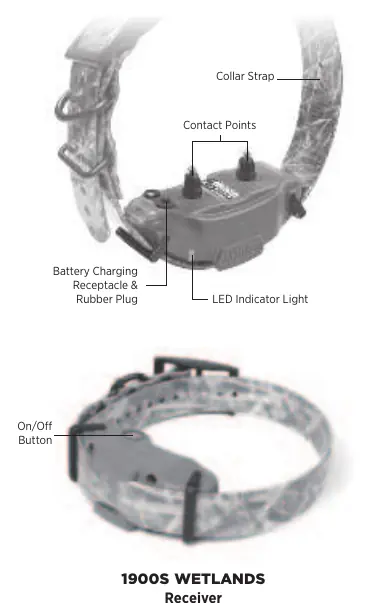
- Receiver Overview p. 8
- Charging Instructions p. 15, 16
Table of contents
Manual images
Click an image to enlargeQuick guide from the manual
The Dogtra 1900S WETLANDS is a 1-dog training system. Before first use, ensure the unit is fully charged for 2 hours. The receiver should be fitted snugly on the dog's neck, allowing two fingers to fit under the strap. Always start at the lowest stimulation level and increase gradually based on your dog's reaction.
Overview of the system
The system consists of a handheld transmitter and a receiver collar. The transmitter features a rheostat dial for precise intensity control (0-127), a Nick button for a single pulse, a Constant button for continuous stimulation, and a Pager button for vibration.
Turning the system on and off
To turn the transmitter on, hold the button on the right side until the LCD screen illuminates. To turn it off, hold the same button until the screen shuts off. To turn the receiver on, hold the on/off button until the LED turns green. To turn it off, hold the button until the LED turns red.
Receiver fitting
Proper fit is essential for consistent correction. The contact points must press firmly against the dog's skin. If the collar is too loose, the receiver may move, causing inconsistent contact and potential skin irritation. Reposition the receiver every few hours and remove it after 8 hours of use.
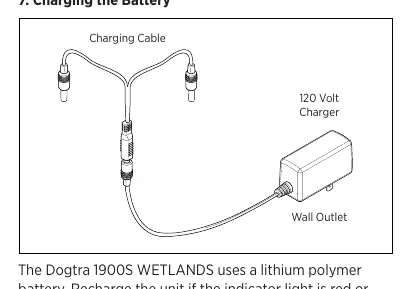
Charging the battery
The system uses lithium polymer batteries. Recharge if the indicator light is red, the transmitter LCD shows only 1 bar, or the unit does not stay on. A full charge takes 2 hours. Always ensure the rubber charging cap is securely in place after charging to maintain the waterproof seal.
Stimulation and training
The rheostat dial allows for gradual intensity adjustments from 0 to 127. Always start at the lowest level. The Nick button provides a single rapid pulse, while the Constant button provides continuous stimulation for up to 12 seconds (it will automatically shut off after 12 seconds as a safety feature). The Pager button provides vibration.
Maintenance
After each training session, inspect the unit for damage. Rinse the receiver and clean out any dirt or debris. Ensure the rubber charging cap is secure during use. Store the unit at room temperature and charge it fully before extended storage.
Troubleshooting
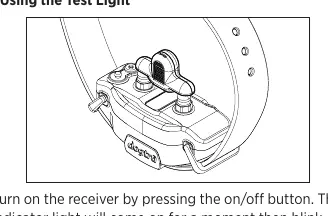
If the dog is not reacting, check the fit, contact points, and intensity level. If the unit is not holding a charge, inspect the charging port for debris or a damaged pin. Use the provided test light to verify stimulation output.
Manufacturer information
Dogtra
Practical help
Common problems
Dog is not reacting to the receiver
Ensure the receiver and transmitter are on, the collar is tight enough for contact points to touch the skin, and the intensity level is high enough.
LED indicator is on, but no stimulation is felt
Test the system using the provided test light. Your tolerance may be higher than the dog's; check the battery level.
Unit is not holding a charge
Clean the charging port with a cotton swab and rubbing alcohol. Check if the charging pin is damaged or wobbling.
Transmitter has no range
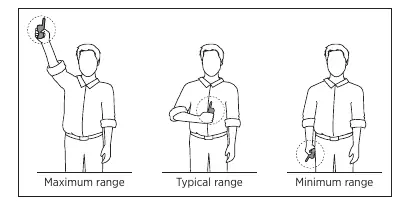
Ensure the antenna is not damaged. Hold the transmitter vertically above your head and avoid obstacles like metal structures.
Before use
- Charge the unit for 2 hours before the first use.
- Ensure the receiver is fitted correctly (two fingers under the strap).
- Test the system using the provided test light.
- Ensure the rubber charging cap is secure.
- Check that the transmitter and receiver are turned on.
Specs in practice
- Rheostat Dial
- Adjusts stimulation intensity from 0 to 127.
Images and diagrams
- Transmitter: Shows antenna, rheostat dial, buttons (Nick, Constant, Pager, On/Off), and charging port.
- Receiver: Shows contact points, LED indicator, and charging port.
- Maximizing distance: Shows the transmitter should be held vertically away from the body.
Model compatibility
- For dogs as small as 35 pounds.
- Range is up to 3/4-mile in flat terrain.

Manual page author
Emily Carter
User documentation editor
Prepares concise manual descriptions and highlights the most useful setup, operation, and maintenance information for readers.