Home / Pet Supplies
User Manual for Dogtra iQ PLUS Training Collar
Comprehensive user guide for the Dogtra iQ PLUS training collar. Learn how to pair, fit, charge, and operate your e-collar, including troubleshooting and training tips.
Quick answers from the manual
Quick answer
- The Dogtra iQ PLUS is an expandable 2-dog training collar. To turn it on/off, hold the red dot on the transmitter to the red dot on the receiver. Use the Rheostat Dial (0-100) to adjust stimulation intensity. p. 10
Key actions
- Turn on/off p. 10
Technical specifications
| Parameter | Value | Meaning | Pages |
|---|---|---|---|
| Range | 400 yards | Maximum operating distance. | p. 7 |
| Charging Time | 2 hours | Time required for full battery charge. | p. 7 |
Where to find it in the PDF
- Overview p. 8, 9
Table of contents
Manual images
Click an image to enlargeQuick Start Guide
The Dogtra iQ PLUS is an expandable 2-dog training system. Before first use, ensure the unit is fully charged for 2 hours. To turn the receiver on or off, hold the red dot on the transmitter against the red dot on the receiver until the LED light activates. Always start with the lowest stimulation level and adjust based on your dog's reaction.
Product Overview
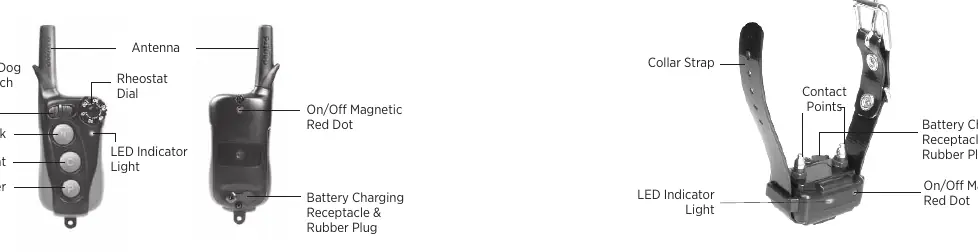
The system consists of a handheld transmitter and a receiver/collar. The transmitter features a Rheostat Dial for intensity adjustment (0-100), a toggle switch for selecting between two dogs, and buttons for Nick, Constant, and Pager (vibration) modes.
Getting Started
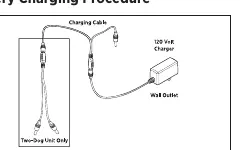
Charging the Battery: Use the provided charger to charge both the transmitter and receiver simultaneously. A full charge takes 2 hours. Do not charge near flammable substances. The LED indicator on the receiver shows battery status: Green (Full), Amber (Medium), Red (Needs charge).
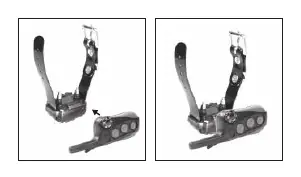
Code Setting (Pairing): To pair the receiver to the transmitter:
- Set the Rheostat Dial to 0.
- Slide the toggle switch to 'I' (for 1st dog) or 'II' (for 2nd dog).
- With the receiver off, hold the red dot on the transmitter to the red dot on the receiver until the receiver LED blinks green rapidly.
- Separate the devices and press the Nick and Constant buttons simultaneously to complete coding.
Operation
Collar Fitting: The collar must be fitted so that the contact points press firmly against the dog's skin. You should be able to fit one finger between the contact points and the dog's neck. Improper fit can cause inconsistent stimulation or skin irritation.
Stimulation: The Rheostat Dial allows for gradual intensity adjustments. Always start at the lowest level. The Nick button provides a single rapid pulse, while the Constant button provides continuous stimulation for up to 12 seconds (auto-shutoff feature).
Maintenance
Regularly inspect the unit for missing parts or casing damage. Ensure the rubber charging cap is securely in place when in use to maintain waterproof integrity. Rinse the receiver/collar with clean water after use, especially if exposed to dirt or salt water. Store in room temperature and charge fully before long-term storage.
Troubleshooting
If the unit is not working as expected, check the following:
- No reaction: Ensure the unit is turned on, the collar is tight enough, and contact points are touching the skin. You may need to trim hair on the dog's neck.
- No stimulation felt: Test the unit on your inner wrist to verify function. Check battery levels.
- Range issues: Avoid touching the antenna, hold the transmitter vertically, and operate away from metal structures or electrical conductors.
Manufacturer information
Dogtra
Practical help
Common problems
Dog is not reacting to the collar
Ensure both devices are on, the collar is tight enough for contact points to touch skin, and the stimulation level is high enough. Trim hair on the dog's neck if necessary.
No stimulation felt
Test the unit on your inner wrist (sensitivity is higher there) to verify it is working. Check if the battery is low.
Range is reduced
Do not touch the antenna while using. Hold the transmitter vertically above your head. Avoid operating near metal structures, cars, or radio towers.
Unit not holding charge
Check if the charging pin is damaged or wobbling. Clean the charging port with a cotton swab and rubbing alcohol. Ensure the charger is functioning.
Before use
- Charge the unit for 2 hours before first use
- Ensure the rubber charging cap is securely in place
- Check that the collar fits snugly (finger test)
- Test stimulation levels on your wrist
- Verify the receiver and transmitter are paired (Code Setting)
Specs in practice
- Rheostat Dial
- Adjusts stimulation intensity from 0 to 100.
- Constant Button
- Delivers continuous stimulation as long as the button is pressed (max 12 seconds).
- Pager Button
- Delivers a vibration signal.
Images and diagrams
- Red dot alignment: Hold the red dot on the transmitter to the red dot on the receiver to turn the unit on/off or enter pairing mode.
- Toggle switch: Used to select between 1st Dog (I) and 2nd Dog (II) operation.
Model compatibility
- Expandable to a 2-dog system.

Manual page author
Michael Turner
Technical manual editor
Reviews PDF manuals for structure, safety notes, and practical product details so readers can find the right information quickly.