Home / Pet Supplies
Owner's Manual for Dogtra DUAL DIAL Training System
Get the most out of your Dogtra DUAL DIAL training system with this comprehensive owner's manual. Learn how to set up your 1-dog or 2-dog system, adjust stimulation levels, charge the battery, and troubleshoot common issues.
Quick answers from the manual
Quick answer
- The Dogtra DUAL DIAL is an expandable 2-dog training system. It features a 1.5-mile range, 0-127 stimulation levels, and a 2-hour rapid charge battery. p. 6
Key actions
- Turn on/off p. 9
- Charge battery p. 16, 17
- Set up 1-dog system p. 22
- Set up 2-dog system p. 23
Problems and fixes
Dog not reacting
Check contact points, increase stimulation level, or trim hair on dog's neck.
p. 29Maintenance and reset
- Clean charging port p. 30
Technical specifications
| Parameter | Value | Meaning | Pages |
|---|---|---|---|
| Range | 1.5 miles | Maximum operating distance. | p. 6 |
| Stimulation Levels | 0-127 | Intensity range. | p. 6 |
Where to find it in the PDF
- Overview p. 7, 8
- Charging p. 16, 17
Table of contents
Manual images
Click an image to enlargeQuick guide from the manual
The Dogtra DUAL DIAL is an expandable training system designed for 1 or 2 dogs. Key operations include turning the transmitter on/off, adjusting stimulation levels using the Rheostat Dial, and selecting between Nick, Constant, or Pager (vibration) modes. Ensure the unit is fully charged before use and that the collar is fitted correctly for effective training.
Safety and Product Information
- Medical Device Interference: The device emits electromagnetic waves that may interfere with pacemakers or defibrillators. Consult a physician before use.
- Aggressive Dogs: Do not use with aggressive dogs; seek professional training assistance.
- Children: This is not a toy; keep away from children.
- Battery Safety: Do not disassemble, crush, or expose the battery to extreme heat.
Main Features
- Rheostat Dial: Allows for gradual stimulation adjustments (0-127).
- Expandable: Supports 1 or 2 dogs from a single transmitter.
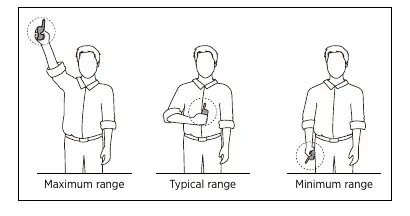
- Range: Up to 1.5-mile range.
- Stimulation Types: Nick (single pulse), Constant (continuous), and Pager (vibration).
- Battery: 2-hour rapid charge lithium polymer batteries.
- Safety Lock: Stimulation Level Lock prevents accidental intensity changes.
Transmitter Overview
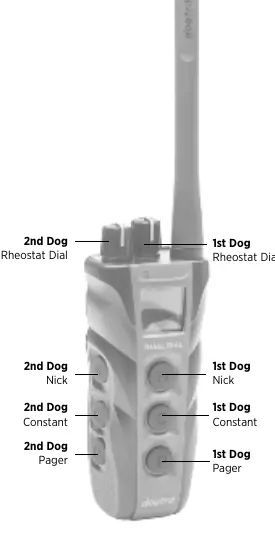
The transmitter features a Rheostat Dial on top for intensity control. The front and side buttons control stimulation for the 1st and 2nd dog respectively. The OLED screen displays the current stimulation level, battery life, and active dog settings.
Turning the System On/Off
To turn the transmitter on, hold down the button on the right side of the transmitter until the OLED screen illuminates. Repeat the process to turn it off.
Transmitter Button Functions
- Nick Button: Emits a single rapid pulse of electrical stimulation.
- Constant Button: Provides continuous stimulation as long as the button is pressed (up to 12 seconds).
- Pager Button: Provides vibration as long as the button is pressed (up to 12 seconds).
Finding the Right Stimulation
The Rheostat Dial ranges from 0 to 127. Start at a low level and adjust upward based on your dog's temperament and the training situation. Stimulation intensity can be adjusted even while the stimulation is in use.
Charging the Battery
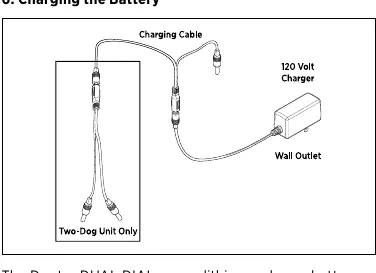
- Open the rubber plug on the charging receptacle.
- Plug the charging cable into a 120-volt wall outlet.
- The battery is fully charged within 2 hours. The indicator light will turn from red to green when fully charged.
- Replace the rubber plug after charging.
Code Setting Guide
To set up the system:
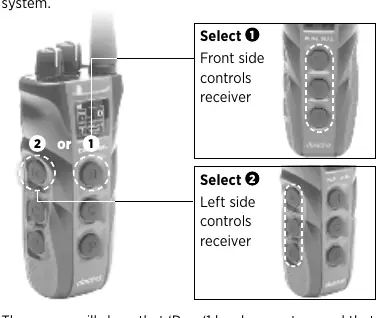
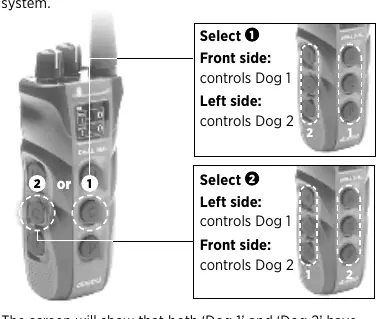
- Setting Mode: Ensure the transmitter is off. Hold the on/off button until the green LED blinks and the screen shows "Setting Mode".
- 1-Dog Setup: Press the top button to configure as a 1-dog system.
- 2-Dog Setup: Press the middle button to configure as a 2-dog system.
- Receiver Pairing: With the transmitter in Setting Mode, hold the red dot on the transmitter against the red dot on the receiver (or hold the on/off button on the receiver) until the LED blinks rapidly.
Maintenance and Troubleshooting
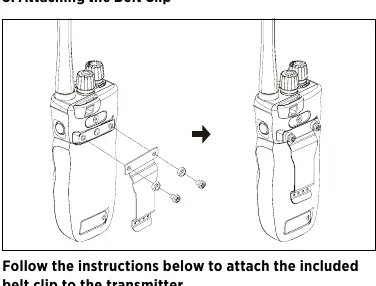
- Maintenance: Keep the charging port clean and ensure the rubber cap is secure. Store in room temperature.
- Troubleshooting: If the dog is not reacting, check the collar fit, contact points, and stimulation level. If the unit has no range, ensure the antenna is undamaged and you are operating away from electrical conductors.
Manufacturer information
Dogtra
Practical help
Common problems
Dog not reacting to the system
Ensure the receiver and transmitter are on, the collar is tight enough for contact points to touch the skin, or increase the stimulation level.
Test light works but no stimulation felt
Test the unit on your inner wrist where sensitivity is higher, or check if the battery is low.
No range or stimulation is weak at distance
Check for a damaged antenna, hold the transmitter vertically, and avoid operating near metal structures or electrical conductors.
Unit not holding a charge
Clean the charging port with a cotton swab and rubbing alcohol, check for a damaged charging pin, or contact customer service.
Before use
- Charge the unit for 2 hours before first use.
- Ensure the rubber charging cap is securely in place.
- Check that the collar strap is tight enough for contact points to touch the dog's skin.
- Verify the transmitter and receiver are turned on.
- Ensure the stimulation level is set appropriately for your dog.
Specs in practice
- Stimulation Levels
- 0-127 levels for gradual intensity adjustment.
Images and diagrams
- The transmitter features a Rheostat Dial for intensity, Nick/Constant buttons for stimulation, and a Pager button for vibration.
- The OLED screen displays the stimulation level and battery life.
- The Safety Stimulation Level Lock prevents accidental changes to the intensity.
Model compatibility
- Compatible with iQ MINI, iQ PLUS, 200C/202C, 280C/282C, ARC, and 1900S/1902S.
- Not compatible with 2300NCP, 3500NCP/3502NCP, 2500T&B/2502T&B, and 2700T&B/2702T&B.

Manual page author
Emily Carter
User documentation editor
Prepares concise manual descriptions and highlights the most useful setup, operation, and maintenance information for readers.