Electronics / Smart Trackers
User Manual for Dongguan 1908-OT1 Remote Control Toy
Get started with your Dongguan 1908-OT1 remote control toy. This guide covers battery installation, controller operation, disassembly, and Bluetooth app control setup.
Quick answers from the manual
Quick answer
- The 1908-OT1 is a remote-controlled toy vehicle. It can be operated via the included physical remote controller or via a smartphone app using Bluetooth. p. 1, 2
Key actions
- Install batteries p. 1
- Connect via App p. 2
First start
- Insert batteries into the controller and the vehicle. Turn on the vehicle power. For app control, enable Bluetooth on your phone and search for the device. p. 1, 2
Problems and fixes
Beeping sound
Battery is running low.
p. 1Maintenance and reset
- Remove exhausted batteries if the product is not to be used for long periods. p. 1
Where to find it in the PDF
- Controller and Battery Setup p. 1
- App Operation Guide p. 2
Table of contents
Manual images
Click an image to enlargeQuick Guide
The Dongguan 1908-OT1 is a remote-controlled toy vehicle that can be operated using the included physical controller or via a smartphone app using Bluetooth. Ensure you have the required batteries installed before operation. A beeping sound indicates that the vehicle battery is running low.
Battery Installation
Remote Controller: Requires 3 x 1.5V AA batteries (not included). Open the battery compartment and insert batteries according to the correct polarity.
Vehicle: Uses the included 3.7V rechargeable battery. Ensure the battery is properly connected to the vehicle's power socket.
Controller Operation
The remote controller features the following controls:
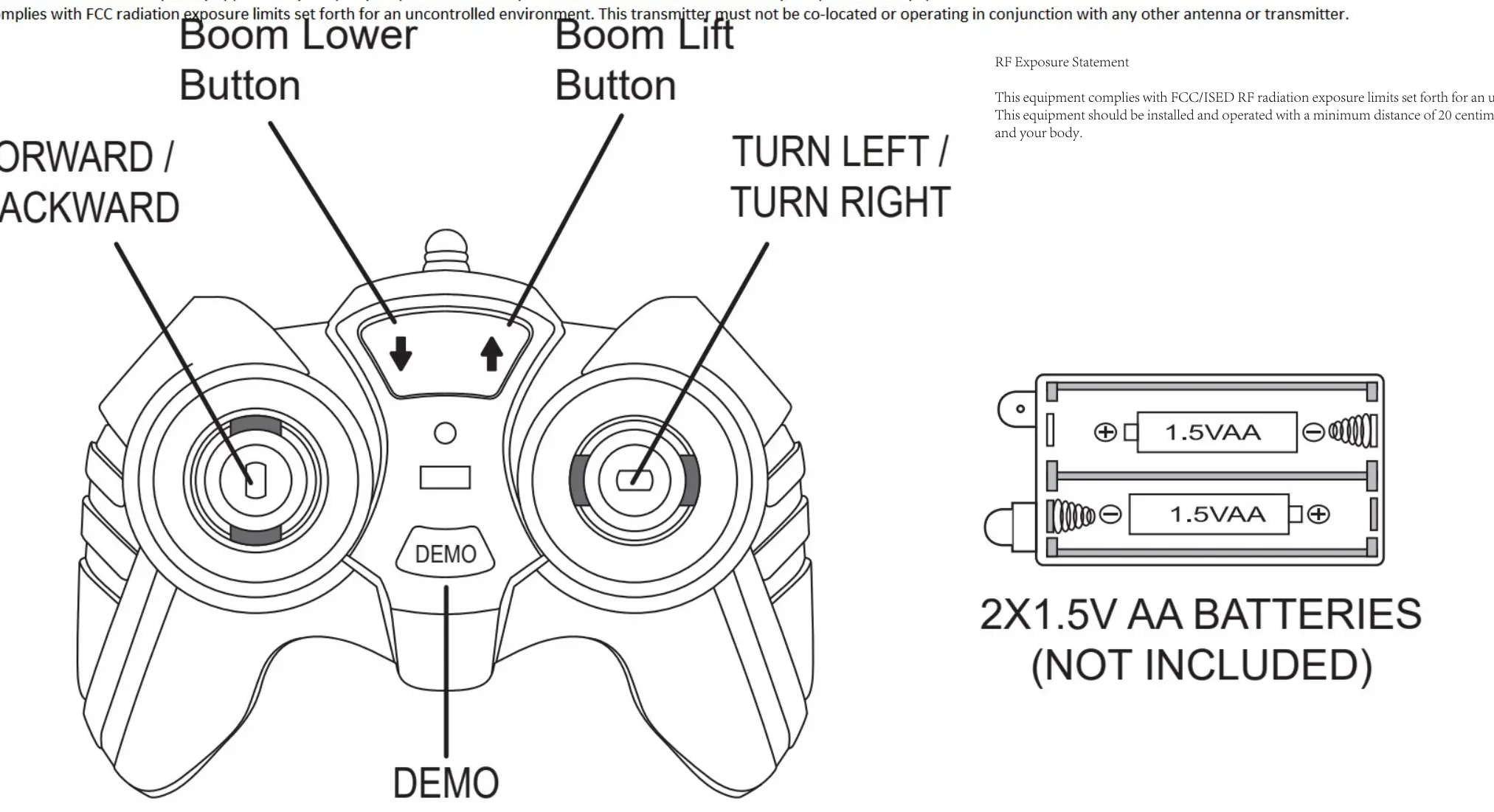
- Forward/Backward: Left joystick.
- Turn Left/Turn Right: Right joystick.
- Boom Lower/Boom Lift: Dedicated buttons on the controller.
- Demo: Activates demonstration mode.
Disassembly Instructions
The vehicle features a buckle mechanism for disassembly:
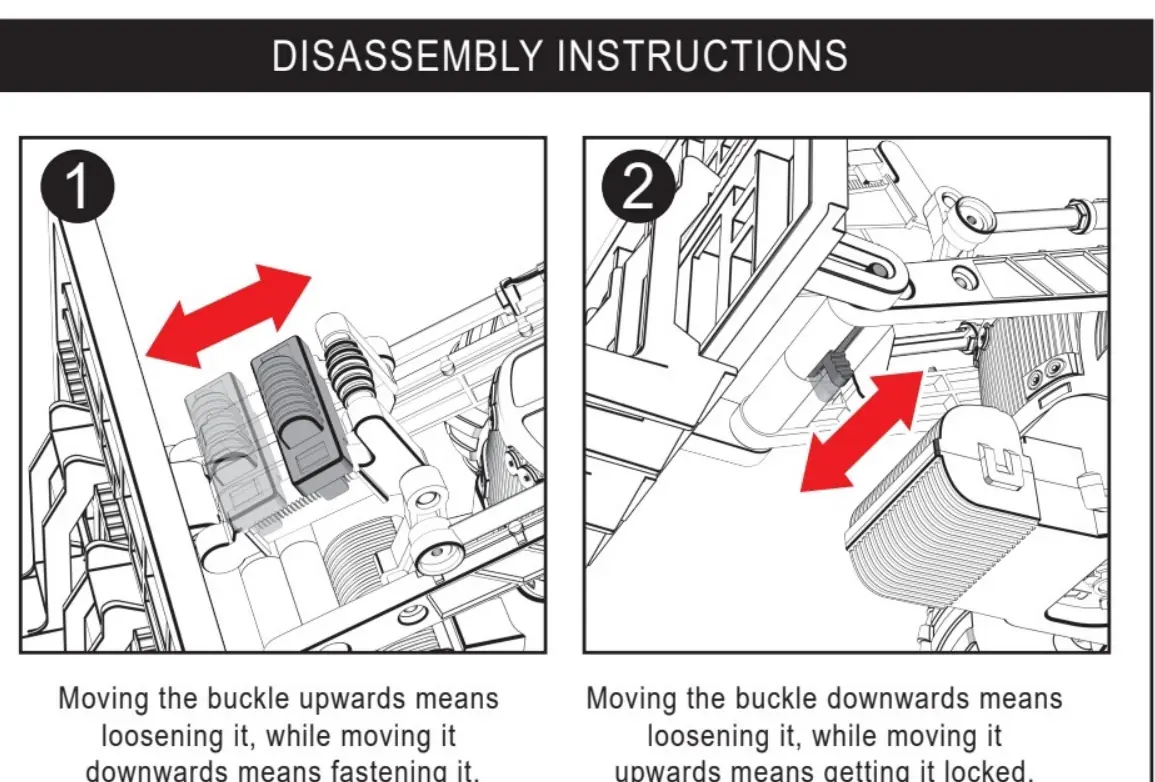
- Loosening: Move the buckle upwards.
- Fastening: Move the buckle downwards to lock the mechanism.
App Operation
You can control the vehicle using a smartphone app via Bluetooth:
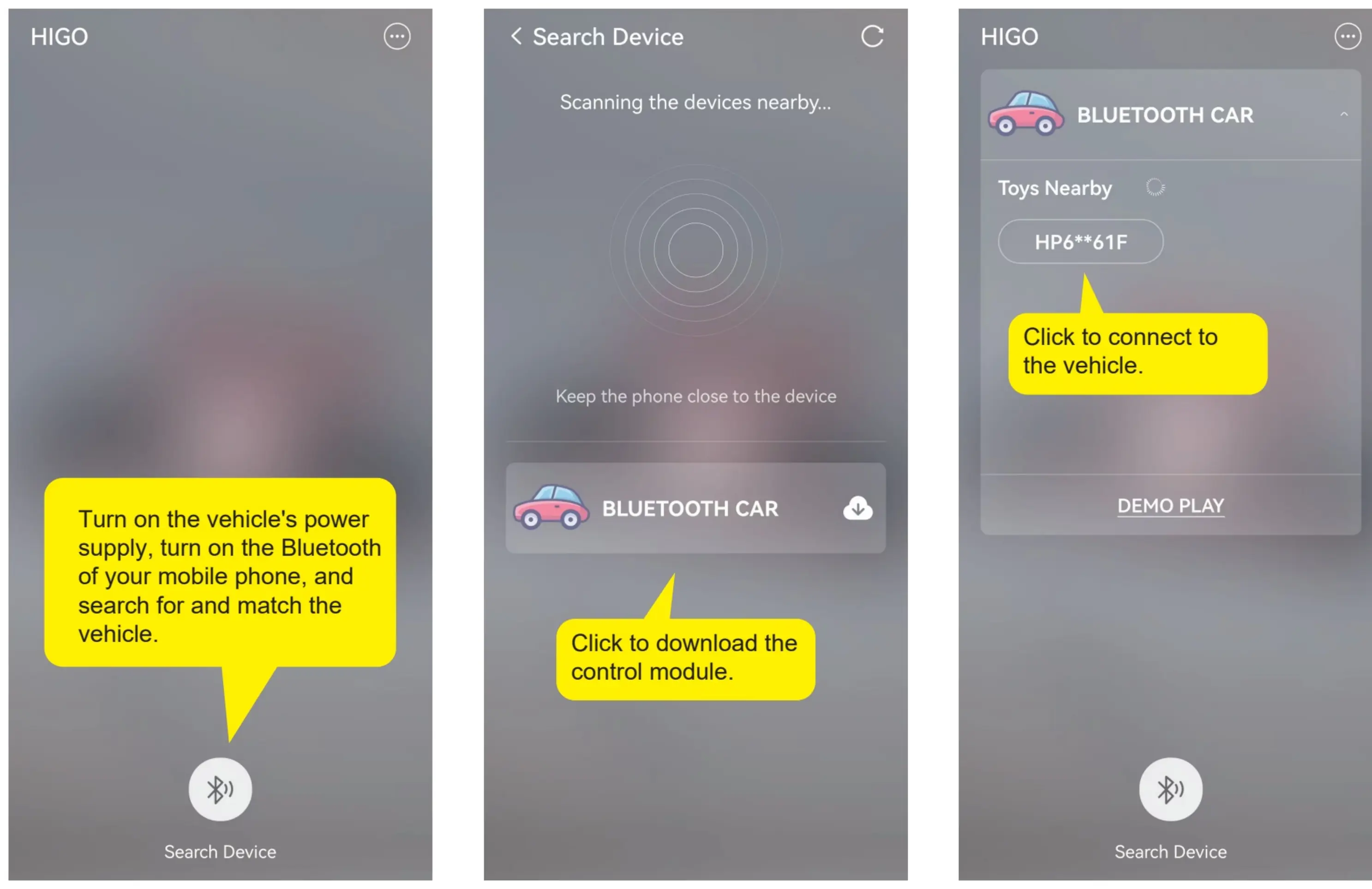
- Turn on the vehicle's power.
- Enable Bluetooth on your mobile phone.
- Search for and match the vehicle in the app.
- Download the control module if prompted.
- Use the app interface to control movement, camera, music playback, demonstration mode, and gravity sensing.
Safety Information
- Never recharge non-rechargeable batteries.
- Always remove exhausted batteries from the product.
- Do not mix old and new batteries or different types of batteries.
- Always insert batteries with the correct polarity.
- Do not short circuit terminals.
- Batteries should be changed by an adult.
- Remove batteries if the product is not to be used for long periods.
Practical help
Common problems
Beeping sound during operation
The vehicle battery is running low and needs to be recharged.
Cannot connect to app
Ensure the vehicle is powered on, Bluetooth is enabled on your phone, and the phone is kept close to the vehicle during pairing.
Before use
- Install 3 x 1.5V AA batteries in the remote controller.
- Ensure the 3.7V rechargeable battery is installed and connected in the vehicle.
- Check that all battery polarities are correct.
- Download the control app if using Bluetooth features.
Specs in practice
- 3.7V Battery
- The rechargeable power source for the vehicle.
- 3 x 1.5V AA Batteries
- The power source for the remote controller.
Images and diagrams
- The controller diagram identifies the joysticks for movement and buttons for boom control.
- The disassembly diagram illustrates the buckle mechanism movement for loosening and fastening.
Model compatibility
- Requires a smartphone with Bluetooth capability for app control.

Manual page author
David Miller
Documentation analyst
Organizes user manual content into clear summaries, with attention to model details, product context, and everyday usability.