Tools / Welding Equipment
User Manual for Draper 98521 Storm Force Rotary Multi-Tool Kit
Quick guide for the Draper 98521 Storm Force Rotary Multi-Tool Kit. Includes setup, bit changing, speed control, safety instructions, and maintenance tips.
Quick answers from the manual
Quick answer
- The Draper 98521 is a 230V rotary multi-tool kit used for drilling, grinding, polishing, milling, and engraving. Always disconnect from power before changing accessories. p. 1, 6
Key actions
- Switching on/off p. 6
- Changing bits p. 6
- Adjusting speed p. 6
Problems and fixes
Motor overheating
Avoid excessive force on the machine.
p. 6, 7Show 3 more answers Show less
Maintenance and reset
- Regular cleaning p. 8
Technical specifications
| Parameter | Value | Meaning | Pages |
|---|---|---|---|
| Rated voltage | 230V/50Hz | Power supply requirement | p. 2 |
| Rated input | 135W | Power consumption | p. 2 |
| Speed (no load) | 35000 r/min | Maximum rotational speed | p. 2 |
| Collet capacity | 3.2/2.3mm | Compatible accessory shank size | p. 2 |
Where to find it in the PDF
- Identification p. 5
- Operations p. 6
- Specifications p. 2
Table of contents
Manual images
Click an image to enlargeQuick guide from the manual
The Draper 98521 is a 230V rotary multi-tool designed for drilling, grinding, polishing, milling, engraving, and cutting. This manual provides essential safety, operation, and maintenance instructions. Always ensure the tool is disconnected from the power source before changing accessories or performing maintenance.
Product Identification
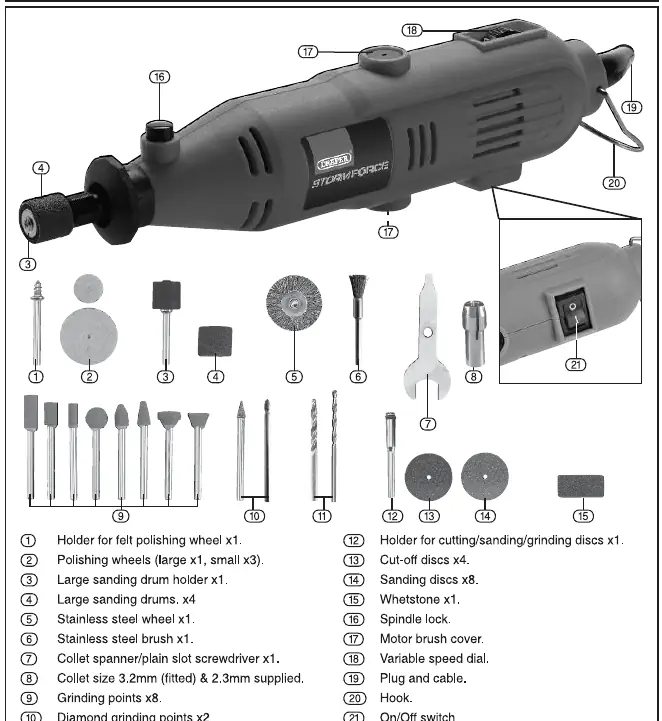
The tool features a variable speed dial, a spindle lock for changing bits, and an on/off switch. The kit includes various accessories such as sanding drums, grinding stones, polishing wheels, and cutting discs. Refer to the identification diagram (Fig. A) to locate the spindle lock (16), variable speed dial (18), and on/off switch (21).
Operations
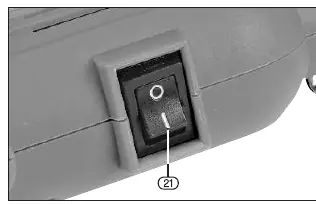
Switching On and Off: Use the switch (21) on the side of the tool. Move to the 'I' position to start and 'O' position to stop.
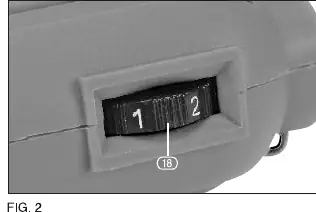
Variable Speed Control: Use the dial (18) to adjust the rotational speed of the tool. Use lower speeds for larger tools and higher speeds for smaller tools.
Holding the Tool: For precision work like engraving, hold the tool like a pen. For heavier work like grinding, hold it in the palm of your hand. Do not cover the air vents to prevent overheating.
Changing Accessories
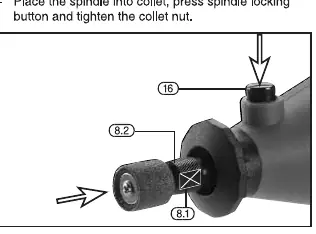
Changing Bits: 1. Disconnect from power. 2. Press the spindle lock button (16) to stop the spindle. 3. Use the spanner (7) to loosen the collet nut (8.1). 4. Insert the bit into the collet. 5. Tighten the collet nut. Do not overtighten.
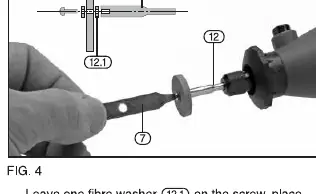
Fitting Cutting/Sanding Discs: Use the disc holder (12). Remove the screw using the provided screwdriver, place the disc on the holder with the fibre washer, and refit.
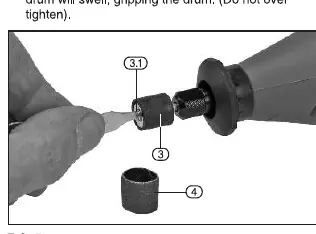
Fitting Sanding Drums: Loosen the small screw (3.1) on the holder (3) to allow the rubber to relax. Slide the sanding drum (4) onto the holder and tighten the screw to secure it.
Maintenance
Regularly inspect and clean the tool. Keep air inlets clear and vacuum the ventilation slots regularly. Do not use solvents or fuels for cleaning. Store the tool in a safe, dry place.
Technical Specifications
The tool operates at 230V/50Hz with a power input of 135W. The no-load speed is up to 35,000 r/min. It supports collet sizes of 3.2mm and 2.3mm. The machine weight is 0.23kg.
Manufacturer information
Draper Tools
Practical help
Common problems
Tool overheating
Avoid excessive force during operation and ensure air vents are not covered.
Bit slipping in collet
Ensure the bit is fully inserted into the collet and the collet nut is tightened securely.
Excessive vibration
Check that the accessory is not damaged, is properly centered, and is compatible with the tool.
Before use
- Check the tool for any damage from shipping.
- Ensure the collet size matches the accessory shank (3.2mm or 2.3mm).
- Verify the power supply matches the 230V rating.
- Wear appropriate PPE (eye protection, ear defenders, gloves).
- Ensure the work area is clean and well-lit.
Show more Show less
Specs in practice
- Rated input: 135W
- The power consumption of the tool.
- Speed (no load): 35000 r/min
- Maximum rotational speed without resistance.
- Collet capacity: 3.2/2.3mm
- The shank sizes of accessories that can be used.
Images and diagrams
- Fig A: Identification of all included accessories and tool parts.
- Fig 3: Procedure for changing bits using the spindle lock and spanner.
- Fig 4 & 5: Instructions for mounting cutting discs and sanding drums.
Model compatibility
- Use only accessories recommended by the manufacturer.
- Ensure the rated speed of the accessory is at least equal to the maximum speed of the tool.

Manual page author
David Miller
Documentation analyst