Tools / Power Tools
User Manual for Draper 92627 Tri Base Sander
Quick guide for the Draper 92627 Tri Base Sander. Learn how to operate, install abrasive sheets, connect dust extraction, and maintain your tool safely.
Quick answers from the manual
Quick answer
- The Draper 92627 is a 230V, 125W Tri-Base Sander intended for light to medium-duty sanding of wood. It features a hook and loop pad system and a dust extraction port. p. 2, 5, 6
Key actions
- Switching the sander on/off p. 5
- Installing abrasive sheets p. 6
- Connecting dust extraction p. 6
Problems and fixes
Motor overload
Apply less pressure on the workpiece.
p. 5Show 3 more answers Show less
Maintenance and reset
- Regular maintenance p. 6
Technical specifications
| Parameter | Value | Meaning | Pages |
|---|---|---|---|
| Voltage | 230V~ | Rated voltage | p. 2 |
| Power | 125W | Rated input | p. 2 |
| Speed | 13,500 opm | Orbits per minute (no load) | p. 2 |
| Weight | 1.0kg | Machine weight | p. 2 |
Where to find it in the PDF
- Introduction and Specifications p. 2
- Safety Instructions p. 3, 4
- Operation and Maintenance p. 5, 6
Table of contents
Manual images
Click an image to enlargeQuick guide from the manual
The Draper 92627 is a 230V Tri-Base Sander designed for light to medium-duty sanding of wood and similar materials. Before using the tool, ensure you are wearing appropriate personal protective equipment, including a face mask, eye protection, and ear defenders. Always keep the work area clean and well-lit, and ensure the tool is disconnected from the power supply before performing any maintenance or changing abrasive sheets.
Product identification
The sander consists of the following main components:
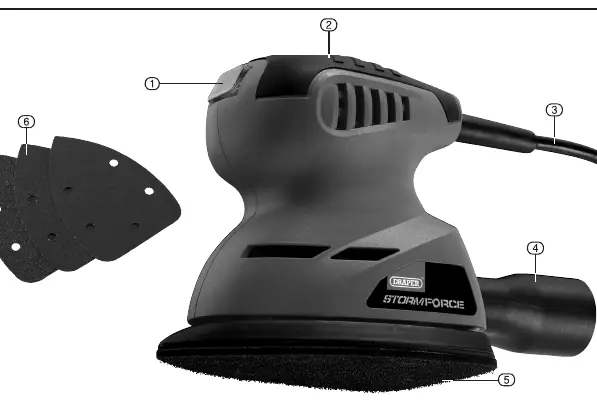
- On/off switch: Located on the top of the unit.
- Soft grip: Ergonomic handle for control.
- Plug and cable: Power connection.
- Dust extraction port adaptor: For connecting to a dust extraction device.
- Hook & loop pad: Base for attaching sanding sheets.
- Abrasive sheets: Consumable sanding pads (60G, 80G, 120G).
Basic sander operations
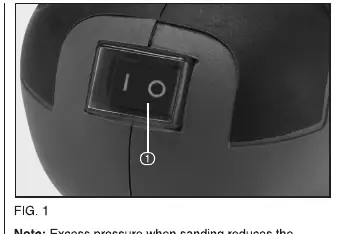
Switching on/off: Ensure the sander is raised off the workpiece before switching on. Move the switch to the "I" position to start and the "O" position to stop. Apply equal pressure on the workpiece with the base pad remaining flat; do not use excessive pressure as this will overload the motor.
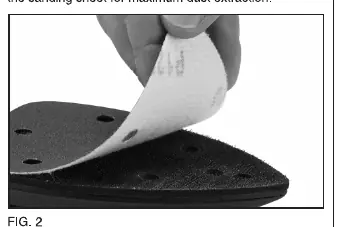
Abrasive sheet installation: The sanding sheets are pressed onto the hook and loop base pad. Ensure the holes in the sanding sheet align with the holes in the sander base for maximum dust extraction.
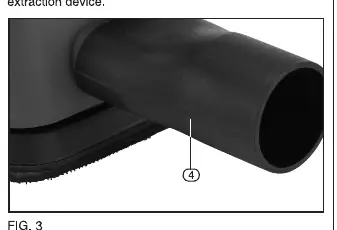
Dust extraction: The sander is supplied with a dust extraction adaptor that slots onto the dust extraction outlet. It is recommended to connect this to a suitable dust extraction device to minimize inhalation of harmful wood dust.
Maintenance
Regular inspection and cleaning are essential to keep the tool in good working condition. Keep air inlets clear and vacuum the ventilation slots regularly. Do not use solvents or fuels to clean the product. When not in use, store the tool in a safe, dry place.
Technical specifications
- Voltage: 230V~ 50Hz
- Power input: 125W
- Orbits per minute (no load): 13,500 opm
- Pad size: 140 x 140 x 80mm
- Sound pressure level (LpA): 76dB(A)
- Sound power level (LWA): 87dB(A)
- Vibration level: 4.370m/s²
- Weight: 1.0kg
Manufacturer information
Draper Tools
Practical help
Common problems
Motor overloading
Reduce pressure on the workpiece. Excess pressure reduces tool effectiveness and can damage the motor.
Poor dust extraction
Ensure the holes in the abrasive sheet are aligned with the holes in the sander base pad.
Clogged abrasive sheets
Replace the abrasive sheet when it becomes clogged with material or the surface shows rips/cracks.
Before use
- Check the tool for any signs of damage.
- Ensure the switch is in the 'O' (off) position before connecting to power.
- Wear appropriate PPE (mask, eye protection, ear defenders).
- Ensure the abrasive sheet is correctly attached and holes are aligned.
- Connect a dust extraction device if working with wood dust.
Show more Show less
Specs in practice
- 13,500 orbits/min
- The speed of the sanding pad oscillation under no-load conditions.
- Class II construction
- Double insulated tool; does not require an earth connection.
Images and diagrams
- Fig A: Overview of the sander components including switch, grip, and dust port.
- Fig 1: Close-up of the on/off switch.
- Fig 2: Illustration of attaching the abrasive sheet to the hook and loop pad.
- Fig 3: Location of the dust extraction port.
Model compatibility
- Designed for light/medium-duty sanding of wood and similar materials only.
- Use only good quality abrasive paper.
- If using an extension lead, ensure it is suitable for outdoor use and fully unwound.

Manual page author
Emily Carter
User documentation editor