Electronics / Audio
User Manual for Dual 1006/A Record Player
Get the most out of your Dual 1006/A record player with this comprehensive user guide. Learn how to set up the voltage, operate the record changer, adjust tracking force, and replace cartridges.
Quick answers from the manual
Quick answer
- This manual provides operating instructions for the Dual 1006/A record player, covering voltage adjustment, connection, operation modes, and cartridge installation. p. 1, 2, 5, 7
Key actions
- Adjust voltage p. 2
- Connect to amplifier p. 5
- Start playback p. 7
First start
- Remove transit screws p. 5
- Connect audio cables p. 5
Show 3 more answers Show less
Problems and fixes
Rumble
Remove drive wheel with special pull-off tool KDW 101 if the motor shaft is bent.
p. 2Technical specifications
| Parameter | Value | Meaning | Pages |
|---|---|---|---|
| Speeds | 16 2/3, 33 1/3, 45, 78 rpm | Supported playback speeds | p. 4 |
| Tracking pressure | 2 to 10 grams | Adjustable tracking force range | p. 4 |
| Record capacity | Up to 10 records | Maximum number of records for changer operation | p. 4 |
Where to find it in the PDF
- Voltage and Frequency Adjustment p. 2
- Controls Diagram p. 3
- Features p. 4
- Connection p. 5
- Operation p. 6, 7, 8
- Cartridge System p. 9, 14
- Stylus Care p. 11
- Wiring Diagram p. 12
Table of contents
Manual images
Click an image to enlargeQuick Guide
The Dual 1006/A is a versatile record player and changer. Before use, ensure the transit screws are removed to activate the suspension. Verify that the voltage selector is set to your local power supply and that the correct motor pulley is installed for your local frequency (50Hz or 60Hz). The device supports automatic record changing for up to 10 records, as well as manual operation.
Device Overview
The main controls are located on the top panel:
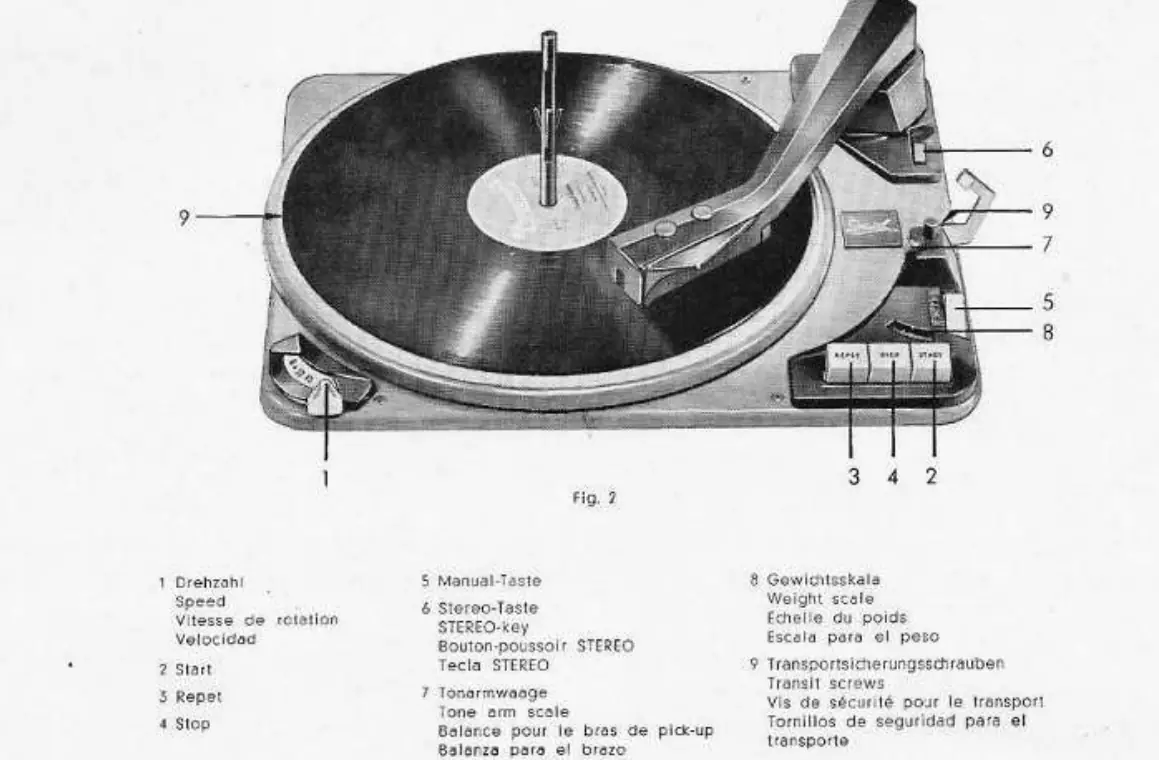
- Speed Selector: Allows selection of 16 2/3, 33 1/3, 45, and 78 rpm.
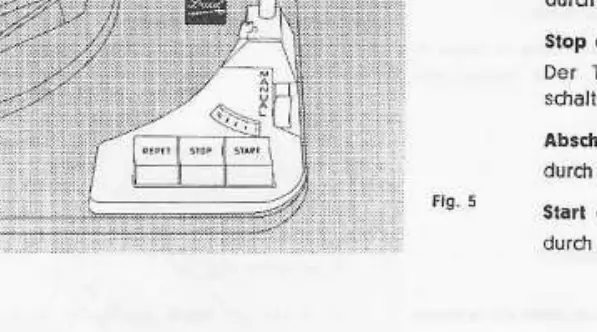
- Control Buttons: Includes Start, Stop, and Repeat functions.
- Stereo Switch: Used to toggle between stereo and mono playback.
- Tracking Force Scale: Built-in scale to monitor stylus pressure.
- Transit Screws: Must be removed for operation to allow the suspension to function.
Installation and Connection
Proper installation is critical for performance:
- Transit Screws: Remove the two transit screws (item 9) to release the suspension.
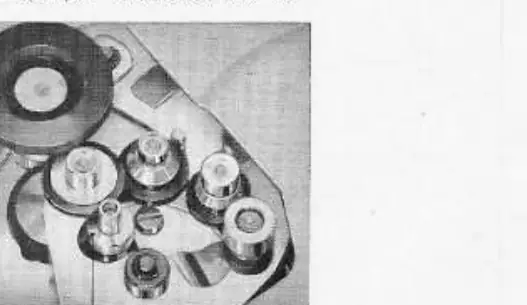
- Voltage Selection: Access the voltage selector (Fig 3) under the unit to set it to 110/125V or 220/240V.
- Frequency Adjustment: Ensure the correct motor pulley is installed for 50Hz or 60Hz operation.
- Audio Connection: Connect the red plug to the left channel and the yellow plug to the right channel of your amplifier.
Operation
The unit can be used as a record changer, automatic player, or manual player:
- Record Changer: Insert the changer spindle into the turntable bushing and lock it. You can stack up to 10 records of the same speed and groove profile.
- Automatic Playback: Press the Start button (2) to begin.
- Manual Playback: Place the tone arm on the record by hand and press the Manual button (5).
- Stop/Reject: Press the Stop button (4) to return the tone arm to the rest position and shut off the unit.
- Repeat: Press the Repeat button (3) to replay a record.
Cartridge and Stylus Maintenance
The Dual 1006/A allows for cartridge replacement and tracking force adjustment:
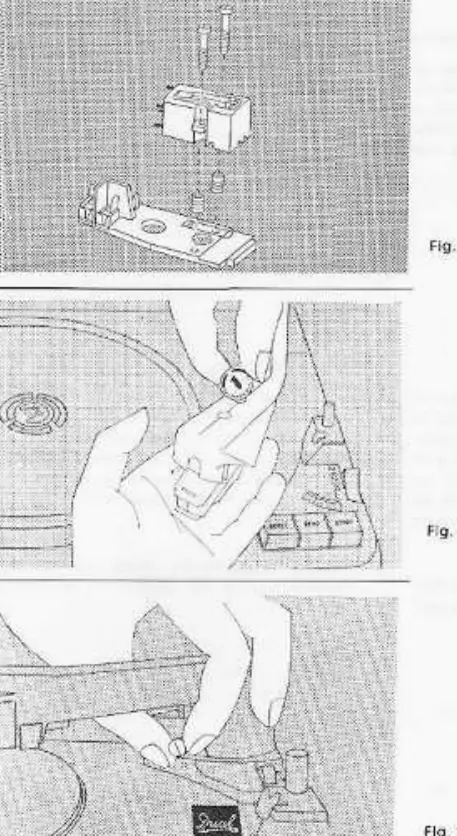
- Tracking Force: Use the adjustment screw (item 8) to set the tracking force. The built-in scale (item 7) allows you to verify the pressure, which should typically be between 2g and 10g depending on the cartridge.
- Cartridge Replacement: To replace the cartridge, lift the tone arm slightly and use a coin to turn the locking cap. Ensure the cartridge is mounted correctly using the provided gauge to maintain the proper distance.
- Stylus Care: Replace the stylus regularly to maintain sound quality and protect your records. Always use original Dual replacement parts.
Manufacturer information
Dual
Practical help
Common problems
Incorrect playback speed
Check the voltage selector setting and ensure the correct motor pulley (50Hz or 60Hz) is installed.
Tracking force is inaccurate
Use the built-in scale (item 7) and adjustment screw (item 8) to set the force between 2g and 10g.
Suspension not working
Ensure the two transit screws (item 9) have been removed from the chassis.
Before use
- Remove the two transit screws to activate the suspension.
- Verify the voltage selector matches your local power supply.
- Check that the correct motor pulley is installed for your local frequency (50Hz or 60Hz).
- Ensure the cartridge tracking force is set correctly before playing records.
- Connect audio cables to the correct amplifier channels (Red=Left, Yellow=Right).
Show more Show less
Specs in practice
- Tracking Force
- The pressure of the stylus on the record, adjustable between 2g and 10g.
- Record Capacity
- Can stack up to 10 records in changer mode.
Images and diagrams
- Fig 2: Overview of controls including speed selector, start/stop/repeat buttons, and transit screws.
- Fig 3: Location of the voltage selector under the unit.
- Fig 8-10: Instructions for replacing the cartridge and adjusting tracking force.
- Fig 14: Gauge for correct cartridge mounting distance.
Model compatibility
- Compatible with both stereo and mono records.
- Supports record sizes from 7 to 12 inches.
- Requires specific motor pulleys for 50Hz or 60Hz operation.

Manual page author
Michael Turner
Technical manual editor