Power / Batteries & Chargers
Einhell Multi-Ah Power X-Change Plus Battery User Manual
Quick guide for the Einhell Multi-Ah Power X-Change Plus battery. Learn how to check charge levels, convert between 4.0Ah and 6.0Ah modes, and troubleshoot error codes.
Table of contents
Manual images
Click an image to enlargeQuick guide from the manual
This document provides instructions for the Einhell Multi-Ah Power X-Change Plus battery. The battery can be converted between two modes: 4.0Ah (45.115.02) for longer total lifespan and 6.0Ah (45.115.03) for longer runtime per charge. The battery is supplied in the 4.0Ah mode.
Battery Description
The battery features two main controls:

- Button (A): Used for checking the charge level and for the capacity conversion procedure.
- Display (B): Shows the current charge level in percentage and the currently set capacity.
Converting the Battery Capacity
You can switch the battery between 4.0Ah and 6.0Ah modes using a specific button sequence. Read all instructions before starting.
- Hold the charge level button (A) for approximately 6 seconds until the display (B) starts counting from 1 to 9. Release the button.
- To switch modes, press button (A) briefly when the specific number appears:
- To switch to 6.0Ah: Press button (A) when the number 6 appears.
- To switch to 4.0Ah: Press button (A) when the number 4 appears.
- The counting will continue to 9. After the sequence finishes, the new capacity (6Ah or 4Ah) will be displayed for about 2 seconds.
Important: The conversion only occurs if the button is pressed precisely when the digit 4 or 6 appears to prevent accidental changes.
Battery Charge Level Indicator
Press button (A) briefly. The display (B) will show the charge status in % and then the current capacity, each for 2 seconds. Note that the charge level may need to be adjusted after conversion, so it is recommended to charge the battery after switching modes.
Troubleshooting
If the battery displays an error code, follow these steps:
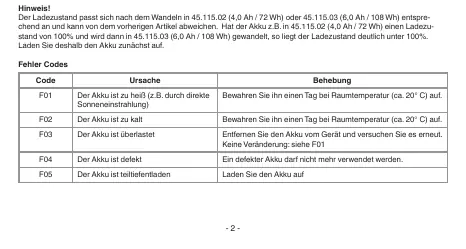
- F01 (Too hot): Store at room temperature for one day.
- F02 (Too cold): Store at room temperature for one day.
- F03 (Overloaded): Remove from the device and try again.
- F04 (Defective): Do not use the battery.
- F05 (Deeply discharged): Recharge the battery.
Safety and Transport
For transport according to special provision 188, the battery must be set to 45.115.02 (4.0Ah). Defective lithium-ion batteries must not be sent normally. Contact iSC GmbH for assistance with transport.
Manufacturer information
Einhell
Practical help
Common problems
F01 - Battery too hot
Store at room temperature (approx. 20°C) for one day.
F02 - Battery too cold
Store at room temperature (approx. 20°C) for one day.
F03 - Battery overloaded
Remove from the device and try again.
F04 - Battery defective
Do not use the battery.
F05 - Battery deeply discharged
Recharge the battery.
Before use
- Check the current battery charge level using button (A).
- Ensure the battery is at room temperature before use.
- Verify if the current capacity mode (4.0Ah or 6.0Ah) is suitable for your task.
- Charge the battery if the charge level is low after mode conversion.
Specs in practice
- 45.115.02 (4.0Ah / 72Wh)
- Gentle on the battery, resulting in approximately 3x longer total lifespan.
- 45.115.03 (6.0Ah / 108Wh)
- Provides longer runtime per battery charge.
Images and diagrams
- Button (A) is used to trigger the charge level display and the capacity conversion mode.
- Display (B) shows the charge percentage and the active capacity mode.
Model compatibility
- For transport under special provision 188, the battery must be set to 45.115.02 (4.0Ah).

Manual page author
Michael Turner
Technical manual editor
Reviews PDF manuals for structure, safety notes, and practical product details so readers can find the right information quickly.