Music / Instruments
User Manual for Electro-Harmonix MOD REX Polyrhythmic Modulator Pedal
Comprehensive user guide for the Electro-Harmonix MOD REX Polyrhythmic Modulator. Learn how to configure modulation sections, manage presets, use MIDI, and set up your pedal for optimal performance.
Table of contents
Manual images
Jump to the sectionQuick guide from the manual
The Electro-Harmonix MOD REX is a powerful modulation tool featuring four simultaneous modulation sections: MOD, TREM, PAN, and FILTER. It supports 100 storable presets, full stereo I/O, MIDI control, and tap tempo. The unit requires a 9VDC center-negative power supply (100mA) and does not support batteries.
Device Overview
The pedal consists of four main modulation sections that can be used individually or simultaneously. All sections are linked to the same master tempo but can have independent tempo subdivisions.
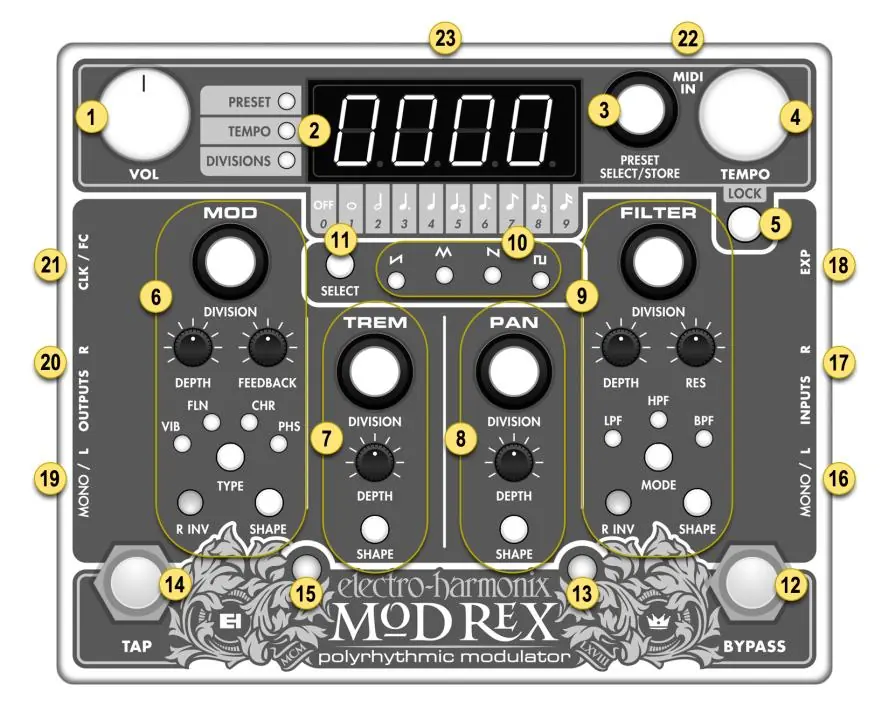
- MOD: Offers Vibrato, Flanger, Chorus, or Phaser effects.
- TREM: Provides a tremolo effect modulating signal volume.
- PAN: Modulates the signal between left and right outputs.
- FILTER: Offers Low-pass, High-pass, or Band-pass filter modes.
The signal path when all sections are active is: FILTER -> MOD -> TREM -> PAN.
Display Modes
The four-digit display screen has three main modes, indicated by LEDs to the left of the display:
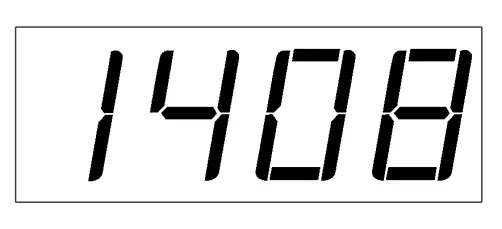
- DIVISIONS: Each digit represents the tempo subdivision for one of the four sections (0-9). 0 means the section is off.
- TEMPO: Displays the current tempo in beats per minute (BPM). Range is 10 to 500 BPM.
- PRESET: Displays the current preset number (1-100).
Modulation Parameters
Each section has a DIVISION knob to set tempo subdivisions and activate/deactivate the section. You can also select from four LFO shapes: Rising-sawtooth, Triangle, Falling-sawtooth, and Square. To change the LFO shape, hold the section's SHAPE button and toggle the SELECT button.
Presets
The Mod Rex can store and recall 100 presets. Upon powering up, the unit loads the last used preset.
- Loading: Rotate the PRESET SELECT/STORE knob and press to load.
- Saving: In PRESET display mode, toggle to the desired slot, hold the PRESET SELECT/STORE knob until the blue LED blinks, then release.
- LOCK Button: When pressed, the current tempo is maintained when switching presets.
- What You See Is What You Get (WYSIWYG) Mode: Hold the TREM DIVISION knob until all three LEDs light and the display shows four dashes to snap all parameters to the current physical knob positions.
Footswitches and Jacks
- BYPASS: Toggles between effect and buffered bypass mode.
- TAP: Sets master modulation tempo. Tapping in quarter notes syncs the LFOs to the nearest quarter note. Hold for over one second to hard reset LFOs.
- INPUT/OUTPUT: Use MONO/L for mono operation. For stereo, use both MONO/L and R jacks.
- EXP: Input for a passive expression pedal (TRS plug).
- CLK/FC: Configurable input for external pulse clock or foot controller.
MIDI Integration
The Mod Rex accepts MIDI input for tempo sync, preset recall, and parameter control. To set the MIDI channel, hold the PAN DIVISION knob until the display shows a number (1-16) with a dash on each side, then rotate the knob to select.
Factory Reset
To perform a factory reset, unplug the power. Hold the BYPASS footswitch and MOD DIVISION knob while plugging the power back in. Continue holding for 3-4 seconds until the display switches back to DIVISIONS mode. Note: This erases all saved presets.
Safety and Power
The unit requires a 9.6VDC/200mA power supply with a center-negative plug. Do not exceed 10.5VDC. The unit does not accept batteries. Using an incorrect adapter may damage the unit and void the warranty.
Practical help
Common problems
Preset changes not saving
Ensure you hold the PRESET SELECT/STORE knob until the blue LED begins to blink before releasing.
Tempo sync issues
Verify MIDI clock settings or external pulse clock connections. The display may round the BPM, but the modulation remains in sync.
Expression pedal not functioning
Ensure the expression pedal is a passive type with a TRS plug. If using MIDI for expression, ensure nothing is plugged into the physical EXP jack.
Factory reset not working
Ensure you are holding both the BYPASS footswitch and the MOD DIVISION knob simultaneously while plugging in the power.
Before use
- Use only the included 9.6VDC/200mA power supply (center negative).
- Do not use batteries.
- Connect your instrument to the MONO/L input for mono operation.
- For stereo operation, connect both MONO/L and R inputs.
- Set the MIDI channel if you intend to use MIDI control.
Specs in practice
- Divisions (0-9)
- Tempo subdivision settings for each modulation section (0 = off, 1 = whole note, 9 = sixteenth note).
Images and diagrams
- 1-VOL: Master volume control.
- 2-Display: Shows current mode (Divisions, Tempo, or Preset).
- 3-Preset Select/Store: Knob for managing presets.
- 4-Tempo: Manual tempo adjustment.
- 12-Bypass: Footswitch to toggle effect on/off.
Model compatibility
- Requires 9VDC center-negative power supply (100mA draw).
- MIDI input via 5-pin DIN connector.
- Expression pedal input requires a TRS plug.
- CLK/FC jack supports external pulse clock or standard foot controller.

Manual page author
Michael Turner
Technical manual editor
Reviews PDF manuals for structure, safety notes, and practical product details so readers can find the right information quickly.