Power / Batteries Chargers
User Manual for Electro-Harmonix PLATFORM Stereo Compressor/Limiter Pedal
Quick guide for the Electro-Harmonix PLATFORM Stereo Compressor/Limiter pedal. Learn about controls, signal path, power requirements, and tips for optimal sound.
Table of contents
Manual images
Jump to the sectionQuick guide from the manual
The Electro-Harmonix Platform is a versatile stereo compressor/limiter pedal. It requires a 9VDC power supply with a center negative plug, drawing 125mA. The internal signal path is: Input -> Compressor/Limiter -> Overdrive -> Swell -> Output. The pedal features true stereo input and output, buffered bypass, and saves the state of the Knee, Limiter, and Drive settings in flash memory for power-up.
Compressor/Limiter Controls
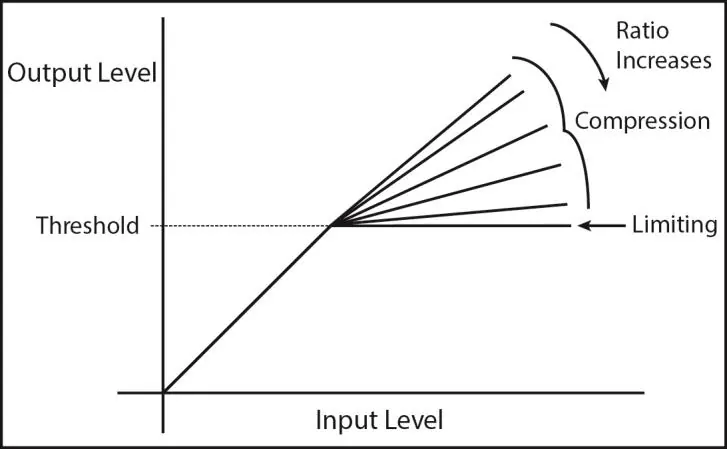
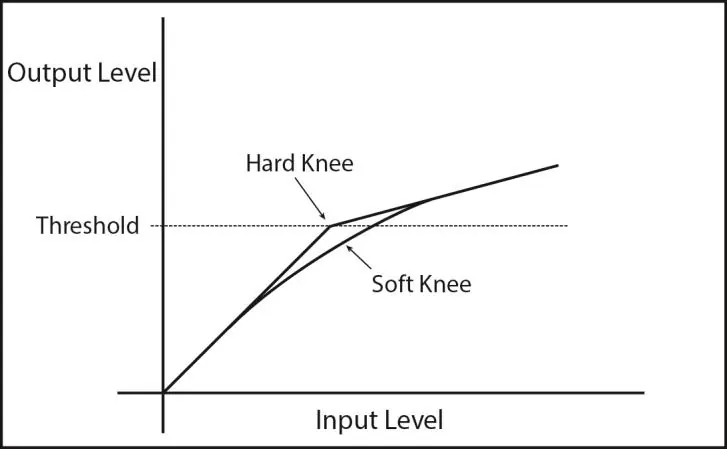
SUSTAIN Knob: In Compressor mode, it adjusts the compression ratio (higher ratio reduces peaks). In Limiter mode, it adjusts the threshold level (lower threshold forces the limiter to act sooner). ATTACK Knob: Sets the time delay before activation. Clockwise increases attack time from fast to slow. RELEASE Knob: Sets the time the compressor takes to stop working after the signal drops below the threshold. Slower settings are smoother; faster settings can cause "pumping" effects. KNEE Button: Toggles between Soft Knee (lit, transparent compression) and Hard Knee (unlit, dramatic compression). LIMITER Button: Engages the limiter with an infinite ratio. Bar Graph LEDs: Indicate real-time gain reduction (3dB per LED).
Drive (Overdrive) Controls
DRIVE Knob: Controls input gain and saturation. TONE Knob: Adjusts the frequency response of the hi-cut filter. VOL Knob: Controls the output volume of the Drive section. DRIVE Footswitch: Engages or bypasses the overdrive section. Note: The pedal must be in Effect mode for the Drive section to be audible.
Swell Control
The Swell function replaces the instrument's normal attack with a sound that fades in slowly. It is located after the overdrive and compressor in the signal chain. The SWELL knob adjusts the fade-in time; setting it to zero bypasses the effect.
Signal Flow and Operation
The pedal supports Mono and Stereo configurations. For Mono, use the Left Input and Left Output. For Stereo, use both Left and Right inputs/outputs. The sidechain sums the left and right signals to control the compressor equally, ensuring stereo balance is maintained. Swell remains separate for left and right inputs.
Tips and Tricks
If you experience "pumping" sounds, try increasing the RELEASE setting, decreasing the ATTACK setting, or decreasing the SUSTAIN setting. If you hear clicking or excessive pop at the start of notes, try decreasing the ATTACK setting, increasing the RELEASE setting, or decreasing the SUSTAIN setting. The Drive section can be used as a clean volume boost by setting the DRIVE knob below 9 o'clock and increasing the Drive VOL knob.
Specifications
- Input Impedance: 1MΩ per input
- Output Impedance: 300Ω per output
- Current Draw: 125mA
- Maximum Input Signal Level: +7.2 dBu
Practical help
Common problems
Audible pumping effect
Increase the RELEASE knob setting, decrease the ATTACK knob setting, or decrease the SUSTAIN knob setting.
Clicking or too much pop at the beginning of notes
Decrease the ATTACK knob setting, increase the RELEASE knob setting, or decrease the SUSTAIN knob setting.
Drive section not audible
Ensure the pedal is in Effect mode (not Bypass mode).
Before use
- Ensure you are using a 9VDC, 125mA (minimum) power supply with a center negative plug.
- Connect your instrument to the MONO/L input if using a single instrument.
- Set the initial knob positions according to your desired effect (e.g., Mild Compression, Warm OD).
- Ensure the pedal is in Effect mode (status LED above BYPASS footswitch is lit) to hear the processing.
Specs in practice
- Input Impedance (1MΩ)
- Standard high impedance suitable for guitar, bass, and keyboards.
- Output Impedance (300Ω)
- Low impedance output suitable for driving long cables or other pedals.
- Current Draw (125mA)
- The amount of power the pedal requires; ensure your power supply can provide at least this amount.
Images and diagrams
- Ratio Diagram: Illustrates how the SUSTAIN knob affects the compression ratio in Compressor mode versus the fixed infinite ratio in Limiter mode.
- Knee Diagram: Shows the difference between Hard Knee (sharper transition) and Soft Knee (smoother transition) compression curves.
Model compatibility
- Compatible with guitar, bass, keyboards, synthesizers, and organs.
- Accepts Boss and Ibanez style AC adapters (9VDC, center negative, at least 150mA).

Manual page author
David Miller
Documentation analyst
Organizes user manual content into clear summaries, with attention to model details, product context, and everyday usability.