Music / Instruments
User Manual for Electro-Harmonix Pitch Fork+ Polyphonic Pitch-Shifter/Harmony Pedal
Complete user guide for the Electro-Harmonix Pitch Fork+ pedal. Learn how to connect, configure pitch-shifting modes, manage presets, and use expression/footswitch controls.
Table of contents
Quick guide from the manual
The Electro-Harmonix Pitch Fork+ is a polyphonic pitch-shifter and harmony pedal. To get started quickly:
- Power: Connect the included 9.6VDC/200mA power supply to the 9V jack. The pedal requires at least 120mA at 9VDC with a center-negative plug.
- Connections: Connect your instrument to the INPUT jack and your amplifier to the MAIN OUTPUT jack using standard 1/4 inch instrument cables.
- Loading Presets: Press the PRESET mode button, turn the VALUE knob to scroll through presets 1-10, and press VALUE to load.
- Creating a User Preset: Select the LIVE template, adjust SHIFT 1 and SHIFT 2 settings, set volume levels, select an empty preset slot, and hold the VALUE knob for two seconds to save.
Device Overview
The pedal features several controls for sound shaping:
- DRY Knob: Controls the volume of the dry signal.
- SHIFT 1 & SHIFT 2 Knobs: Control the volume of the respective effect voices.
- VALUE Knob: A rotary encoder that also functions as a button to enter sub-menus, adjust parameters, and save presets.
- 4-Character Display: Shows current parameter values and menu settings. A dot in the lower right corner indicates an available sub-menu.
- BYPASS Footswitch: Toggles between effect and buffered bypass.
- USER Footswitch: A programmable switch that can be assigned to various functions.
Connections
The pedal includes several I/O options:
- INPUT Jack: 2.2MΩ impedance.
- MAIN & AUX OUTPUT Jacks: 470Ω impedance. The AUX output offers multiple routing options.
- EXP Jack: For expression pedals or control voltage (CV). Requires a TRS cable.
- EXT Jack: For external three-button foot controllers (e.g., EHX Triple Foot Controller). Requires a TRS cable.
Operating Modes
The Pitch Fork+ has eight modes accessed via illuminated buttons:
- AUX: Selects which channels are sent to the AUX output.
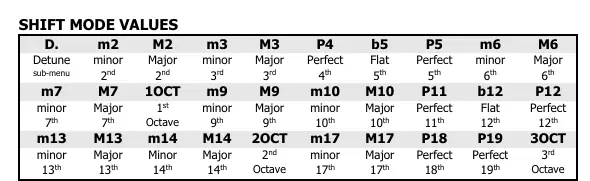
- SHIFT 1 & SHIFT 2: Sets the transposition amount (up to +/- 3 octaves) and detuning.
- EXP: Configures how the expression pedal or CV signal affects frequency, glissando, and volume.
- USER: Programs the function of the USER footswitch.
- X-MOD: Accesses cross-modulation and SHIFT2+DETUNE2 settings.
- PRESET: Manages loading and saving of presets.
- LATCH: Controls BYPASS footswitch behavior (latching or momentary).
Preset Management
The pedal features 100 preset slots. Slots 1-10 are factory presets, while 11-100 are empty. To save a preset, select the desired slot, adjust your settings, and hold the VALUE knob for two seconds. The PRESET button will blink during the saving process and remain lit when complete.
External Footswitch Functions
Using an external controller (like the EHX Triple Foot Controller) via the EXT jack allows for expanded control, including cycling through modes, entering/exiting sub-menus, loading presets, and scrolling through parameter values.
Practical help
Common problems
Preset not saving
Ensure you hold the VALUE knob for two seconds until the PRESET LED stops blinking.
Expression pedal not working
Ensure you are using a TRS cable and that the pedal is compatible (10k linear taper, wiper to TIP, toe-down to RING).
Power issues
Ensure you are using the correct 9VDC, 120mA minimum, center-negative power supply.
Preset reverts to previous value
You must save the preset before pressing the USER footswitch if you are setting up a JUMP chain.
Before use
- Connect 9VDC power supply (center negative, 120mA minimum).
- Connect instrument to INPUT jack.
- Connect MAIN OUTPUT to amplifier.
- If using expression pedal, use a TRS cable.
- If using external footswitch, use a TRS cable.
Specs in practice
- Input Impedance
- 2.2MΩ
- Output Impedance
- 470Ω
- Power Requirements
- 9VDC, 120mA minimum, center-negative plug
Model compatibility
- Expression Pedals: EHX Expression Pedal, EHX Dual Expression, M-Audio EX-P, Moog EP-2 & EP-3, Roland EV-5, Boss FV-500L.
- External Foot Controllers: EHX Triple Foot Controller, Digitech FS3X.

Manual page author
David Miller
Documentation analyst
Organizes user manual content into clear summaries, with attention to model details, product context, and everyday usability.