Electronics / Video Lighting
User Guide for Elgato Key Light
Quick guide for the Elgato Key Light. Learn how to set up, mount, connect to Wi-Fi, use the Control Center app, and reset your device.
Quick answers from the manual
Quick answer
- The Elgato Key Light is a Wi-Fi-controlled studio light. Setup involves mounting the pole to a desk, connecting power, and pairing via the Control Center app on a 2.4 GHz network. p. 2, 3
Key actions
- Mounting the light p. 2
- Pairing with Wi-Fi p. 3
- Resetting the device p. 3
First start
- Download Control Center, power on the light, and use the app to pair. p. 3
Show 4 more answers Show less
Problems and fixes
Light does not connect
Ensure 2.4 GHz network and proximity to router.
p. 3Maintenance and reset
- Hold Reset button (II) for 10 seconds until 3 flashes. p. 3
Technical specifications
| Parameter | Value | Meaning | Pages |
|---|---|---|---|
| Frequency | 2412 - 2472 MHz | Operating frequency range | p. 3 |
| Max Load | 2.00 kg | Maximum weight capacity for the pole | p. 2 |
Where to find it in the PDF
- Regulatory Information p. 1
- Setup and Mounting p. 2
- Software and Reset p. 3
Table of contents
Manual images
Click an image to enlargeQuick guide from the manual
The Elgato Key Light is a Wi-Fi-enabled studio light designed for content creation. This guide covers the essential steps to mount the light, connect it to your network, and control it via the Elgato Control Center app. Ensure your network is 2.4 GHz for successful pairing.
Mounting and Setup
The Key Light includes a desk clamp and an adjustable pole.
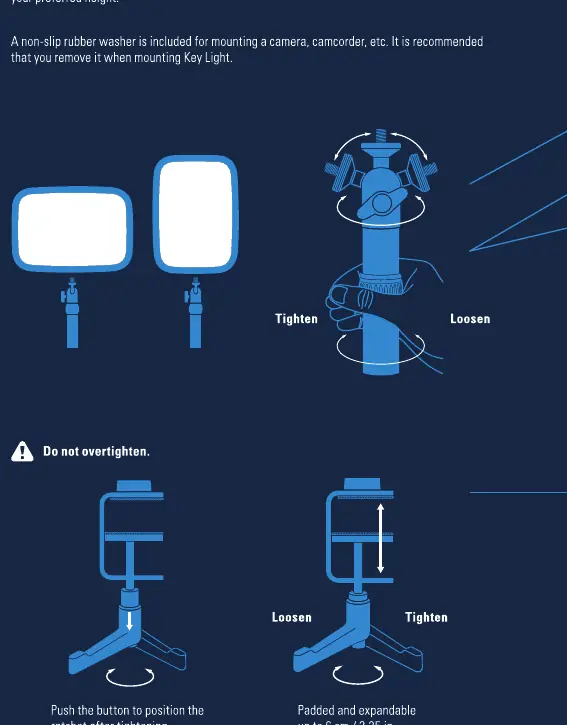
- Mounting: Screw the light directly onto the pole using the integrated socket.
- Desk Clamp: Attach the clamp to your desk. The clamp is padded and expandable up to 6 cm.
- Height Adjustment: Extend the pole to your preferred height (minimum 55 cm, maximum 125 cm).
- Safety: Do not overtighten the clamp or the light mount. The maximum load for the pole is 2.00 kg.
Software Installation and Wi-Fi
The Key Light is controlled via the Control Center app on your computer or mobile device.
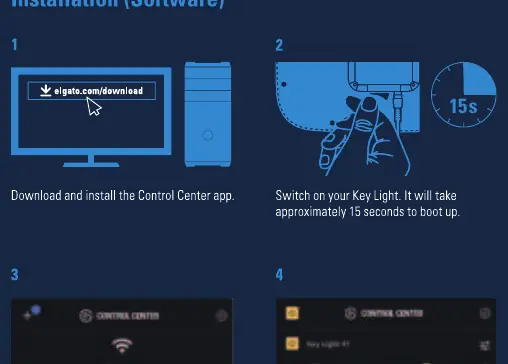
- Download and install the Control Center app from the official Elgato website.
- Power on the Key Light. It will take approximately 15 seconds to boot up.
- Launch the Control Center app.
- Click the + icon to add your Key Light.
- Follow the on-screen instructions to pair the device to your 2.4 GHz Wi-Fi network.
Reset Procedure
If you need to restore factory settings or clear Wi-Fi credentials:
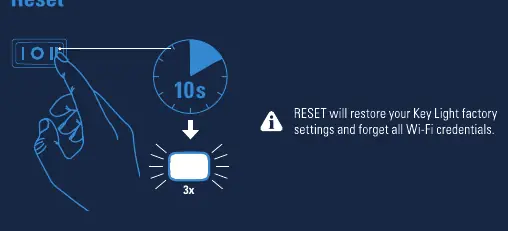
- Power off the Key Light.
- Locate the Reset button (II) on the power switch.
- Press and hold the Reset button for at least 10 seconds until the light flashes 3 times.
- Wait a moment before switching the light back on.
Warnings and Maintenance
- Heat: The light may become hot during prolonged use; handle with care.
- Ventilation: Do not cover the product or block ventilation holes.
- Environment: Do not place near flammable materials (curtains, carpets) or expose to direct sunlight.
- Cleaning: Keep the light free from dirt and dust. Wipe with a soft, moist cloth and mild detergent. Do not use benzene, thinner, or other volatile agents.
- Stability: Always mount on a level, stable surface to prevent tipping.
Technical Specifications
- Frequency Range: 2412 - 2472 MHz
- Max e.i.r.p power:< 20 dBm
- Operating Temperature: 0 °C - 45 °C
Manufacturer information
Elgato
Practical help
Common problems
Light not connecting to Wi-Fi
Ensure you are using a 2.4 GHz network. Check that the Key Light is within range of your router.
Light is unstable
Ensure the desk clamp is tightened properly and the pole is on a level, stable surface.
Need to clear Wi-Fi settings
Perform a factory reset by holding the Reset (II) button for 10 seconds until the light flashes 3 times.
Before use
- Check that your desk surface is stable for the clamp.
- Ensure a 2.4 GHz Wi-Fi network is available.
- Download the Control Center app from the Elgato website.
- Verify the light is within range of your router.
Show more Show less
Specs in practice
- Frequency range
- 2412 - 2472 MHz (Required for Wi-Fi operation)
- Maximum load
- 2.00 kg (Do not exceed this weight on the pole)
- Operating temperature
- 0 °C - 45 °C (Safe operating environment)
Images and diagrams
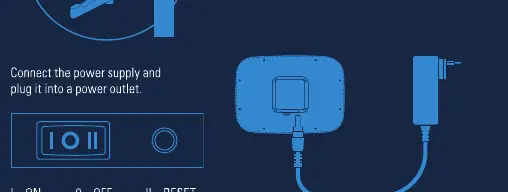
- The power switch has three positions: I (ON), 0 (OFF), and II (RESET).
- The desk clamp can be adjusted to fit surfaces up to 6 cm thick.
Model compatibility
- Requires 2.4 GHz Wi-Fi network with WPA or WPA2 encryption.
- Control Center app is required for initial pairing and advanced settings.

Manual page author
Michael Turner
Technical manual editor