Electronics / Video Lighting
User Guide for Elgato Ring Light
Comprehensive user guide for the Elgato Ring Light. Learn how to assemble the Master Mount S, adjust brightness and color temperature, install the Control Center software, and perform a factory reset.
Quick answers from the manual
Quick answer
- The Elgato Ring Light is a professional lighting solution controlled via the Control Center app or physical buttons. It features adjustable brightness and color temperature. p. 2, 3
Key actions
- Setup the Ring Light p. 2
- Adjust Brightness p. 2
- Reset the device p. 3
First start
- Download Control Center app, plug in light, launch app, and add accessory. p. 3
Show 4 more answers Show less
Problems and fixes
Device not responding or Wi-Fi issues
Perform a factory reset by holding the Reset button for 10 seconds.
p. 3Maintenance and reset
- Factory Reset p. 3
Technical specifications
| Parameter | Value | Meaning | Pages |
|---|---|---|---|
| Max Load | 2.00 kg / 4.50 lbs | Maximum weight capacity for the mount. | p. 2 |
| Mount Height | 33 cm - 54 cm | Adjustable height range. | p. 2 |
Where to find it in the PDF
- Setup and Adjustments p. 2
- Software and Reset p. 3
Table of contents
Manual images
Click an image to enlargeQuick Guide
The Elgato Ring Light is designed for professional lighting setups. You can control it using the physical buttons on the back of the unit or via the Control Center app on your computer or mobile device. For the best experience, install the Control Center app to fine-tune brightness and color temperature.
Hardware Setup
Follow these steps to assemble your Ring Light:
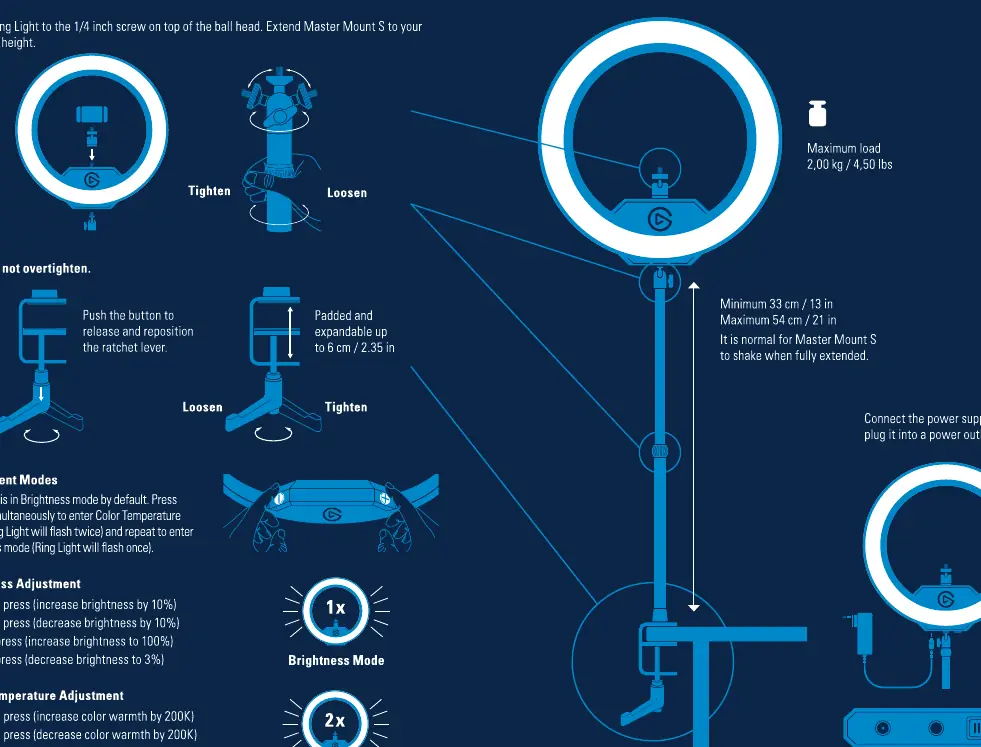
- Secure the Ring Light to the 1/4 inch screw located on top of the ball head.
- Attach the assembly to the Master Mount S.
- Extend the Master Mount S to your preferred height (Minimum 33 cm / 13 in, Maximum 54 cm / 21 in).
- Use the tightening mechanisms to secure the mount in place. Do not overtighten.
- Connect the power supply and plug it into a power outlet.
Adjustment Modes
The Ring Light features two primary adjustment modes:
- Brightness Mode: Adjusts the light intensity.
- Color Temperature Mode: Adjusts the warmth of the light (2900K to 7000K).
To switch between modes, press the + and - buttons simultaneously. The Ring Light will flash twice to indicate Color Temperature mode and once to indicate Brightness mode.
Brightness Adjustment
- Single press +: Increase brightness by 10%.
- Single press -: Decrease brightness by 10%.
- Long press +: Increase brightness to 100%.
- Long press -: Decrease brightness to 3%.
Color Temperature Adjustment
- Single press +: Increase color warmth by 200K.
- Single press -: Decrease color warmth by 200K.
- Long press +: Increase color warmth to 2900K.
- Long press -: Decrease color warmth to 7000K.
Software Installation
To control the Ring Light from your computer or mobile device:
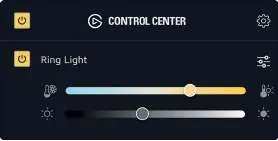
- Download and install the Control Center app from the official Elgato website for Mac, Windows, iOS, or Android.
- Switch on the Ring Light and wait approximately 10 seconds for it to boot up.
- Launch the Control Center app and click the + icon to add the Ring Light.
- Follow the on-screen instructions to pair the device with your Wi-Fi network.
Reset Procedure
If you need to restore factory settings and clear Wi-Fi credentials:
- Switch off the Ring Light.
- Press and hold the RESET button (II) for at least 10 seconds.
- The light will flash 3 times.
- Wait a moment before switching the Ring Light on again.
Safety and Maintenance
- The Ring Light may become hot during prolonged use; handle with care.
- Do not cover the Ring Light, especially its ventilation holes.
- Keep the device away from flammable materials, curtains, or carpets.
- Clean the device with a soft cloth moistened with a little water and mild, neutral detergent. Do not use benzene or thinner.
- Ensure the Master Mount S is placed on a level, stable surface to prevent tipping.
Manufacturer information
Elgato
Practical help
Common problems
Ring Light not connecting to Wi-Fi
Ensure you are using the Control Center app on a compatible device. If pairing fails, perform a factory reset by holding the Reset button for 10 seconds.
Light is unstable
Ensure the Master Mount S is fully extended and tightened on a stable, level surface.
Before use
- Ensure the Master Mount S is securely attached to a stable surface.
- Check that the Ring Light is securely fastened to the 1/4 inch screw.
- Download the Control Center app for your device.
- Verify the power outlet is functional.
Show more Show less
Specs in practice
- Brightness Mode
- Controls the light intensity from 3% to 100%.
- Color Temperature Mode
- Controls the light warmth from 2900K to 7000K.
Images and diagrams
- The setup diagram illustrates the assembly of the Ring Light onto the Master Mount S and the tightening points.
- The control diagram shows the physical buttons on the back of the unit (I = ON, 0 = OFF, II = RESET).
Model compatibility
- Compatible with Mac, Windows, iOS, and Android via the Control Center app.
- Requires Wi-Fi for initial pairing.

Manual page author
Michael Turner
Technical manual editor