Electronics / Stream Controllers
User Manual for Elgato Stream Deck Pedal
Quick guide for the Elgato Stream Deck Pedal. Learn how to install the software, connect the device, customize actions, adjust pedal pressure, and convert the middle pedal into a footrest.
Quick answers from the manual
Quick answer
- The Elgato Stream Deck Pedal is a programmable controller. To set it up, download the Stream Deck app, connect the device directly to a USB port, and configure actions by dragging and dropping them onto the pedals in the software. p. 2, 3
Key actions
- Adjusting pedal pressure p. 4
- Converting middle pedal to footrest p. 4
First start
- Download and install the Stream Deck app, then connect the pedal directly to a USB port. p. 2
Show 1 more answers Show less
Where to find it in the PDF
- Regulatory Information p. 1
- Installation and Software Setup p. 2, 3
- Hardware Adjustments p. 4
Table of contents
Manual images
Click an image to enlargeQuick Start Guide
The Elgato Stream Deck Pedal is a programmable controller designed to trigger actions on your computer. To begin using the device, you must install the companion software and connect the hardware directly to your computer.
Software Installation and Configuration
The Stream Deck Pedal requires the Stream Deck app to function and be configured.
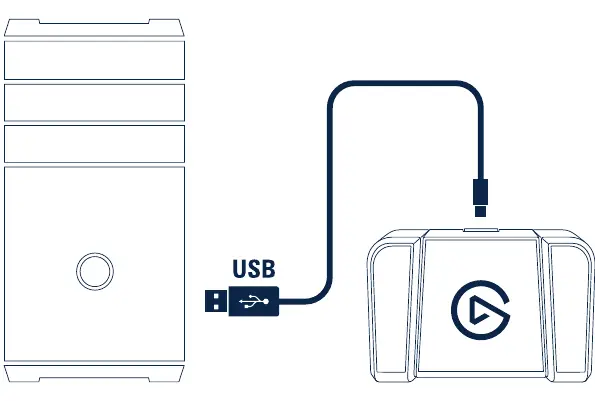
- Download: Visit elgato.com/download to get the latest version of the Stream Deck app.
- Connection: Connect the Stream Deck Pedal directly to a USB port on your PC or Mac. Do not use a USB hub, as it may cause connectivity issues.
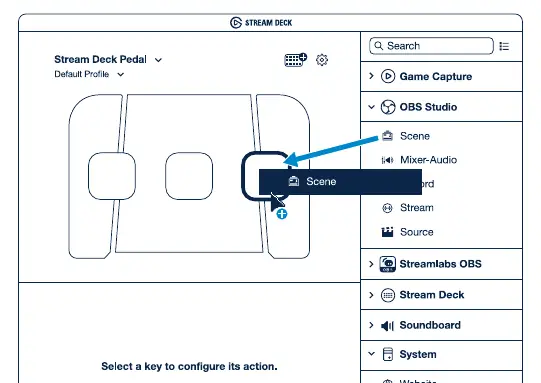
- Configuration: Launch the app to customize your pedal. You can drag and drop actions from the right panel onto your desired pedals on the left.
- Management: Right-click on icons within the software to copy, delete, or move them to different pedals.
Hardware Adjustments
The Stream Deck Pedal allows for physical customization to suit your comfort and usage preferences.
Adjusting Pedal Pressure
You can change the resistance of the pedals by swapping the internal springs.
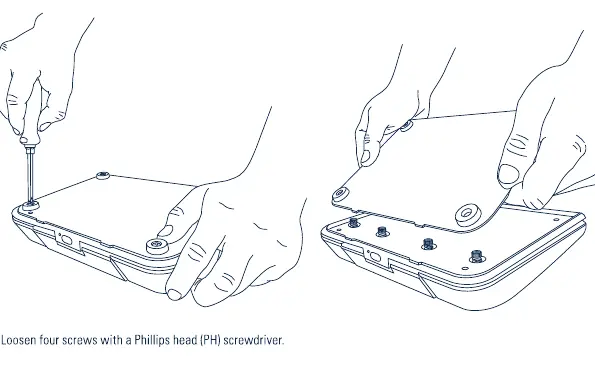
- Loosen the four screws on the pedal using a Phillips head (PH) screwdriver.
- Remove the pedal cover.
- Replace the existing springs with the desired set (Soft, Medium, or Hard) provided in the box.
- Reassemble the pedal.
Using the Middle Pedal as a Footrest
If you prefer to use the middle pedal as a static footrest rather than a button:
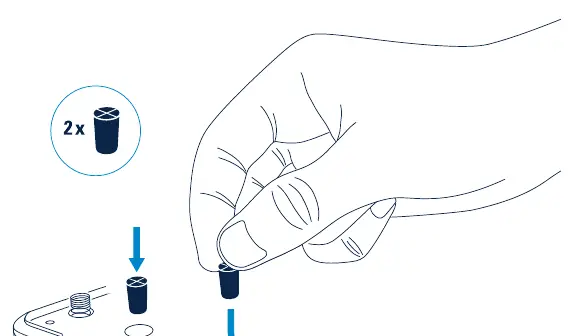
- Insert the included stoppers into the designated slots on the middle pedal.
- This will lock the pedal in place, preventing it from being pressed.
Official resources from the manual
Manufacturer information
Elgato
Practical help
Common problems
Device not recognized or unstable connection
Connect the Stream Deck Pedal directly to a USB port on your PC or Mac. Do not use a USB hub.
Pedal feels too stiff or too soft
Adjust the pedal pressure by loosening the four screws on the pedal and swapping the internal springs with the provided Soft, Medium, or Hard tension sets.
Before use
- Download and install the Stream Deck app from elgato.com/download
- Ensure you have a direct USB connection to your computer
- Have a Phillips head (PH) screwdriver ready if you intend to adjust pedal tension
Show more Show less
Specs in practice
- Spring Tension Sets
- Included components to customize pedal resistance (Soft, Medium, Hard).
- Middle Pedal Stopper
- Included components to lock the middle pedal, converting it into a static footrest.
Images and diagrams
- The manual illustrates the process of loosening screws to access the internal springs for tension adjustment.
- The manual shows how to insert stoppers into the middle pedal to lock it.
Model compatibility
- Compatible with PC and Mac.
- Requires the Stream Deck app for configuration.

Manual page author
Michael Turner
Technical manual editor