Power / Power Management Systems
Owner's Manual for Enerdrive B-TEC Lithium Battery
Quick guide for the Enerdrive B-TEC Lithium Battery. Learn about installation, charging requirements, parallel connections, BMS reset procedures, and technical specifications.
Quick answers from the manual
Quick answer
- The Enerdrive B-TEC is a LiFePO4 battery requiring specific charging profiles (14.2-14.6V). It features a BMS for protection and smartphone monitoring. It must be installed upright in a dry, cool location. p. 1, 5, 10
Key actions
- Restarting the battery p. 8
- Parallel connection p. 11
Problems and fixes
Battery shut down
Charge within 14 days and use reset button procedure.
p. 7, 8Show 3 more answers Show less
Maintenance and reset
- Reset button procedure p. 8
Technical specifications
| Parameter | Value | Meaning | Pages |
|---|---|---|---|
| Nominal Voltage | 12.8V / 25.6V / 38.4V | Operating voltage | p. 13, 14 |
| Charge Voltage | 14.2-14.6V (12V) | Required charge voltage | p. 5, 13 |
Where to find it in the PDF
- Installation p. 4
- Charging p. 5
- Restarting p. 8
- Specifications p. 13, 14
Table of contents
Manual images
Click an image to enlargeQuick guide from the manual
The Enerdrive B-TEC Lithium (LiFePO4) battery is designed for deep cycle applications with integrated smartphone monitoring. Key operational requirements include using a compatible LiFePO4 charger, ensuring proper cable sizing for inverter loads, and maintaining the battery in a dry, cool, and upright position. If the battery shuts down due to low voltage, a reset procedure is required to restore power.
Installation
The battery must be installed in a dry and cool location. Enerdrive recommends the following installation guidelines:
- Orientation: Install in an upright position.
- Clearance: Maintain at least 25mm of clear space around the battery.
- Mounting: Use supplied battery trays and straps with sufficiently rated fasteners.
- Prohibited Areas: Do not install in vehicle engine bays, high heat environments, wet areas (e.g., boat decks, open ute trays), or compartments dedicated to gas storage.
- Safety: Avoid mounting near metallic service lines (LPG, diesel, petrol) to prevent accidental shorting.
Connections
Proper connection is critical for system safety and performance:

- Terminals: It is recommended to connect no more than four terminals to a battery terminal. Use a fuse block and negative busbar if more connections are required.
- Cable Sizing: Use cables of adequate size for system demands. Examples: 1000W Inverter (35mm²), 2000W Inverter (70mm²), 3000W Inverter (95mm²).
- Hardware: Use spring washers on terminal bolts to apply pressure to lugs. Ensure the main battery cable lug is mounted directly onto the battery terminal with no washers between them.
Charging
Lithium batteries require specific charging profiles to ensure longevity:
- Charger Type: Must use a charger with a lithium LiFePO4 setting (AC chargers, DC to DC chargers, or solar controllers).
- Voltage Settings: Set charge voltage to 14.2 - 14.6V and float voltage to 13.5 - 13.6V (for 12V models).
- Prohibited: Do not use chargers with "Pulse Stage" or "Equalisation Mode". Do not connect directly to an alternator or a VSR (Voltage Sensitive Relay).
Restarting Your Battery
If the DC system shuts down due to the internal low voltage disconnect, follow this procedure:
- Turn off all DC and AC loads.
- Connect charging source(s) and switch ON.
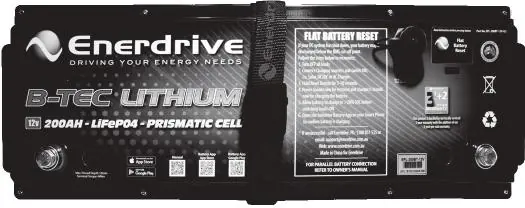
- Hold the "Reset" button for 5 seconds, release, and perform a quick press.
- Release and wait 7 seconds.
- Power will be restored and charging will commence after a few seconds.
- Once the State of Charge (SOC) is above 20%, loads can be switched on.
Using the Smart Phone Battery Monitor App
The battery incorporates a wireless monitoring system. Download the Android or Apple app to monitor capacity, voltage, current, SOC, state of health, temperature, and alarms. The red warning light on the app is an indicator, not necessarily a fault condition. The default password to change the Bluetooth name is 1234.
Warnings
- Do not use for cranking/starting applications.
- Do not connect batteries in series.
- Do not disassemble the battery.
- If the battery emits a peculiar smell, heating, or distortion, stop using it immediately.
- If the battery leaks and gets into eyes or on skin, rinse with clean water and seek medical attention.
Manufacturer information
Enerdrive
Practical help
Common problems
Battery shut down due to low voltage
Charge the battery within 14 days to prevent permanent damage. Use the reset button procedure if the battery is equipped with one.
Cannot connect in series
Series connection is not supported. Contact Enerdrive for higher voltage solutions.
Battery not charging
Ensure the charger is set to LiFePO4 mode (14.2-14.6V). Do not use pulse or equalization modes.
Before use
- Ensure installation location is dry and cool
- Verify charger has a LiFePO4 setting
- Check cable sizing for inverter load
- Ensure battery is installed in an upright position
- Verify no metallic service lines are near the battery
Show more Show less
Specs in practice
- Nominal Voltage
- 12.8V, 25.6V, or 38.4V depending on the specific model.
- Charge Voltage
- 14.2-14.6V (for 12V models) is required for optimal charging.
- Float Voltage
- 13.5-13.6V (for 12V models) is the recommended standby voltage.
Images and diagrams
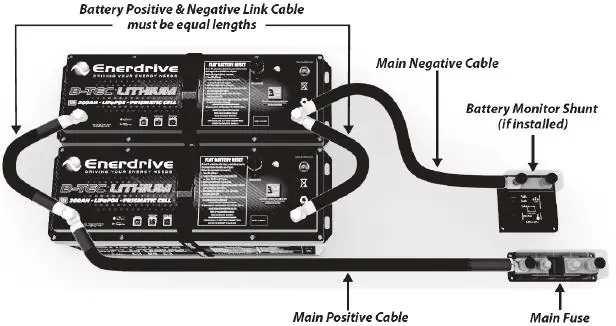
- Parallel connection diagram: Shows positive and negative cables from different batteries connected to the system to ensure equal current draw.
Model compatibility
- Not for cranking/starting applications
- Do not connect in series
- Do not charge directly from an alternator
- Do not use VSR (Voltage Sensitive Relay) systems

Manual page author
David Miller
Documentation analyst