Power / Solar Inverters
Enerdrive ePRO Universal Remote Control
Quick guide for the Enerdrive ePRO Universal Remote Control. Learn how to install, operate, adjust charging currents, and configure settings for your inverter/charger system.
Table of contents
Quick guide from the manual
This document provides instructions for the Enerdrive ePRO Universal Remote Control (URC). It is designed to control Enerdrive ePRO Combi, TBS Powersine, and TBS Omnicharge devices using the ePROLink protocol. The URC allows you to monitor parameters, turn the device on/off, and adjust specific charging settings.
Installation
Safety Warning: Before removing the connection compartment panel, disconnect the battery and unplug all AC sources. Leave the power switch in position I for at least 10 seconds before proceeding.
- Mount the URC in a dry location, away from direct sunlight.
- Ambient temperature must be between -10°C and +50°C.
- Do not apply excessive pressure to the display window.
- Use a straight-wired CAT5 Ethernet patch cable for connection.
- Important: Never connect the ePROLink connector to standard Ethernet networks or eLITE/ePRO Battery Monitor quick connection kits.
Display and control overview
The URC features a graphical display and a rotary controller knob for navigation. The rotary knob is used to select values, browse lists, and change numeric settings. The power button activates the power options menu or turns off the device when pressed for 3 seconds. The alarm LED flashes red if an error occurs, and the power LED lights green when the device is active.
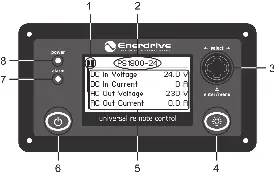
General functionality
When the ePRO device is switched on, the URC starts up automatically. You can browse parameters by turning the rotary controller knob. If ambient light is poor, use the backlight button to illuminate the display. To turn off the device or change operating modes, press the power button once to access the power options menu.
Charger only functionality
When connected to a battery charger, you can dynamically reduce the Maximum Charging Current (MCC). This is useful when AC source power is limited. Press the rotary controller knob once to access the MCC menu, adjust the percentage of the maximum rated charge current, and press the knob again to save the setting.
Combi only functionality
When connected to a combi device, you can adjust both the Maximum Charging Current (MCC) and the AC Input Current Limit. Press the rotary controller knob to access the MCC menu, then press it again to access the AC In Current Limit screen. Adjust the values as needed to prevent exceeding available AC power.
Setup
To access the setup menu, press and hold the rotary controller knob for three seconds. Select Remote Control Setup to modify properties such as display contrast. Save changes by pressing the rotary controller knob for three seconds. If no buttons are touched for 90 seconds, the URC will exit the setup screen without saving changes.
Technical specifications
- Nominal operating voltages: 12VDC or 24VDC
- Protection class: IP30
- Operating temperature: -10°C to +50°C
- Storage temperature: -20°C to +65°C
- Dimensions: 130 x 70 x 36 mm
- Panel cutout: 113 x 61 mm
- Weight: 140 grams
Manufacturer information
Enerdrive
Practical help
Common problems
Alarm LED flashing red
An error has occurred. Check the display for the specific error type message.
Device not turning on
Ensure the main power switch on the inverter/charger is on and the battery is connected.
Display contrast is poor
Enter the URC setup menu (hold knob for 3 seconds) and adjust the display contrast property.
Device draws current in standby
The device draws a small current to detect button presses. For long-term storage, turn off the device using the local main power switch.
Before use
- Disconnect battery and unplug AC sources before installation.
- Ensure the mounting location is dry and between -10°C and +50°C.
- Use a straight-wired CAT5 Ethernet patch cable.
- Verify the device is an Enerdrive ePRO Combi, TBS Powersine, or TBS Omnicharge model.
- Do not connect to standard Ethernet networks.
Specs in practice
- MCC (Maximum Charging Current)
- The maximum current the charger will output, adjustable as a percentage to limit AC power consumption.
- AC In Current Limit
- Limits the AC input current drawn by the combi device to prevent overloading the AC source.
Images and diagrams
- The rotary controller knob (3) is the primary interface for selecting values and browsing menus.
- The power button (6) is used to access power options or turn the device off (hold 3s).
- The alarm LED (7) indicates system errors.
Model compatibility
- Compatible with Enerdrive ePRO Combi, TBS Powersine, and TBS Omnicharge series.
- Not compatible with eLITE or ePRO Battery Monitor quick connection kits.
- Supports cable lengths up to 50 meters.

Manual page author
Michael Turner
Technical manual editor
Reviews PDF manuals for structure, safety notes, and practical product details so readers can find the right information quickly.