Home Appliances / Dehumidifiers
Eurolamp 20L Dehumidifier User Manual
Quick guide for the Eurolamp 20L Dehumidifier. Learn about installation, operation modes, maintenance, and troubleshooting steps for models 300-95008 and 300-95009.
Quick answers from the manual
Quick answer
- The Eurolamp 20L Dehumidifier is designed to remove excess humidity in daily life and assist in drying clothes. It features multiple modes (Automatic, Continuous, Dry Clothes, Air Clean) and a timer function. p. 1, 6, 7
Key actions
- Emptying the water tank p. 10
- Cleaning the air filter p. 14
First start
- Plug in the unit, ensure the water tank is properly set, and press the Stand-by button. p. 10
Problems and fixes
No operation
Check power connection, empty water tank, or ensure tank is seated correctly.
p. 15Maintenance and reset
- Clean the air filters every 2 weeks. p. 14
Technical specifications
| Parameter | Value | Meaning | Pages |
|---|---|---|---|
| Dehumidify Capacity | 20L/day | At 30°C/80% RH | p. 4 |
| Rated Input Power | 320W | At 27°C/60% RH | p. 4 |
Where to find it in the PDF
- Installation p. 5
- Controls p. 6
Table of contents
Manual images
Click an image to enlargeQuick guide from the manual
This dehumidifier is designed to remove excess humidity in daily life and assist in drying clothes. It is not intended for use as an exclusive air cleaner or for keeping humidity levels extremely low (below 50%). Before operating, ensure the unit is placed on a flat, stable surface and that the water tank is correctly inserted.
Installation
For efficient operation, maintain the following clearances around the unit:
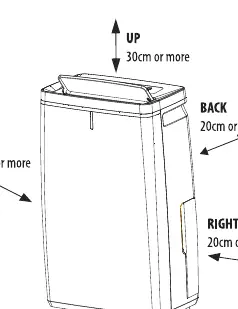
- Up: 30cm or more
- Back: 20cm or more
- Left: 20cm or more
- Right: 20cm or more
- Front: 10cm or more
If the unit causes noise interference with TVs or radios, keep it at least 70cm away.
Operation
The control panel allows you to select different modes and set a timer:
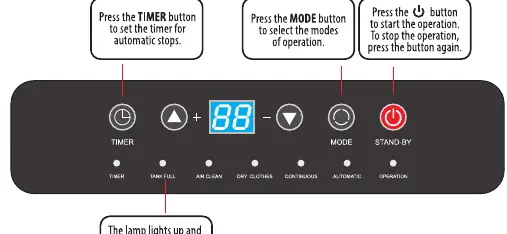
- Automatic: Stops dehumidifying when humidity is below 55%.
- Continuous: Ideal for closets or drying clothes.
- Dry Clothes: High-intensity mode for faster drying.
- Air Clean: Circulates air without dehumidifying.
To start, plug in the unit, ensure the tank is set properly, and press the Stand-by button. You can use the Timer button to set an automatic stop time (0-24 hours).
Maintenance
Regular maintenance ensures optimal performance:
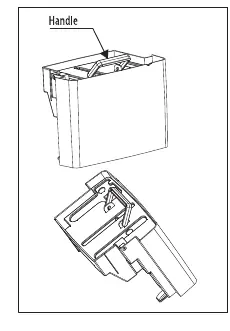
- Water Tank: Empty when full. The unit will stop automatically and a buzzer will sound.
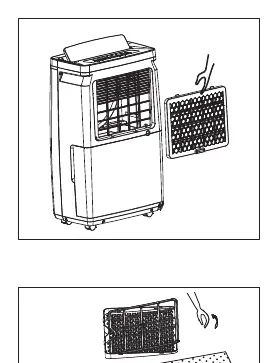
- Air Filters: Clean the back and side air intakes every 2 weeks. Use a vacuum cleaner or wash with neutral detergent and let dry completely.
- Cleaning: Wipe the unit with a dry, soft cloth. Do not use gasoline, thinner, or liquid cleaners.
Troubleshooting
If the unit does not operate, check the following:
- Ensure the power plug is connected.
- Check if the water tank is full or not positioned correctly.
- Ensure all air flaps are open.
- If the dehumidified volume is low, check if filters are dirty or air openings are blocked.
Manufacturer information
EUROLAMP S.A.
Practical help
Common problems
Unit does not operate
Check if the power plug is disconnected, the water tank is full, the tank is not positioned correctly, or if all flaps are closed.
Dehumidified volume is low
Check if filters are dirty, air openings are blocked, or if the unit is set to 'Air Clean' mode.
Loud noise during operation
Ensure the unit is installed on a flat and stable floor.
Washed clothes are not drying
Ensure clothes are exposed to the airflow and the room temperature is not too low.
Before use
- Ensure the unit is on a flat, stable surface.
- Check that the water tank is properly inserted.
- Ensure the air filter is installed.
- Verify the power supply is 220-240V.
- Check that the air outlet flap is open.
Specs in practice
- Dehumidify Capacity
- 20L/day at 30°C/80% RH; 10L/day at 27°C/60% RH.
- Rated Input Power
- 320W (at 27°C/60% RH).
- Airflow Volume
- 195m³/h.
Images and diagrams
- The unit features an upward air outlet and a back air intake.
- The control panel includes buttons for Timer, Mode, and Stand-by.
- The water tank is located at the back and can be removed by pulling it gently.
Model compatibility
- Not suitable for keeping humidity very low (approx 50% or less).
- Not intended for use as an exclusive air cleaner.

Manual page author
David Miller
Documentation analyst
Organizes user manual content into clear summaries, with attention to model details, product context, and everyday usability.