Home Appliances / Dehumidifiers
User Manual for PureMate 20L Dehumidifier PM-480
Quick guide for the PureMate 20L Dehumidifier (PM-480). Learn how to operate, set modes, clean filters, and troubleshoot common issues with this 20L/day unit.
Quick answers from the manual
Quick answer
- The PureMate PM-480 is a 20L/day dehumidifier. It features multiple modes (Normal, Continuous, Strong, Dry Clothing), a 5.5L water tank, and auto-restart functionality. p. 1, 14
Key actions
- Emptying the water tank p. 10
- Cleaning the filters p. 12
- Activating Child Lock p. 9
Problems and fixes
No operation
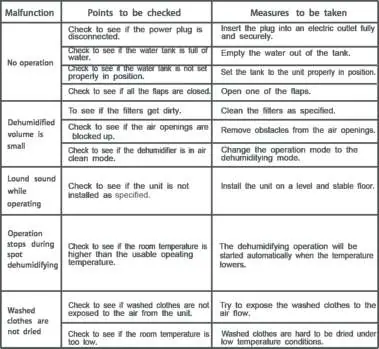
Check power plug, empty water tank, ensure tank is seated properly, open flaps.
p. 14Maintenance and reset
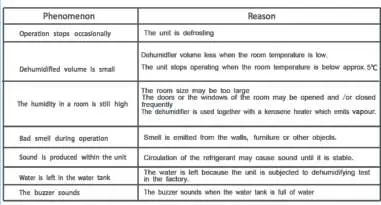
- The unit features an automatic defrost function that stops the compressor when frost builds up. p. 9
Technical specifications
| Parameter | Value | Meaning | Pages |
|---|---|---|---|
| Power Consumption | 440W | Power usage during operation. | p. 13 |
| Net Weight | 12 kg | Weight of the unit. | p. 13 |
Where to find it in the PDF
- Safety Instructions p. 2, 3, 4
- Operating Instructions p. 7, 8, 9
- Troubleshooting p. 14, 15
Table of contents
Manual images
Click an image to enlargeQuick guide from the manual
The PureMate 20L Dehumidifier (PM-480) is designed for indoor use to reduce humidity levels. Key safety precautions include keeping the unit in an upright position, ensuring it is not used in temperatures below 5°C, and unplugging the device before cleaning or maintenance. Do not use extension cables or cover the airflow.
Components
The unit features a control panel on top, a water tank at the back, and castor wheels for mobility. The front includes a humidity indicator light: Red (>70% humidity), Green (50%-70%), and Blue (<50%).
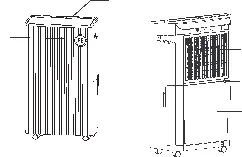
Control Panel and Modes
The control panel allows you to select various modes:
- Normal: Machine works to reach the set humidity level (30%-80%).
- Continuous Dehumidifying: Runs continuously with low fan speed.
- Strong Dehumidifying: Runs continuously with high fan speed to target 30% humidity.
- Dry Clothing: Operates at high fan speed to assist in drying clothes.
- Air Circulation: Circulates air without dehumidifying.
Operating Instructions
Power: Press the Power button to turn the unit on or to standby.
Timer: Set a turn-on or shut-off timer between 1-24 hours by pressing the timer button and using the arrow keys.
Child Lock: Press both the Auto Swing and Air Clean buttons for a few seconds to activate or deactivate. The LED will display 'LC'.
Auto-Restart: If power is cut, the unit will automatically restart with previous settings when power resumes (unless a timer was set).
Water Tank and Drainage
When the water tank is full, the indicator illuminates, the buzzer beeps 20 times, and the unit stops. To empty: pull the tank out from the back, use the handle to lift and tilt, empty, and reinsert. For continuous drainage, connect a hose to the drain hole and ensure it leads to a suitable outlet (e.g., a bucket or drain).
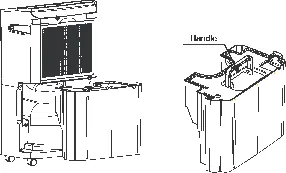
Cleaning and Maintenance
Regularly clean the filters to maintain efficiency. Remove the back cover, then vacuum or pat the filters to remove dust. If excessively dirty, remove the carbon filter and wash the back grid and filter cover with warm soapy water.
Troubleshooting
If the unit malfunctions, check the power connection, ensure the water tank is correctly positioned, and verify that air openings are not blocked. If the unit is noisy, ensure it is on a level, stable floor. The unit may stop occasionally for the automatic defrost function.
Specifications
The PM-480 has a 20L/day extraction capacity, a 5.5L water tank, and operates between 5°C and 32°C. It uses R290 refrigerant (60g) and requires a 220V-240V power supply.
Practical help
Common problems
No operation
Check if the power plug is connected, the water tank is full or misaligned, or if the flaps are closed.
Dehumidified volume is small
Check if filters are dirty, air openings are blocked, or if the unit is in the wrong operation mode.
Loud sound while operating
Ensure the unit is installed on a level and stable floor.
Operation stops occasionally
The unit is likely performing an automatic defrost cycle.
Before use
- Ensure the unit is in an upright position.
- Check that the water tank is correctly inserted.
- Verify the room temperature is between 5°C and 32°C.
- Ensure the power supply matches the 220V-240V specification.
- Check that air inlets and outlets are not obstructed.
Specs in practice
- Maximum Extraction
- 20L/Day (measured at 30°C/80% RH).
- Water Tank Capacity
- 5.5L total capacity.
- Operating Temperature
- 5°C - 32°C. Do not use below 5°C to prevent ice buildup.
Images and diagrams
- The control panel includes indicators for full water, timer, sleep, dry clothes, air circulation, swinging, child lock, defrost, and various dehumidifying modes.
- The back of the unit contains the air inlet and the continuous drainage hose connection.
Model compatibility
- Do not use extension cables.
- Not suitable for outdoor use.
- Do not use in temperatures below 5°C.

Manual page author
Michael Turner
Technical manual editor
Reviews PDF manuals for structure, safety notes, and practical product details so readers can find the right information quickly.