Home Appliances / Coffee Equipment
User Manual for CREATE Air Dry Connect Dehumidifier
Quick guide for the CREATE Air Dry Connect dehumidifier. Learn about installation, control panel settings, Wi-Fi setup, maintenance, and troubleshooting.
Quick answers from the manual
Quick answer
- The CREATE Air Dry Connect is a residential dehumidifier. It features Auto, Continuous, and Night modes, Wi-Fi connectivity via the CREATE HOME app, and a 3-minute compressor protection delay. p. 10, 11, 14
Key actions
- Empty the water tank when the 'FL' message appears. p. 13
First start
- Place on a firm, level surface with 30cm clearance. If tilted >45°, wait 24 hours before turning on. p. 10, 11
Problems and fixes
Device does not work
Check power, empty tank, or check temperature range.
p. 15Error codes
| Code | Meaning | Action | Pages |
|---|---|---|---|
| FL | Water tank is full. | Empty the water tank. | p. 13, 15 |
| E1/E2 | Sensor problem. | Change the sensor. | p. 15 |
Maintenance and reset
- Clean the air filter every two weeks. p. 14
Technical specifications
| Parameter | Value | Meaning | Pages |
|---|---|---|---|
| Operating Temperature | 5°C - 35°C | Safe operating range. | p. 10 |
Where to find it in the PDF
- Parts List p. 10
- Control Panel p. 11, 12
- Troubleshooting p. 15
Table of contents
Manual images
Click an image to enlargeImportant Information from the Manual
The CREATE Air Dry Connect is a residential dehumidifier designed for indoor use. It uses R-290 (propane) refrigerant. Safety Warning: If the unit is tilted more than 45°, allow it to stand upright for at least 24 hours before operating. The unit operates within a temperature range of 5°C to 35°C. It features a 3-minute compressor protection delay.
Parts of the Device
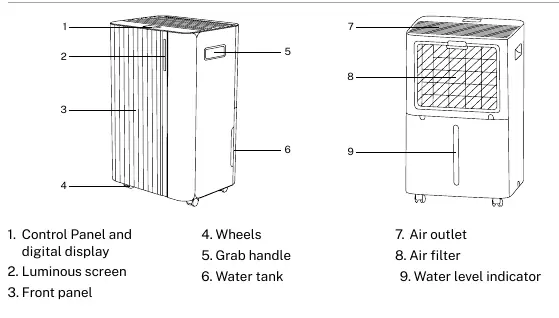
- Control Panel and digital display
- Luminous screen
- Front panel
- Wheels
- Grab handle
- Water tank
- Air outlet
- Air filter
- Water level indicator
Installation
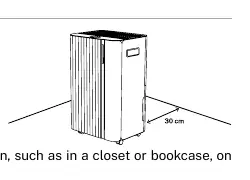
Place the unit on a firm, level surface with at least 30 cm of free space around it to ensure proper air circulation. Do not install the unit in rooms smaller than 4 m² or where flammable gas may leak. Avoid heat sources, direct sunlight, and excessive dust.
Operation
Control Panel
The control panel allows you to manage the following settings:
- Power button: Turns the device on and off.
- Mode button: Switch between Auto and Continuous modes. Long press for Night mode.
- Settings button: Adjust humidity (30-80%) or time (1-24h).
- Timer button: Set, check, or cancel timing. Long press for Wi-Fi configuration.
- Gear button: Switch between low and high fan speeds.
- Safety lock button: Activate or deactivate the child lock.
Modes
- Auto Mode: The fan and compressor operate based on the set humidity. If ambient humidity is 3% higher than the set humidity, the unit starts. If 3% lower, it stops.
- Continuous Mode: The device operates continuously regardless of ambient humidity.
- Night Mode: Indicators dim and the display turns off if no operation occurs for 10 seconds.
Drainage
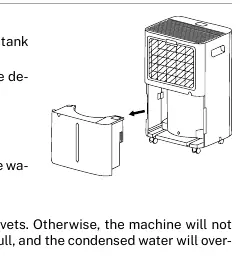
When the water tank is full, the device will buzz, the full tank icon will light up, and "FL" will appear on the screen. Empty the tank and replace it correctly. For continuous drainage, connect a drain pipe to the outlet, ensuring the pipe is lower than the outlet and not bent.
Cleaning and Maintenance
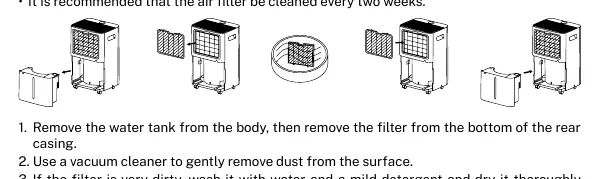
It is recommended to clean the air filter every two weeks. Remove the water tank, take out the filter from the rear casing, and use a vacuum cleaner to remove dust. If very dirty, wash with water and mild detergent, then dry thoroughly before replacing.
Wi-Fi Connection
Download the CREATE HOME app. Ensure your phone is connected to a 2.4G Wi-Fi network (5G is not supported). Turn on the device, click "Add a device" in the app, and select the dehumidifier. Long press the "Timer" button on the device to start network setup until the Wi-Fi indicator flashes.
Troubleshooting
If the device does not work, check the power supply, ensure the water tank is correctly positioned, or verify that the ambient temperature is within the 5°C-35°C range. If the unit makes loud noises, ensure it is placed on a flat floor. If "FL" appears, empty the tank. If "E1/E2" appears, there is a sensor issue.
Manufacturer information
Create
Practical help
Common problems
Device does not work
Check power supply, empty water tank, or check ambient temperature (must be 5-35°C).
Loud noise during operation
Ensure the dehumidifier is placed on a flat, stable floor.
FL message on screen
The water tank is full; empty it.
E1/E2 message
Sensor issue; contact support.
Before use
- Check for damage after unpacking
- Ensure 30cm clearance around the unit
- Check ambient temperature is between 5°C and 35°C
- Ensure water tank is correctly positioned
- If tilted >45°, wait 24 hours before turning on
Specs in practice
- Operating Temperature
- 5°C to 35°C. Outside this range, the unit stops.
- Compressor Delay
- 3-minute protection delay before resuming dehumidification.
Images and diagrams
- The unit has a control panel on top, a water tank at the bottom, and an air filter at the rear.
- Continuous drainage requires a pipe connected to the outlet, ensuring the pipe is lower than the outlet.
Model compatibility
- Wi-Fi requires a 2.4G network; 5G networks are not supported.

Manual page author
David Miller
Documentation analyst
Organizes user manual content into clear summaries, with attention to model details, product context, and everyday usability.