Tools / Drills
User Manual for Fieldmann FDS 10102-A Cordless Screwdriver
Comprehensive user guide for the Fieldmann FDS 10102-A cordless screwdriver. Includes instructions on the 6-bit rotating head system, battery charging, operation, and safety guidelines.
Table of contents
Manual images
Click an image to enlargeQuick Guide
The Fieldmann FDS 10102-A is a cordless screwdriver featuring a unique 6-bit rotating head system. Key operational points include:
- Charging: Requires 3-5 hours for a full charge using the provided adapter.
- Bit System: The head rotates to switch between 6 different bits.
- Operation: Features forward and reverse rotation modes.
- Safety: Always keep the device away from children and use appropriate protective gear.
Product Description
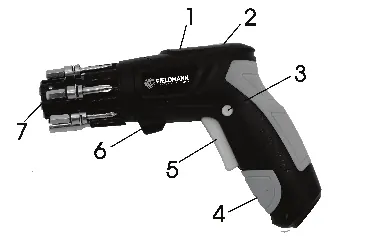
The device consists of the following main components:
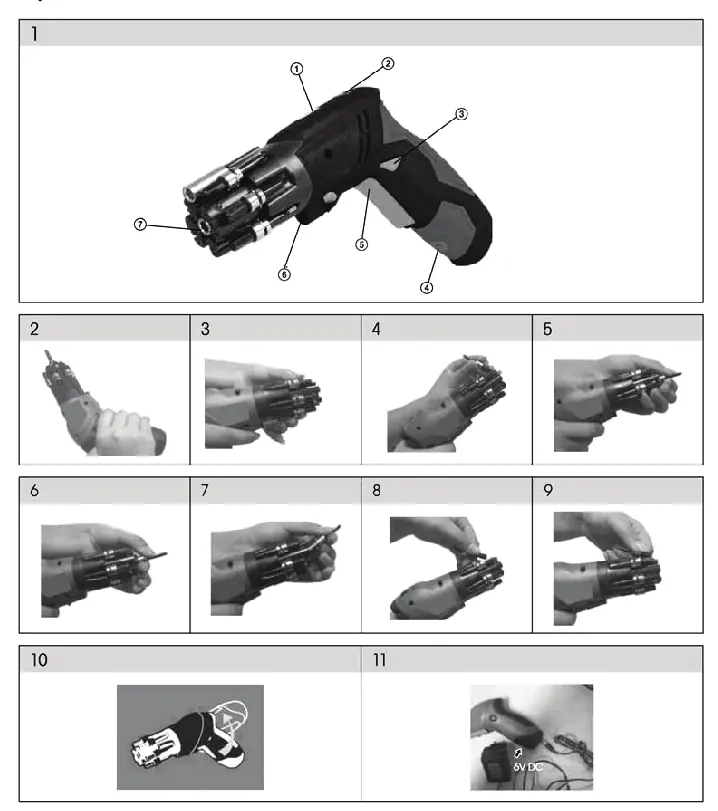
- LED battery display
- Rotating head switch
- Direction switch (Forward/Reverse)
- Charging port
- Trigger (On/Off)
- LED light
- Chuck
Assembly and Bit Changing
The screwdriver uses a 6-bit rotating head system for quick tool changes:

- Select the desired bit from the rotating head.
- Rotate the head to bring the chosen bit into position.
- Insert the bit into the chuck.
- To remove or change, rotate the head back to the storage position and ensure it is locked.
Operation
Rotating the Head: Press the rotating head switch and turn the head clockwise until it clicks into the horizontal position. To return to the pistol grip position, press the switch and turn counter-clockwise until it clicks.
Forward/Reverse: Use the direction switch to change the rotation of the chuck. Select the left position (marked L) for forward rotation (clockwise) and the right position (marked R) for reverse rotation (counter-clockwise).
Charging
To charge the battery, connect the provided adapter to a 230V power outlet and plug the connector into the charging port on the handle. A red light indicates that the device is charging. The typical charging time is 3 to 5 hours.
Safety Instructions
- Read all instructions before use.
- Keep the device in a dry place.
- Do not submerge the device in water.
- Use only the provided charger.
- Wear protective eyewear and hearing protection when operating.
- Keep the work area clean and well-lit.
- Do not operate in explosive atmospheres.
Manufacturer information
Fieldmann
Practical help
Common problems
Device does not start
Ensure the battery is charged and the trigger is pressed correctly.
Bit falls out during use
Ensure the bit is fully inserted into the chuck and the rotating head is properly locked in position.
Before use
- Check the device and power cable for any visible damage.
- Ensure the battery is fully charged (3-5 hours).
- Select the correct bit for the screw type.
- Ensure the work area is clean and free of obstructions.
- Wear appropriate protective gear, including eye and ear protection.
Specs in practice
- Charging Time
- 3 to 5 hours for a full charge.
- Acoustic Pressure
- Lpa < 72.8 dB (A).
Images and diagrams
- The device features a 6-bit rotating head system for quick tool changes.
- The LED display indicates battery status.
- The charging port is located on the bottom of the handle.
Model compatibility
- Use only the charger supplied with the product.
- Do not use accessories not designed for this specific tool.

Manual page author
David Miller
Documentation analyst
Organizes user manual content into clear summaries, with attention to model details, product context, and everyday usability.