Industrial / Commercial Timers
User Manual for Finder 12.C1 Bluetooth Weekly Astronomical Time Switch
Quick guide for the Finder 12.C1 Bluetooth Weekly Astronomical Time Switch. Learn how to wire, configure via the Finder Toolbox app, synchronize with GPS, and understand LED status indicators.
Table of contents
Quick guide from the manual
The Finder 12.C1 is a weekly astronomical time switch with Bluetooth connectivity. To function correctly, the device must be configured using the Finder Toolbox app. The device features a PROG LED for status indication and a push button for manual control, communication, and factory resets.
Wiring and Installation
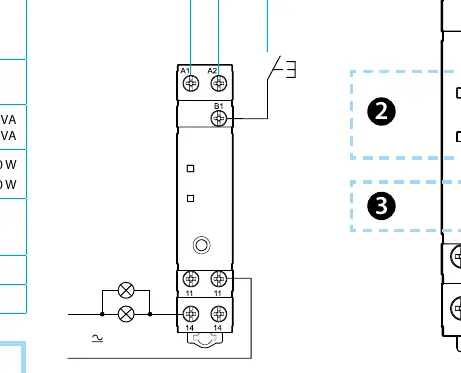
The device is designed for standard electrical installation. Ensure the power supply is within the 110-230V AC/DC range. The wiring diagram indicates the connection for Line (L) and Neutral (N). A wired push button can be connected to the B1 terminal, which can be wired on either the phase or neutral side.
Device Push Button Operations
The push button on the device serves multiple functions depending on the duration of the press:
- Communication with App: Press and hold for 3 seconds to start communication. The PROG LED will flash blue.
- Contact Switching: Press briefly (less than 2 seconds) to switch the relay status. The relay will return to the programmed status at the next time slot. This function can be disabled via the app.
- Factory Settings: Press and hold for 12 seconds to reset the device to factory settings.
LED Status Indicators
The PROG (multicoloured) LED provides visual feedback on the device status:
- Steady Red: Time needs setting.
- Flashing Red: Bluetooth communication failed.
- Steady Blue: Bluetooth connection in progress.
- Flashing Blue: Waiting for connection with smartphone.
- Steady Green: Time correctly set.
- Flashing Green: Bluetooth communication successful.
- Yellow (1 flash): Device has time but no on/off program.
- Yellow (2 flashes): Device has schedule but incorrect time.
- Purple: Holiday programme active.
- Purple (1 flash): Holiday programme active but no on/off program.
The Contact LED is red when relay contacts are closed and off when open.
GPS Synchronization
The device time can be synchronized using the optional Bluetooth GPS antenna (Type 012.BG). If installed within 10 metres, synchronization occurs automatically at 4:40 a.m. or 7 minutes after power-up. You can also perform manual synchronization via the Finder Toolbox app to check signal quality and last sync status.
Power Backup
The device includes a power backup feature that maintains settings during power outages. The duration depends on how long the device was previously powered: 15 minutes of power provides approx. 16 hours of backup; 1 hour provides approx. 36 hours; 12 hours provides approx. 3 days; 24 hours provides approx. 7 days.
Technical Specifications
- Supply Voltage: 110-230V AC/DC (50/60 Hz)
- Contact: 1 NO (SPST-NO), 10 A 250V AC
- Operating Temperature: -10 to +50 degrees Celsius
- Protection Rating: IP20
- Minimum Switching Time: 1 second
Manufacturer information
Finder S.p.A.
Practical help
Common problems
PROG LED flashing red
Bluetooth communication failed. Ensure the smartphone is within range and the app is active.
PROG LED flashing yellow (1 flash)
The device has the correct time but no on/off program configured.
PROG LED flashing yellow (2 flashes)
The device has an on/off schedule but the time is not correctly set.
Before use
- Verify power supply is 110-230V AC/DC.
- Download the Finder Toolbox app on your smartphone.
- Ensure the device is installed in an environment between -10 and +50 degrees Celsius.
- Check wiring for L, N, and B1 push-button connections.
- If using GPS sync, ensure Type 012.BG antenna is within 10 metres.
Specs in practice
- 1 NO (SPST-NO)
- Normally Open contact, suitable for switching up to 10A at 250V AC.
Images and diagrams
- The wiring diagram illustrates the connection of Line (L) and Neutral (N) to the device.
- The B1 terminal is used for connecting an external push button, which can be wired on either the phase or neutral line.
Model compatibility
- Compatible with Finder 012.BG Bluetooth GPS antenna for automatic time synchronization.
- Requires Finder Toolbox app for initial configuration and advanced settings.

Manual page author
Michael Turner
Technical manual editor
Reviews PDF manuals for structure, safety notes, and practical product details so readers can find the right information quickly.