HVAC / Thermostats & Controls
User Manual for Danfoss 103E5 Electronic Time Switch
Quick guide for the Danfoss 103E5 electronic time switch. Includes installation, wiring diagrams for various heating systems, programming instructions, and troubleshooting tips.
Table of contents
Manual images
Click an image to enlargeQuick guide from the manual
The Danfoss 103E5 is a single-channel electronic timeswitch designed to control hot water and heating systems. It features 3 ON/OFF periods per day and supports both 24-hour and 5/2 day programming modes. In the event of a power cut, the built-in lithium battery retains settings for up to 15 days.
Installation and Wiring
Installation must be performed by a qualified electrician or heating installer in accordance with IEEE wiring regulations.
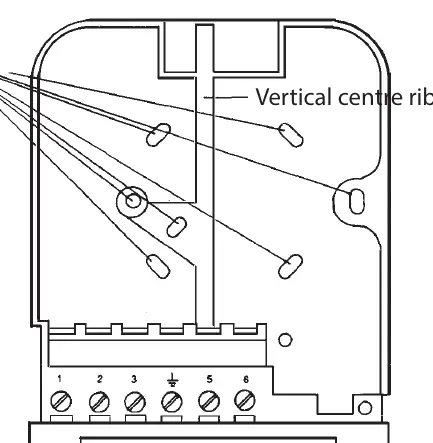

- Wallplate Mounting: Loosen the fixing screw to release the wiring cover. Press the center of the wallplate to separate it from the module. Fix the wallplate to the wall or plaster box, ensuring screw heads do not protrude beyond the vertical center rib.
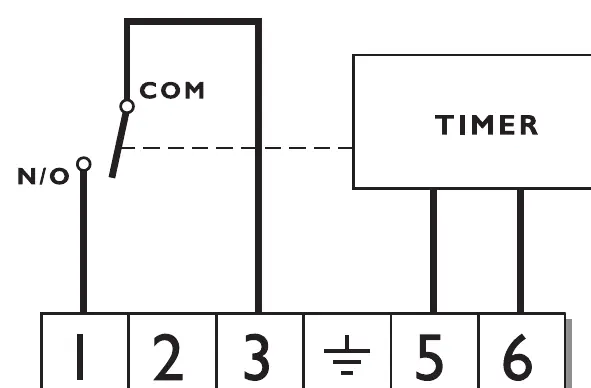
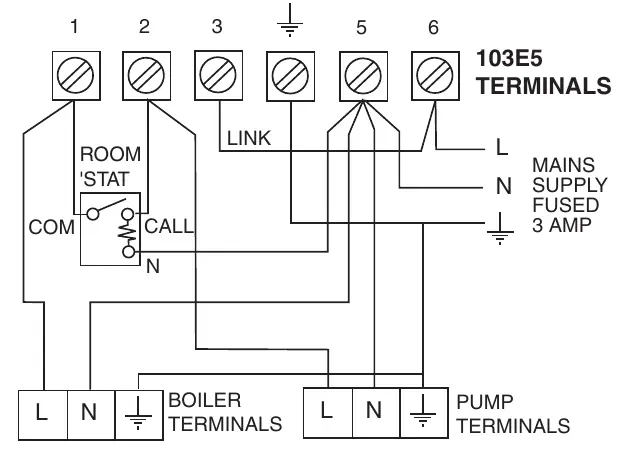
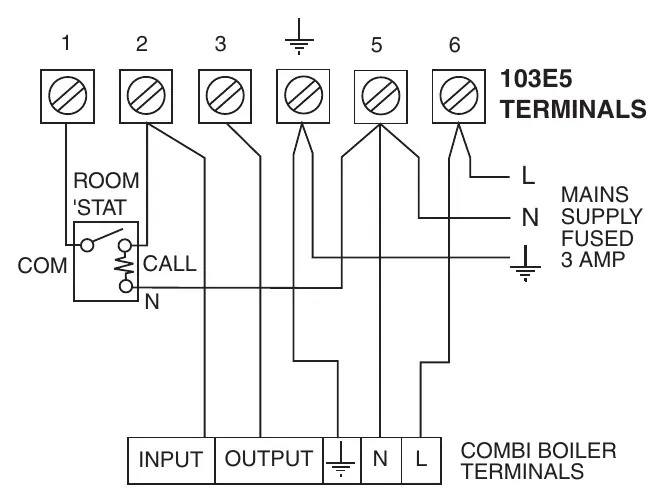
- Wiring: Surface cables must enter from below. If a wiring center is not used, refer to the terminal identification: 1 (ON), 2 (SPARE), 3 (COM), 5 (N), 6 (L). For 230V systems, link terminals 3 and L.
- Mode Selection: The unit is factory-set to 24-hour mode. To convert to 5/2 day mode, remove the small two-way connector from the pins on the rear of the module, then press SELECT, ADVANCE, +, and - buttons simultaneously to reset the unit.
Programming the Timer
Before programming, reset the unit by pressing SELECT, ADVANCE, +, and - buttons simultaneously. This sets the time to 12:00pm on Monday.
- Setting the Clock: Press PROGRAMME once, use + and - buttons to set the time, then press PROGRAMME again. In 5/2 day mode, use + and - to select the day before pressing PROGRAMME to enter run mode.
- Programming Events: Press PROGRAMME until Event 1 shows. Use + and - to set the desired ON time. Press PROGRAMME to move to Event 2 and set the OFF time. Repeat for events 3-6.
Operating Modes and Overrides
Press the SELECT button to cycle through operating modes:
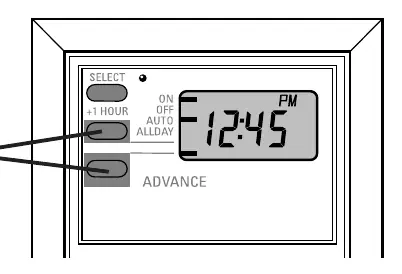
- ON: Heating/hot water remains on constantly.
- OFF: Heating/hot water will not come on.
- AUTO: Follows the programmed schedule.
- ALLDAY: Comes on at the first programmed ON and stays on until the last programmed OFF.
Temporary Overrides:
- +1 HOUR: Press to add an extra hour of operation. Press again to cancel.
- ADVANCE: In AUTO mode, press to advance to the next programmed event. Press again to cancel.
Battery Backup and Maintenance
The built-in battery maintains settings for 15 days during power cuts. If power is lost for longer, the unit will switch off and display two dots. Once power is restored, press the PROGRAMME button to reactivate and reset the time and day.
Manufacturer information
Danfoss A/S
Practical help
Common problems
Heating not coming on
Check if the unit is in OFF mode; press SELECT to change to AUTO or ON. Also, verify that the room thermostat or cylinder thermostat is not satisfied.
Unit display shows two dots
A power cut has lasted longer than 15 days. Press the PROGRAMME button to reactivate the unit and reset the time and day.
Heating not following schedule
Ensure the unit is in AUTO mode. Check if the 2nd ON/OFF times are set to the same time, which causes them to be ignored.
Before use
- Ensure installation is performed by a qualified electrician.
- Verify mains supply is 230V, 50Hz.
- Check if 24-hour or 5/2 day mode is required before mounting.
- Ensure wallplate screw heads do not protrude beyond the center rib.
- Reset the unit before initial programming.
Specs in practice
- Power supply
- 230 Vac ± 15%, 50 Hz
- Switch rating
- 264 Vac, 50/60Hz, 3(1)A
- Power Reserve
- Minimum 14 days via built-in lithium battery
- Enclosure Rating
- IP30
Images and diagrams
- Wallplate terminals: Terminals 1-6 are used for load and mains supply connections.
- Wiring diagrams: Specific configurations provided for gravity DHW, solid fuel systems, and combi boilers.
Model compatibility
- Compatible with various heating systems including gravity DHW and pumped heating.
- Can be used as a replacement for many older timer models (refer to the replacement table in the manual).

Manual page author
Emily Carter
User documentation editor
Prepares concise manual descriptions and highlights the most useful setup, operation, and maintenance information for readers.