Industrial / Commercial Timers
Finder 12.A1/12.A2 Digital Astro Time Switch User Manual
Comprehensive user guide for the Finder 12.A1 and 12.A2 Digital Astro Time Switches. Learn how to program via NFC, configure Astro functions, set up holiday schedules, and manage manual overrides.
Table of contents
Manual images
Click an image to enlargeQuick guide from the manual
The Finder 12.A1 and 12.A2 are digital astro time switches that can be programmed via NFC using the Finder Toolbox App. Before installation, ensure you have the correct model for your application (12.A1 for single channel, 12.A2 for dual channel). The device requires a CR 2032 battery for backup, which should only be replaced by qualified personnel.
Device overview
The device features a joystick for navigation and a backlit display (when powered). Key indicators include:
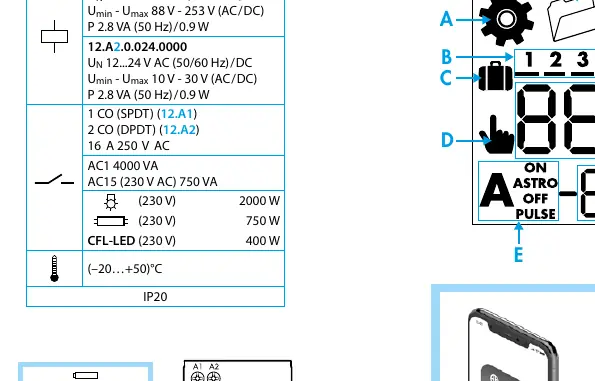
- A: Setting Menu
- B: Days of the week (1=Mon...7=Sun)
- C: Holiday program
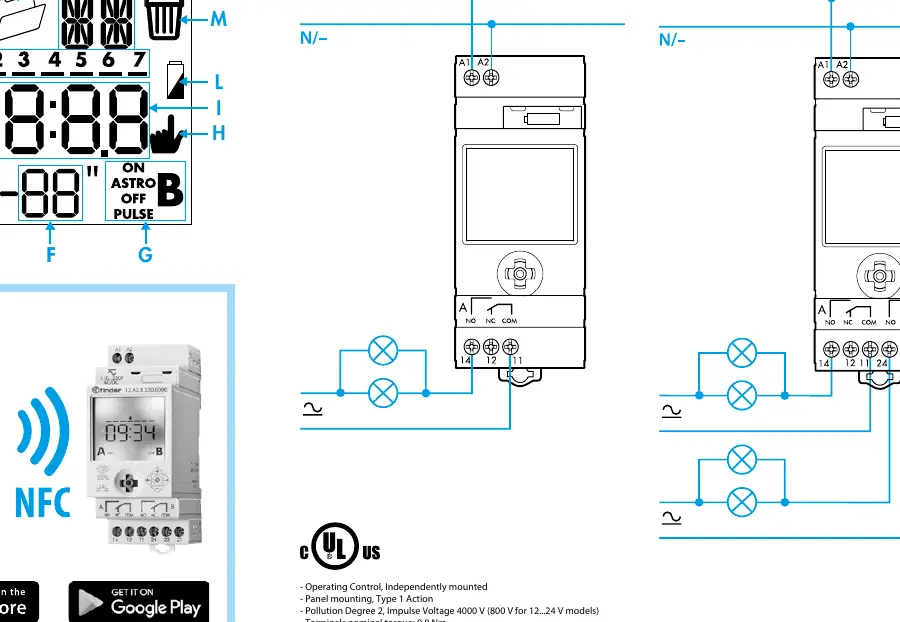
- D/H: Permanent Manual over-ride (Channel A/B)
- E/G: Channel functions (ON, OFF, Astro ON, Astro OFF, Pulse)
- L: Low battery indicator
Settings and configuration
To access settings, press and hold the joystick for >3 seconds. The menu allows you to configure:
- Time/Date: Set year, day, month, hour, and minutes.
- Location: Set country, postal code (CP), or geographic coordinates (Latitude/Longitude) for accurate Astro timing.
- Holiday Program: Define start and finish dates for holiday periods.
- PIN: Enable or disable PIN protection.
Programming modes
The device supports three main programming types:
- Astro ON/OFF: Automatically switches based on sunrise/sunset times, with the ability to retard or advance the switching time.
- ON/OFF: Standard time-based switching.
- Pulse: Short duration switching (1 second to 59 minutes).
To program, navigate to the desired function using the joystick, select the days of the week, and set the required times or coordinates.
Manual operation
You can manually override the current state of the channels:
- Manual ON/OFF: Toggle the current state of channel A or B.
- Permanent Manual Over-ride: Force the channel to stay ON or OFF until the override is cancelled.
Maintenance and technical specifications
The device is designed for panel mounting. Key technical data includes:
- Supply Voltage: 110...230 V AC/DC or 12...24 V AC/DC (depending on model).
- Contact Configuration: 1 CO (SPDT) for 12.A1; 2 CO (DPDT) for 12.A2.
- Rated Current: 16 A at 250 V AC.
- Operating Temperature: -20 to +50 °C.
- Protection: IP20.
- Battery: CR 2032 (LiMnO2) 3V, 230mAh.
Manufacturer information
Finder S.p.A.
Practical help
Common problems
Display is blank
Check if the device is powered. If powered and still blank, the battery may be depleted or the unit faulty.
Astro switching times are incorrect
Verify that the geographic coordinates, time zone, and daylight saving settings are configured correctly in the settings menu.
Cannot change settings
Check if a PIN code is active. If so, you must enter the PIN to access the settings menu.
Before use
- Download the Finder Toolbox App on your smartphone.
- Verify the supply voltage matches your model (110-230V or 12-24V).
- Ensure the CR 2032 battery is installed.
- Check the wiring diagram for your specific model (12.A1 vs 12.A2).
- Confirm the installation environment is within -20 to +50 °C.
Specs in practice
- 16 A 250 V AC
- Maximum switching current and voltage for the output contacts.
Images and diagrams
- Wiring Diagram: Shows the L/N connections and the load connections for 12.A1 (single channel) and 12.A2 (dual channel).
- Joystick: The primary interface for navigating menus and adjusting values.
Model compatibility
- NFC programming requires a smartphone with NFC capability.
- 12.A1 is a single-channel device.
- 12.A2 is a dual-channel device.

Manual page author
Emily Carter
User documentation editor
Prepares concise manual descriptions and highlights the most useful setup, operation, and maintenance information for readers.