Home / Security
First Alert 2070AF Digital Anti-Theft Wall Safe User Manual
Quick guide for the First Alert 2070AF Digital Anti-Theft Wall Safe. Includes installation steps, passcode programming, battery replacement, and troubleshooting.
Quick answers from the manual
Quick answer
- The First Alert 2070AF is a digital wall safe. Use the factory code 159A to open it initially, then program your own 3-8 digit code followed by 'A'. p. 3, 4
Key actions
- Program personal passcode p. 4
- Install batteries p. 3
First start
- Open with factory code 159A p. 5
Show 4 more answers Show less
Problems and fixes
Security Lockout
Wait 20s (3 errors), 5m (4-6 errors), or 1h (7+ errors).
p. 5Maintenance and reset
- Battery replacement p. 3, 5
Technical specifications
| Parameter | Value | Meaning | Pages |
|---|---|---|---|
| Batteries | 4 x AA | Power source | p. 3 |
Where to find it in the PDF
- Initial Setup p. 3
- Programming p. 4
- Mounting p. 6
Table of contents
Manual images
Click an image to enlargeImportant Information
The First Alert 2070AF is a digital wall safe designed for secure storage. Important: Never store the emergency override keys inside the safe. The factory pre-set passcode is 159A and should be changed immediately upon installation. Ensure the interior light switch is turned off when closing the safe to prevent battery drain.
Package Contents
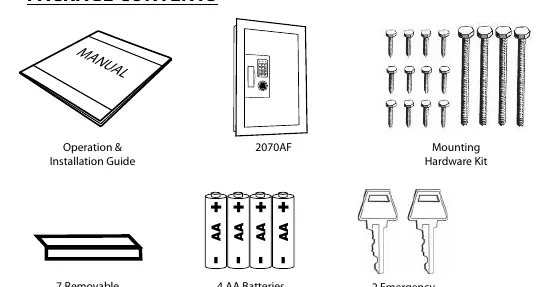
- Operation & Installation Guide
- 2070AF Wall Safe
- Mounting Hardware Kit
- 7 Removable Shelf Extensions
- 4 AA Batteries
- 2 Emergency Override Keys
Initial Setup
Your safe comes with batteries pre-installed. To check battery status, press the 'B' key on the keypad. If the yellow LED flashes and you hear a beep, the batteries are good. If the red LED flashes, replace the batteries within two months.
Changing Batteries:
- Open the safe using your personal passcode or the emergency override key.
- Locate the battery compartment on the back of the door.
- Press firmly on the right side of the cover and slide to the left.
- Replace with 4 new Alkaline AA batteries, ensuring correct polarity.
Programming a Personal Passcode
- Open the safe using the factory code 159A.
- Locate and press the small red memory button inside the safe on the edge of the lock cover. The keypad will beep twice and the yellow LED will light.
- Enter a new passcode (3 to 8 numbers, no letters) on the keypad.
- Press the 'B' key. The keypad will beep twice and the yellow LED will light.
- Test the new code with the door open before locking.
Mounting Instructions
The safe is designed to fit between standard 16-inch center-to-center wall framing (2x4 or thicker).
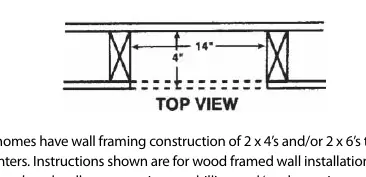
- Wall Cutout: Determine the stud location. Drill a pilot hole to verify. Use a building square to draw a vertical line 21 1/8 inches long along the inside edge of the stud. Measure 14 inches to the left to mark the other side.
- Cutting: Use a jigsaw or equivalent tool to cut along the marked lines.
- Installation: Insert the safe into the cutout. Extend the telescoping back until it hits the back of the wall. Secure the safe to the studs using the provided wood screws through the pre-drilled holes on the side and the front flange.
Use, Care and Maintenance
To maintain the safe, keep the digital keypad clean and free of dirt or liquids. If the safe will not be used for an extended period, remove the batteries. For high-humidity areas, air out the safe for at least 20 minutes every two weeks.
Troubleshooting and Security
If the wrong passcode is entered multiple times, the safe will enter a security lockout period:
- After 3rd error: 20-second lockout.
- 4-6 errors: 5-minute lockout.
- 7+ errors: 1-hour lockout.
If you forget your passcode, use the Emergency Override Key located beneath the digital keypad.
Manufacturer information
First Alert
Practical help
Common problems
Safe will not open
Check if batteries are dead; use the Emergency Override Key. Ensure you are entering the code followed by 'A'.
Security lockout
Wait for the lockout period to expire (20 seconds, 5 minutes, or 1 hour depending on the number of failed attempts).
Interior light draining batteries
Ensure the light switch on the inside door panel is turned to the OFF position before closing the door.
Before use
- Verify all parts are present
- Test factory code 159A
- Program a personal passcode
- Check battery status
- Ensure wall framing is 16-inch center-to-center
Show more Show less
Specs in practice
- Factory Passcode
- 159A
- Passcode Format
- 3 to 8 digits followed by the letter 'A'
- Battery Type
- 4 Alkaline AA batteries
Images and diagrams
- Wall cutout dimensions: 14 inches wide by 21 1/8 inches high.
- Mounting: Fits between standard 16-inch center-to-center wall studs.
Model compatibility
- Designed for wood framed walls.
- Requires 2x4 or thicker framing.

Manual page author
Emily Carter
User documentation editor