Home / Security
User Manual for First Alert 2087DF-BD / 2092DF-BD Digital Waterproof Fire Safe
Comprehensive user guide for the First Alert 2087DF-BD and 2092DF-BD digital waterproof fire safe. Includes instructions for first-time activation, battery installation, passcode programming, emergency override, and maintenance.
Quick answers from the manual
Quick answer
- To activate the safe, install 4 AA batteries, remove the internal locking pin, and test the lock with the door open. Immediately program a personal 3-8 digit passcode using the reset button inside the door. p. 3, 4
Key actions
- Program Personal Passcode p. 4
- Emergency Access p. 5
First start
- Install batteries and remove locking pin p. 3
Show 4 more answers Show less
Problems and fixes
Handle will not turn
Turn the handle slightly back to the left until it stops, then turn upwards to the right again.
p. 4Maintenance and reset
- Resetting/Programming Passcode p. 4
Technical specifications
| Parameter | Value | Meaning | Pages |
|---|---|---|---|
| Fire Protection | 1 Hour | Interior remains below 350°F during 1700°F fire | p. 5 |
Where to find it in the PDF
- First Time Activation p. 3
- Programming Passcode p. 4
- Emergency Override p. 5
Table of contents
Manual images
Click an image to enlargeQuick Start Guide
To begin using your safe, install four AA batteries, remove the internal locking pin, and test the locking system with the door open. Immediately program your personal passcode to replace the factory default.
Package Contents
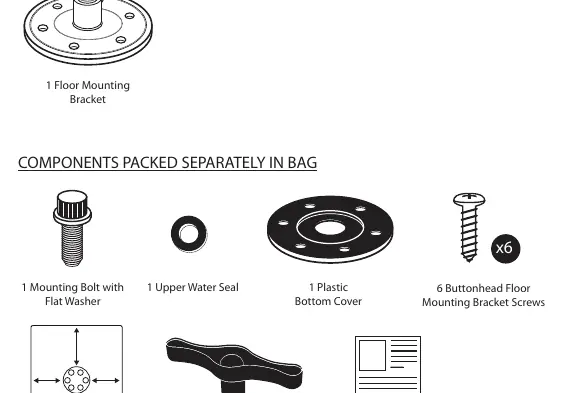
- 2 Emergency Override Keys
- 1 Adjustable Shelf
- 4 AA Batteries
- Mounting hardware (screws, gaskets, bolt cover, floor mounting bracket)
- Ready-Seal mounting template and instructions
First Time Activation
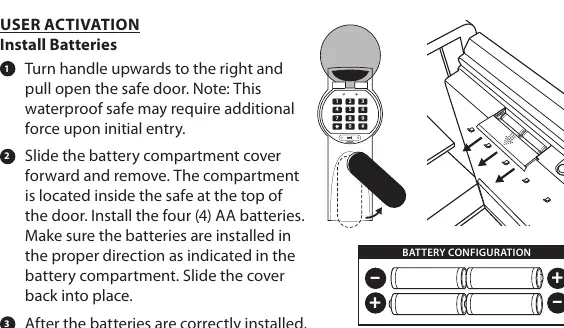
Batteries: Slide the battery compartment cover forward (located inside the safe at the top of the door). Install four AA batteries, ensuring correct polarity. The keypad will beep and lights will flash to confirm power.
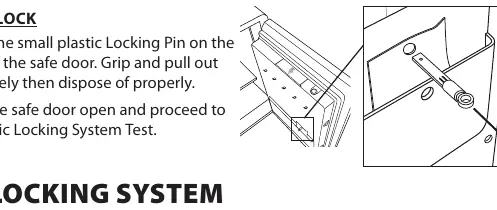
Locking Pin: Locate the small plastic locking pin on the inside of the safe door. Grip and pull it out completely to prevent the safe from locking before activation is complete.
Programming Your Passcode
The factory pre-set code is 159. For security, change this immediately:
- Open the protective cover on the front of the safe.
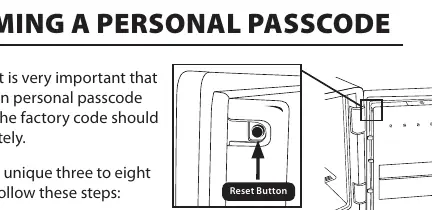
- With the door open, press the small reset button located on the inside top edge of the door.
- Enter your new 3-8 digit passcode followed by the # key.
- Repeat the sequence (new passcode + #) to confirm.
- The green light will illuminate for 5 seconds to confirm the new code is set.
Emergency Override & Battery Replacement
If batteries fail, use the Emergency Override Key:
- Open the protective keypad cover.
- Remove the two screws securing the small Emergency Override Key lock cover below the keypad.
- Insert the key and turn clockwise to open.
- If replacing batteries, proceed to open the battery compartment inside the door and install fresh AA batteries.
Maintenance and Care
- Cleaning: Use a mild cleaner (e.g., window cleaner). Do not use abrasive cleansers.
- Moisture: Avoid high humidity. Open and air out the safe for at least 20 minutes every two weeks.
- Storage: Do not store pearls (heat damage), firearms, or combustible items in the safe.
- Battery Maintenance: Replace all batteries at least once a year. Clean battery contacts before installing new ones.
Mounting the Safe
The safe can be bolted to the floor using the included Ready-Seal technology, which maintains fire and water protection. Refer to the separate Ready-Seal Mounting Instructions included in the package for specific steps.
Manufacturer information
First Alert
Practical help
Common problems
Handle will not turn after entering code
Turn the handle slightly to the left until it stops, then turn upwards to the right again.
Forgot personal passcode
Use the Emergency Override Key to open the safe.
Low battery indication
The red light will flash every two seconds when the battery level is low; replace all four AA batteries.
Before use
- Remove the plastic locking pin from the inside of the door.
- Install four new AA batteries.
- Test the locking system with the door open.
- Program a personal 3-8 digit passcode.
- Record your model, serial, and key numbers in a safe place.
Show more Show less
Specs in practice
- Fire Protection
- Interior temperature remains below 350°F for 1 hour during a fire up to 1700°F.
- Security Lockout
- The safe automatically locks out entry for 15 minutes after three invalid passcode attempts.
- Passcode Length
- Must be between 3 and 8 digits.
Images and diagrams
- Battery compartment is located inside the safe at the top of the door.
- Reset button is located on the inside top edge of the door.
- Emergency override key lock is located below the digital keypad.
Model compatibility
- Not intended for audio/video cassettes, floppy discs, data cartridges, film, or photos.
- Do not store pearls due to heat sensitivity.

Manual page author
David Miller
Documentation analyst